Welcome to Indie App Spotlight. This is a weekly 9to5Mac series where we showcase the latest apps in the indie app world. If you’re a developer and would like your app featured, get in contact.
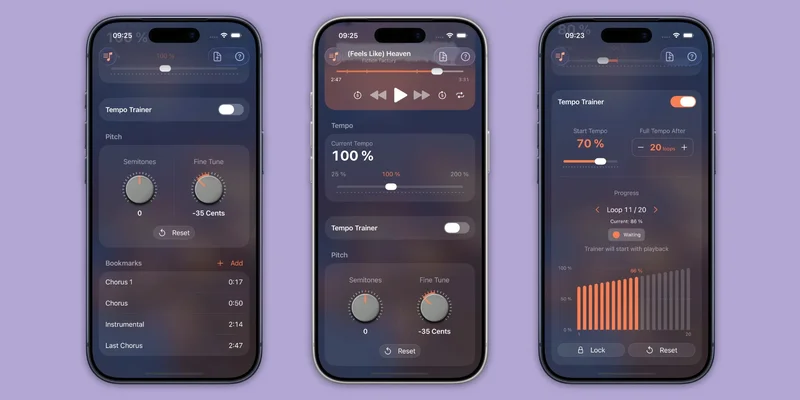
If you’re an aspiring musician, Pocket Jam might be something you find useful. It helps you turn your favorite songs into a practice tool, letting you slow down, change the pitch, loop, and dissect tracks as you learn them.
Highlights
Of course, if you want to learn to practice a song, you can just listen to it on your phone, pause accordingly, and try to get the hang of it that way – though it may not be super effective. Pocket Jam gives you the capability to pause a song at the moment you want to practice, then slow it down, adjust the pitch, or play it in a loop. You can even bookmark sections you want to spend more time practicing on.
Pocket Jam works by allowing you to import audio files or a song from Apple Music, though you do lose some features from Apple Music import – like the ability to adjust the pitch.
In the newest 5.0 update, Pocket Jam includes a new redesigned waveform view, making it much easier to navigate through a song, zoom and scrub, jump around, and isolate the parts that matter to you. There’s also a new tempo trainer for starting slow and speeding up as you’re learning, better looping, and bookmark descriptions.
Download the app
Pocket Jam is available for free on the App Store for iPhone, iPad, and Mac running iOS/iPadOS 17 or macOS 14 Sonoma and later. For unlimited imports and music access, you’ll need Pocket Jam Premium, which is $4.99/month with a 3 day free trial, or $29.99/year.
All in all, if you’re someone wanting to learn a new instrument and practice it with some of your favorite songs on your iPhone – Pocket Jam is a great learning tool.
My favorite Apple accessory recommendations:
- Anker MagSafe/Qi2 Ultra-Slim Battery Pack
- AirPods Pro 3 (2x ANC vs AirPods Pro 2!)
- Anker Nano 45W Fast Charger with Smart Display
- Anker Nano 13-in-1 MacBook Docking Station
- Logitech MX Master 4 Mouse for Mac
- Belkin Qi2 3-in-1 MagSafe Charging Stand
Follow Michael: X/Twitter, Bluesky, Instagram