Earlier this year, I upgraded my aging laptop because it was slowing down. It couldn't keep up when running my usual daily work apps alongside more than a dozen Chrome tabs.
Naturally, I thought buying a new rig would solve my performance bottlenecks, but I was wrong. I still hit the same frustrating walls on my new laptop, which I blame largely on Windows.
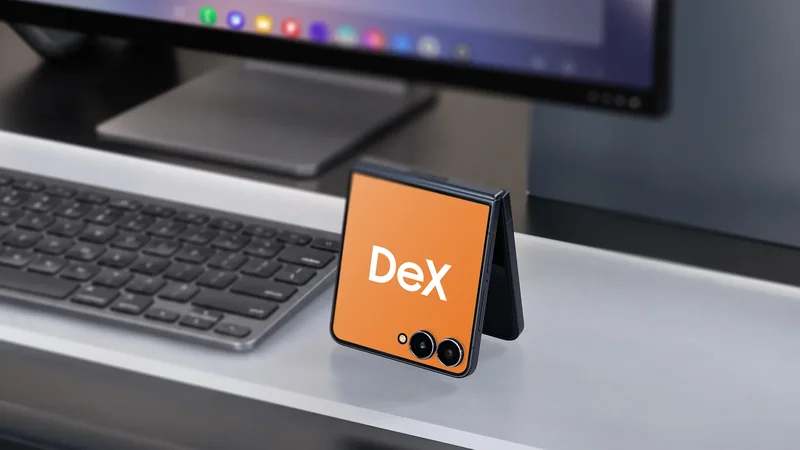
As a frequent Samsung DeX user on my Samsung Galaxy Tab S10 FE, I decided to take my new Galaxy Z Flip 7 for a spin.
Unlike the tablet, the foldable supports an external display or monitor output over a cable to transform it into a desktop.
After a few days of relying solely on the Flip 7 as my primary workstation, I was blown away by its ability to deliver reliable performance that I didn't get from my laptop.
The problem with my laptop (and Windows)
Hardware isn't always enough for a smooth experience
For the past three years, my trusty Lenovo IdeaPad 5 Pro has handled my workload without much fuss, even squeezing in some casual gaming with RPG titles on the side.
However, my work required me to add more programs to the mix. I needed to keep multiple Chrome tabs open alongside our CMS and apps, and that's when the slowdowns began.
That was on top of setting up separate desktops for streaming and editing workspaces.
While my laptop handled the load early on, it eventually slowed down with all my work apps running. My initial reaction was to blame the older processor and limited RAM.
So, I picked up an HP Omen 14, which offered a faster chip and significantly more memory. I assumed this hardware jump would give me plenty of performance headroom, but I was wrong.
I ran into the same issues. The system started to crawl the second I launched my work tools simultaneously, especially during extended periods.
It left me regretting that I didn't diagnose the actual bottleneck before investing in the new laptop.
I was hesitant about whether my Galaxy Z Flip 7 could hack it
It quickly proved me wrong
Before utilizing my Samsung Galaxy Flip 7, I tried offloading some work to my Galaxy Tab S10 FE since it also has a built-in Samsung DeX.
I expected the same performance hiccups, but to my surprise, it performed well and didn't stutter with the same number of Chrome tabs and background apps running simultaneously.
However, I realized it doesn't support external display output for DeX. That eventually brought me to the Flip 7. Still, I was skeptical given its compact foldable footprint.
In my experience on my Galaxy tablet, Google Pixel 9 Pro XL, DeX, and Desktop Mode require significant processing horsepower and aggressive thermal management.
So, I expected the same in the Flip 7 or even worse heat dissipation due to its smaller form factor. When I put it to the test, those assumptions didn't hold up.
My Flip 7 ran smoothly, even through extended work sessions. And for several days now, it has completely taken over my laptop's duties.
It made me appreciate how far these tiny foldable form factors have come in handling a demanding full-day workflow.
Where my Galaxy Z Flip excels
It didn't stutter like my laptop
Beyond the hardware, Samsung DeX does the heavy lifting here.
Samsung's workstation platform recently underwent an overhaul, aligning its UI more closely with the stock Desktop Mode. That sounded like a downgrade on paper, but it brought a few trade-offs.
This updated DeX strips away several legacy features, such as flexible active app limits per desktop and multi-window snapping.
However, that's a minor gripe. The overall performance on the Flip 7 more than compensates for these missing UI perks.
On Flip 7, I routinely keep 10 to 15 active tabs open per Chrome window on one desktop, while running another session on a second desktop alongside apps such as Spotify and Google Sheets.
Beyond adjusting to keyboard shortcuts, hopping between Chrome tabs was fluid and snappy. I didn't experience the frequent stuttering that plagued my Windows laptop.
Switching between multiple desktops with active apps was also effortless.
I transformed my phone into a portable computer
Accessory support was smooth sailing
It's also worth noting how painless accessory connectivity is on the Flip 7 while docked in DeX mode, which is another reason I continue to do my workload on it.
I paired my wireless Logitech Bluetooth mouse and keyboard alongside an Edifier speaker. All three devices connected fast, and connections remained stable even when used simultaneously.
Moreover, if you travel on the go, DeX offers a nifty toggle to transform your foldable screen into a virtual touchpad or on-screen keyboard.
It serves as a practical backup when you leave a dedicated mouse behind.
Even if you lack an external speaker, DeX now includes an intuitive audio output toggle that defaults to the display's built-in speakers.
A portable setup like this rivals a traditional laptop or desktop computer. All you need is an available monitor or display to hook up to your device.
DeX even supports wireless display connections depending on your monitor. This ditches the need to bring an HDMI or USB-C cable.
That level of broad compatibility helps match the desktop experience without any extra bulk.
I also plan to test it with a portable monitor in the future to see if it's as efficient as a laptop.
Where it falls short
It's a challenge to charge it while on DeX
Despite the impressive performance, replacing a PC with DeX isn't without its caveats. This includes heat management, which remains a primary challenge under extra-demanding loads.
In one instance, running graphics-intensive tasks while charging can cause excessive heat in the Flip 7. My Flip 7 forcibly closed DeX after hitting a thermal ceiling while charging on my desk.
I had to unplug the foldable and let it cool down for several minutes before resuming my work.
The number of optimized apps for DeX is another drawback. Many third-party Android apps still don't scale within a desktop interface, remaining locked to fixed mobile layouts.
Plus, some UI elements like menus and containers look stretched on large windows.
Integration with peripherals could also use some polish. For example, the side scroll wheel on my Logitech MX Master mouse doesn't support native tab switching in Chrome.
The lack of keyboard shortcut customization is another annoyance. I wanted to remap or disable specific system shortcuts, but One UI offers no native method to reconfigure them.
Hopefully, Samsung and Google will address this in future updates.
I'm excited about what Android desktop modes will bring next
Working on Samsung DeX has its quirks.
Working within a mobile interface means it differs from desktop‑level apps and programs, and that's one of the notable trade‑offs here. In addition, the need to set up peripherals is another choke hold.
However, these are minor.
I'm happy that my Galaxy Z Flip 7 can replace my laptop without taking a hit to my productivity.
And with Samsung and Google making meaningful strides in Android's desktop mode, I'm excited about how Android might bridge those remaining gaps down the line.
Samsung Galaxy Z Flip 7
-
**SoC** - Exynos 2500
-
**RAM** - 12GB
-
**Storage** - 256GB/12GB
The Samsung Galaxy Z Flip 7 delivers major upgrades from its foldable predecessor. Save big on the 512 GB variant at Amazon.