I found the Galaxy Z Fold 8's biggest weakness, and it's not the new design
Aug 12, 2026 — 5:00 AM ET
I’ve been enjoying using the Samsung Galaxy Z Fold 8, with its unique shape and powerful underlying hardware. But what I’ve been less impressed with is the continued subpar multitasking within the Z Fold 8’s software.
The work laptop has been under constant attack from phones and tablets — and more recently, foldables — for the past several years. However, despite the onslaught, the humble portable computer has been doing well for several reasons.
Laptops are cheaper than comparably powerful phones; they generally come with longer-lasting batteries and have built-in trackpads and keyboards for more precise inputs than a touchscreen. Some even park their tanks on the tablet’s lawn and offer touchscreens or a 360-degree hinge for a literally more flexible experience.
But it’s the app multitasking ability that I think really keeps touchscreen devices from becoming proper work machines. And the Galaxy Z Fold 8 series doesn’t do enough to change that.
Are multitasking features an appealing part of foldable phones for you?
Splitting and sliding
Arranging apps across your screen in customizable windows is something we take for granted on Windows, macOS, or Linux machines. But as descendants of smartphones, tablets, and foldables, they are still designed to use one app at a time. That’s fine if you are happy to focus on one particular task, but less handy if you need to switch from your chat app to your notes, to your to-do list, to your current document, and back again.
Tablets, with their larger displays, pioneered multitasking on touchscreen devices, and foldables like the Galaxy Z Fold family adopted these systems. For years, Galaxy Z Fold models could offer up to three apps — one taking up half the screen, the other two taking up a quarter — plus additional apps in small slide-over windows. This could work well if you only need small viewports of specific apps, like your notes or a browser, but trying to watch a video while scrolling social media was limited and frustrating.
It’s the app multitasking ability that I think really keeps touchscreen devices from becoming proper work machines.
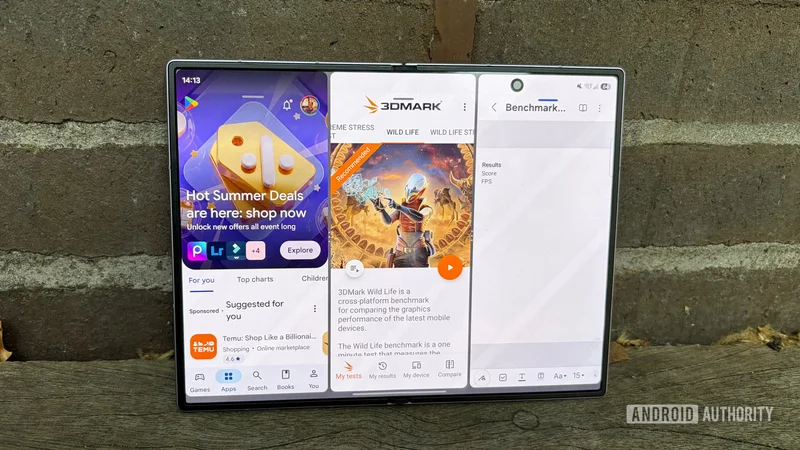
The Galaxy Z Fold 8 and Galaxy Z Fold 8 Ultra do better than that, and to its credit, Samsung has improved multitasking with this generation. With these phones, Samsung now offers an equal three-app split horizontally or vertically, with the option to adjust the ratios as you wish.
If you drag the dividers to the right place, you can use two apps in full-screen side-by-side mode, sliding between them with ease. It’s familiar to another foldable’s multitasking system that we’ll look at shortly, but this one isn’t well signposted, and only offers a single horizontal layout with a maximum of one full app and two half-split ones.
You can also open up to five pop-up windows if you’d rather have more apps, but with even smaller viewports. As you can see in the photo above, it works, but is a bit hectic — top say the least.
A problem already solved
The OPPO Find N6, still the best foldable phone around as far as I’m concerned, offers a much better app windowing system. If you want to use pop-up, windowed apps, then you can have up to four — one fewer than the Galaxy Z Fold 8. However, it’s much easier to move and resize these apps, with greater flexibility in their height and width. Also, unused apps hide in a corner as icons or thumbnails until you need them, rather than having their icons randomly hang around your screen as they do in Samsung’s One UI.
If you prefer a grid-based multi-app arrangement, then the Find N6 definitely wins with its Boundless View feature. This creates a grid you can slide between, so all three apps you have open are still only a tap away, but hidden when you don’t need them and visible in a larger window when you do. And if you change your mind about whether static or dynamic windows are what you need, then a four-finger pinch gesture lets you switch between them instantly.
This system is close to unchanged from when its stablemate, OnePlus, debuted the Open Canvas system on the OnePlus Open back in 2023. But it remains the gold standard for foldable multitasking, and I’m shocked that Samsung hasn’t tried to copy it more directly.
The OPPO Find N6, still the best foldable phone around, offers a much better app windowing system.
If you allow connections to other devices in your definition of multitasking, the Find N6 also works as a remote viewer for your laptop, meaning you can work on things that aren’t even on the phone, in case you have something urgent to do away from your laptop. Samsung does have its DeX desktop mode, but it can’t be used without a monitor — which is unfortunate, since Galaxy Tab slates have been able to do that for a few years already.
Still, at least the Galaxy Z Fold 8 series is way ahead of what the Google Pixel 10 Pro Fold offers — a static two-app split with no slide-over. Let’s hope the Pixel 11 Pro Fold does things better when that likely launches on August 12.
An old annoyance — especially for Ultra users
Samsung has wisely aimed the regular Galaxy Z Fold 8 at a more casual audience, who are likely not going to be interested in opening all their work apps at once on it. The Galaxy Z Fold 8 Ultra, however, is specifically marketed on its productivity potential, and I feel a little sorry for anyone who buys it in the hope of making it an all-in-one personal/work device.
Samsung’s foldables still have excellent software, thanks to its years of experience. Galaxy AI and other tools aside, most apps simply work brilliantly with whatever-sized Galaxy Z phone you have, and those that don’t can be resized until they do. So it’s all the more peculiar that Samsung seemingly allows the Z Fold 8 series, like the Z Folds that came before, to have an obvious gap in its feature set that other phone makers have already demonstrated how to solve.