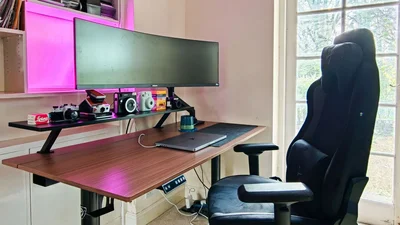
Arozzi's Arena Nordico hails from Sweden and is a premium contender for our best standing desks guide, being suitably minimalist, sturdy and reliable. And end price aside (once key accessories are factored in), it's an easy recommendation.
This has been my daily work station for four months and its electric motor has proved completely reliable, with its four customizable height settings. The smart cable tidy setup and generous cable trays ensure a clean look once all is in place, and the host of accessories I had for this review, which included a 'desk riser', monitor arm, headphone hanger and more, have all proved to be top quality too.
If you like the look of the Arena Nordico and its one-size dimensions suit your needs, then you won't be disappointed.
Latest Videos From
(Image credit: Tim Coleman)
Arena Nordico Electric Standing Desk: Unboxing
Like most standing desks, the Arena Nordico arrives flat-packed in two boxes, the heavier of which contains the steel legs and frame, the larger and lighter of which includes the particle board tabletop. It is shipped directly from Sweden.
Price and availability
The Arena Nordico is available directly from the Arozzi site for £291 / €349 and ships across Europe from Sweden. Shipping costs are calculated at checkout. I also picked up the Desk Riser (£50 / €60), single gas spring Monitor Arm (£50 / €60) and Headphone Hanger (£17 / €20) for this review. It has wide availability in the UK and Europe direct and from retailers like Currys for £285 (see here). However, it's not yet on sale in the US and Australia.
Given the simplicity and dimensions of the desk, I also requested accessories to complete my home setup, which came in separate boxes; a desk riser (raised worktop section), gas spring monitor arm (for my large and weighty 32:9 curved monitor), plus a headphone hanger.
The contents in each box were securely packaged by protective foam and cardboard. Unfortunately there was scuffing on the curved supporting bracket of one of the main steel legs — I'm pretty sure that would have occurred prior to packing. Once the desk was assembled, it was damage that you'd hardly notice at all.
Image 1 of 4
The contents of the Arozzi Arena Nordico, plus some of the extras I picked up
(Image credit: Tim Coleman)
(Image credit: Tim Coleman)
The scratches on one of the legs
(Image credit: Tim Coleman)
The premium hex key tool was much appreciated by me
(Image credit: Tim Coleman)
All assembling accessories and instructions were neatly packaged together and every component easily identifiable; the two worktop pieces, legs, control box, screws and so on.
Sign up to the TechRadar Pro newsletter to get all the top news, opinion, features and guidance your business needs to succeed!
A premium hex key tool with rubber handle and dual length hex keys was supplied with desk, which I greatly appreciated because it made the task of tightening the screws that much more comfortable and straightforward, even for awkwardly placed screw holes.
There was even white gloves supplied presumably to avoid fingerprint smudge marks, which felt a little overkill — this wasn't developing photo prints in a lab!
I chose the walnut version of the Arena Nordico with black steel legs of the four versions available. There are also pine, white or black finishes available (with white or black steel legs). The worktop measures 70 x 140cm, and there are no alternative sizes to choose from.
Arena Nordico Electric Standing Desk: Assembly
I've assembled a complex L-shaped standing desk before, and by comparison the build of the Arena Nordico proved particularly straightforward, and much quicker — with the help of my teenage son, I clocked 47 minutes exactly from unboxing to the desk being in situ with optional accessories attached.
The instruction manual couldn't be clearer, with the only potential point of confusion being which side to attach the desk's control box, given the desk is best constructed upside down and you need to think about it potentially reversing as the desk is turned over. Not once did I have to backtrack on the assembly.
There are two worktop panels; the main panel and a slimmer panel which is positioned to the desk's far side. They are lined up with underside brackets which form part of the generous cable tidy baskets frame, and the gap between the two worktop sections can be closed and opened to neatly feed cables through — that's a neat bit of design rather than a hole in one of the worktops.
Image 1 of 5
(Image credit: Tim Coleman)
(Image credit: Tim Coleman)
(Image credit: Tim Coleman)
(Image credit: Tim Coleman)
(Image credit: Tim Coleman)
The cable tidy brackets go on first, followed by the legs which slot in and then a final bracket to fix the legs in place. You'll need to decide which side of the desk you want to fix the electric motor and control panel, but the consequent steps remain the same.
On the same side of the motor goes the control panel. Thankfully the shorter screws design for the control panel fixed it into place perfectly (and months later the panel hasn't so much as budged, which is more than I can say for other standing desks that I have built).
I also added the (optional) headphone hanger before flipping the desk over off of its back and into position, with the help of my son. This is the one part of the whole process that you ideally need two people for.
After that, I attached another accessory, the raised worktop which Arozzi calls the 'Desk Riser', which is fixed in place with screw clamps. I would treat this additional worktop as if its max payload was pretty limited. Then went on the two cable tidy baskets, which easily slot into the bracket holes.
Image 1 of 5
(Image credit: Tim Coleman)
(Image credit: Tim Coleman)
(Image credit: Tim Coleman)
(Image credit: Tim Coleman)
(Image credit: Tim Coleman)
Installing the monitor arm was probably the fiddliest part of the entire build. To reiterate, this is an optional accessory that I went for because my monitor is massive, and I wanted to minimize its footprint on the desk set up.
It works best to screw in the monitor to the monitor arm before sliding the arm's base into place between the two worktop sections, and I found this process much easier with the help of my son.
Throughout the whole process, I thanked Arozzi for supplying the versatile dual length hex key tool — it made the historically fiddliest parts of this type of build a comparative breeze.
Arena Nordico Electric Standing Desk: In use
I've had an electric standing desk fail on me before after extended use, so I was sure to give the Nordico a long-term review. At the time of writing, I've used the desk every working day for 4-5 months, and it works perfectly the same as it did on day one.
The Nordico is able to support up to 60kg according to Arena, which is modest by comparison to other standing desks that I've seen quoting double that payload.
However, I'm not in the habit of sitting on my desk and raising myself up and down, as fun as that sounds. No, I have loaded it with a weighty 32:9 monitor (supported by the heavy duty gas spring version of Arena's monitor arm accessory), my laptop and various other items, and the desk has never struggled or slowed under that weight.
Image 1 of 2
(Image credit: Tim Coleman)
The maximum height of the desk. Particularly tall users might wish for an even higher max setting
(Image credit: Tim Coleman)
The control box offers four customizable single-push height presets, or you can simply press and hold the up or down buttons to adjust the height in centimeter increments. I was the main user of the desk and 2-3 presets would have been plenty enough, but I can see four presets being useful for desks shared by two users of different heights.
My only gripe about the standing function is that the maximum height of 115cm didn't feel quite high enough for me, and I'm 6ft 1 inches. Taller users might find the maximum standing setting not quote high enough. The minimum 71cm setting was plenty low enough, mind you.
Image 1 of 3
71cm — the minimum height of the desk.
(Image credit: Tim Coleman)
Here's the exposed rotor which drives the height adjustments.
(Image credit: Tim Coleman)
The clean surface of the desk, which if you're like me won't stay that way for long with no desk storage accessories
(Image credit: Tim Coleman)
Sadly, the desk doesn't include accessories — those are optional extras, and the cost quickly adds up. And with the limited one-size, I felt like I really needed a monitor arm to free up desk space. Even the headphone hanger is an optional extra.
There's also no option for on-desk storage, for example drawers to slot underneath the desk riser accessory, and so I found the desk quickly filled up with my daily mess.
Thankfully, there's a smart cable tidy setup, with that additional worktop panel that slides open from the far side of the main worktop, and generous cable trays underneath. Sorting and hiding messy cables, therefore, proved pretty easy.
(Image credit: Tim Coleman)
The feet were large and stable, and with their low profile I have so far avoided any stubbed toes.
I didn't necessarily appreciate the motor's rotor being exposed rather than concealed on the desk's underside at first, but it felt like should I run into any issues, that a fix would be simpler to issue.
Overall, every part of the desk, besides the scuffed leg, arrived and has remained entirely presentable and operational.
Arena Nordico Electric Standing Desk: Final verdict
If you like your standing desk with a clean, minimal look, then the Arena Nordico is worth considering. You'll likely need to factor in additional accessories which add to the already sizeable cost, but otherwise and following many month of reliable service, I have few complaints. I can see the Arena Nordico being my primary standing desk for many years to come.
First reviewed: July 2026
For more top office furniture, we've tested out all the best office chairs.