Among mobile productivity fans, Google Keep is a constant source of interest. Android Police writers have found themselves exclusively using it for a month or utilizing various tricks to organize thousands of notes.
I recently decided to follow suit, but for a very particular reason: I wasn't looking for a notes app, but a notes widget, and I was hoping Keep could replace my current choice.
There are plenty of useful Android widgets out there, but it took almost no time testing Google Keep to realize that it simply wasn't up to the task.
Related
My favorite note-taking app is missing a lot
Goodbye, default Notes app
I barely use my phone's Notes app if not through its widget; I find these fantastically useful ways to jump straight into a list or document.
My home screen is plastered with different list widgets: my shopping list, my work to-do, my story ideas list, and so on. Every home screen page has another list.
My phone's menu is basically a load of Notes widgets, web shortcuts and Google Drive links, with actual apps falling between the cracks.
But there's one thing I can't do with my phone's default Notes widgets: edit them from another device. And that's why I wanted to try Google Keep.
It all came about when I found a recipe online I wanted to buy the ingredients for, yet didn't have my phone handy. I wanted a way to create the list on my PC, yet have it on my phone's home page later.
Since Google Keep is a cloud-based notes app, it could do just that. So I decided to make the change. When I next found my phone, I replaced the Notes widgets with Keep ones, to see how they fared.
Learning from the world's shortest experiment
My first widget replacement was replacing my Notes app's 2x2 single-note list with Keep's alternative. This would, in theory, let me see a shopping list on my phone's home screen.
I was hoping Keep would do me one better. My usual Notes app lets me list ingredients, but not check them off individually. I'd have to open the note and remove them.
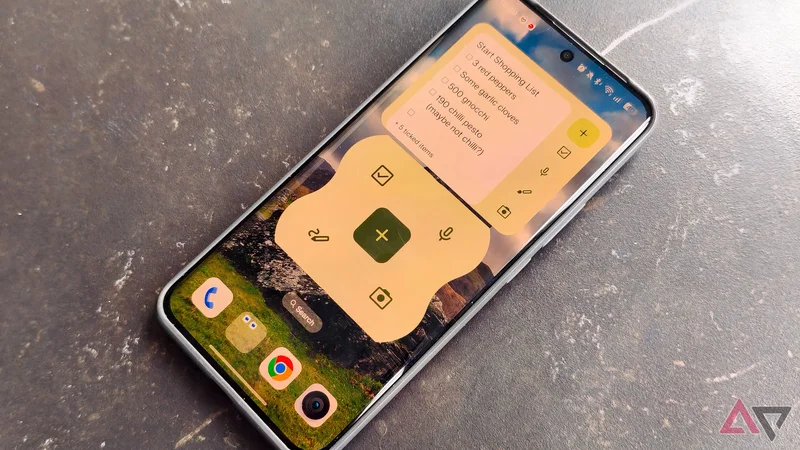
However, as soon as I put the Keep widget on my phone's screen, I knew I'd messed up, and you probably had the same reaction when you saw the image above.
The text in the Keep widget was huge, so big that I could only see one ingredient at a time. There was no way to resize the font. It looked like a pensioner's Kindle.
When I took the phone shopping, I found another issue: the widget isn't quick to update. If I pressed a tick box because I'd picked up an ingredient, nothing happened for a few seconds.
This meant I often pressed a box multiple times, thinking I'd mis-pressed, only to have the ingredient keep flickering on and off the list.
Attempts to course-correct with QuickCapture
But it's still not the one
Google Keep has three widgets: the Single note one we've discussed, a Note collection one, and QuickCapture.
In theory, QuickCapture lets you press a button to create a new kind of list. There are buttons for handwriting, checklists, voice notes, and picture notes.
It's resizable, so it can fit in different spaces on your phone's menu, but it's pretty ugly and, at larger sizes, weirdly low-resolution.
I thought this would be a useful widget for starting a new note, but never actually used it. You see, I rarely start new notes, usually only editing existing ones, so it wasn't helpful.
Even if it's far too big
As soon as I placed the Note collection widget, I found it was the most useful of the three.
This shows you a carousel of all your notes, and has all the QuickCapture options, so you can easily create a new note.
When I used this for my shopping list, I found the font was a much more readable size, so I could easily see the next few ingredients without undue swiping. However, you can't tick items off from it.
I still would've found that more useful for a shopping list, and appreciated the ability to swipe between different notes seamlessly.
However, Note collection is a big widget, taking up 4x3 slots. As you'll see in the pictures, it took up about half of a page on my phone's menu.
So it didn't sit comfortably between my other apps and icons like the single note did. And that's part of what I wanted, so it didn't stick around on my phone's screen either.
It took about a day of using Google Keep to decide that it just wasn't up to the note-taking task, at least on the widget front.
My Realme's Notes app has eight widgets, in different shapes and sizes, not a simple three. It's quickly proven an Android widget I can't live without, a list Keep can't reach.