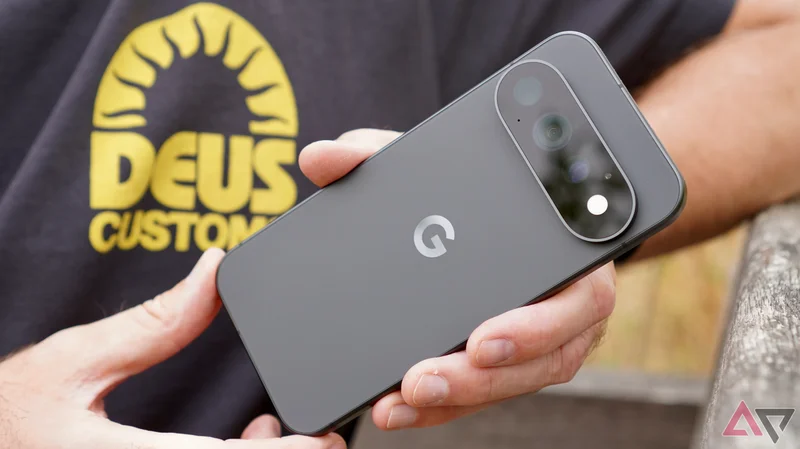
It’s day five of my life with the Google Pixel 11 Pro. This isn’t enough time to give you a full review, but it’s more than enough to have formed a strong, preliminary impression of Google’s latest.
I’ve thought about how I feel about the phone a lot since putting my SIM card in the 11 Pro. It has been tiring, because, on one hand, it's very good, but on the other, there's a host of very Google issues to contend with.
Is it a bad phone?
No, not at all
No, the Pixel 11 Pro isn’t a bad phone at all. It’s already an excellent phone. The trouble is, everything I like about it is also everything I liked about the Google Pixel 9 Pro, and the Pixel 10 Pro too.
This it’s-so-good-lets-just-repeat-it action isn’t a Google problem, it’s the industry. Smartphones, especially expensive ones, are almost universally superb. There aren’t many places to go to really make new models stand out from the last few generations.
What that means is, we sometimes get non-features that are something for celebrities (nominally) to talk about during glitzy launch events. I think Google is guilty of this here, and it risks people feeling let down.
The hardware is fantastic
One of the best phones you'll hold
This can’t be said often enough. Google has nailed the formula for making a beautiful smartphone, and the Pixel 11 Pro is no different.
I’m using the Obsidian version, which has a cool matte black rear that's matched to a matte black chassis, and unlike the majority of black phones, it’s chic and stylish.
The chassis rails are smooth and curved enough that in-hand feel is exceptional, even if there isn’t much grip.
Google has refined the camera bar, but you’ll have to be very familiar with the Pixel 10 Pro to immediately understand the changes. It’s ever-so slightly less prominent, and it allows the phone to rest on a table at less of an angle. It’s helpful when watching video.
The Pixel 11 Pro gets the mix of everyday usability and exquisite build and design just right. This is an expensive product, as we’ll come back to in a bit, but you really do notice your investment every time you pick the phone up.
HiLight is completely useless
I wonder if I'll ever intentionally use it
If you thought the Pixel 8 Pro’s temperature sensor was fairly pointless, HiLight redefines the definition of forgettable. It is almost laughably feeble. It flashes when you talk to Gemini, or when a favorite contact calls. That’s it.
I fail to see when I'd use it. The Pixel 11 Pro is more likely to slip and slide about when you put it face down on a surface, and more likely to get damaged too. The always-on screen is much more useful. The HiLight isn’t bright like a lighthouse either, so it’s still quite easily missed.
I don’t buy the whole minimizing distraction thing, because if you’re aware the HiLight will illuminate when an important call comes in, then I think you’re still going to be mindful of its existence. If so, how is it any less distracting than setting a custom sound or message notification?
There are already dozens of ways to talk to Gemini, from the Pixel Watch 5 to an app on a MacBook, and I don’t need a flashing light to tell me its listening. At this point, I assume it’s always listening somewhere.
Nothing made flashing lights on the back of a phone its identity, and it encouraged you to use the feature. Google has made HiLight so useless, there’s absolutely no reason to think about it at all.
12GB of RAM almost certainly won’t be enough
Performance may not hold up
If you buy the cheapest Pixel 11 Pro with 256GB of storage, it comes with 12GB of RAM. This isn’t going to be enough, and not just long-term either.
I’ve noticed several occasions where, after unlocking the Pixel 11 Pro, Android takes a second or so to catch up. This happens from the moment you unlock it with the fingerprint sensor to opening up an app like WhatsApp. These basic actions should be instant, but it hasn't always been the case here.
My review Pixel 11 Pro has 16GB of RAM. The slow wake-up and reaction time feels RAM-related, although it may also be Tensor G6 related, or even because I’m using the phone ahead of release. Performance problems of any kind are uncommon today, so when they do occur, it's worth mentioning.
Whatever the situation, I hesitate to recommend buying the 12GB model, just in case. Which leads me on to the next Pixel 11 Pro problem.
The price increase really hurts
Value eroded away
I do think you’ll want to buy a Pixel 11 Pro with 16GB of RAM, which means spending at least $1,219. That’s $120 more than the 16GB/256GB Pixel 10 Pro. Sure, you’re getting 512GB of storage space, but it’s still quite a jump.
The Pixel Pro series always looked like good value next to Samsung’s Ultra series, and while a Pixel 11 Pro will set you back less than a Galaxy S26 Ultra (which only has 12GB of RAM), the gap is closing.
It’s also closing in with the 512GB iPhone 17 Pro’s price, which currently sits at $1,299. Google is obsessed with getting people to switch from an iPhone (see the dedicated sequence in its cringe-making launch event), but when prices are this close, it’s a much harder sell.
The real pain for Google comes if you’re a shrewd shopper. Look for deals on the remaining Pixel 10 Pro or Pro XL phones. You won’t miss out on much, and potentially save a lot of money too.
Camera Looks may turn out to be fun
But the interface is bad
Google talked up its Camera Looks feature during the launch, but make no mistake, these are filters and not much more.
Oddly, they’re accessed through a Settings menu on the viewfinder screen in the camera app, where there are six Looks to choose from, called Editorial, Velvet, Classic, Digi, Black Tie, and Minimal. Each can then be tuned using a live editing feature.
In the gallery below, you can see photo examples taken with all the Camera Looks. The order is, from left to right, Default, Editorial, Velvet, Classic, Digi, Black Tie, and Minimal.
It’s rather messy, needlessly complex, and slow to activate in a hurry. It’s also hidden enough that some may not realize they’re a feature at all. It just makes me want to use the regular camera style and edit later.
When I look over photos taken with all the different Camera Looks, it’s the original that looks best. It’s a problem, because I’m unlikely to spend time using a slow interface only to have the resulting photo look worse than if I hadn't bothered.
However, Camera Looks may come into its own in certain circumstances, just like so many in-camera filter systems, so I’ll hold off saying it’s as useless as HiLight for now.
The Pixel 11 Pro is definitely a Pixel
Don’t expect big changes
All this is why the Pixel 11 Pro is a little tiresome. It’s very good in places, and it’s still one of the best Android phones I’ve used this year. However, Google doesn’t really seem motivated to make big, impactful alterations.
The battery life appears similar to previous generations. A 30-minute YouTube video over 5G takes 5%, and 30 minutes of navigation and camera use takes 10%. I’ve charged it twice over the first five days.
It hasn’t overheated, but I’ve noticed phantom heat build up at different points. One situation highlights another problem, the much-vaunted Quick Share feature’s compatibility with Apple’s AirDrop.
This works sporadically, and the Pixel 11 Pro gets quite hot when it endlessly searches for, and ultimately never finds, an AirDrop link. When it does work, it’s fast and useful, but never completely reliable.
I feel this sums up the Pixel 11 Pro rather well. Under some largely forgettable “features” like HiLight and Camera Looks, you’re getting the same old Pixel Pro experience. Great hardware, decent but not outstanding battery life, super software with reliability issues, and the specter of thermal and performance issues hanging over it.
For this, you’ll pay more than you did for the Pixel 10 Pro. I don’t want to be negative about a good phone, but when the features Google highlights disappoint, it sours what's otherwise another solid entry into the Pixel line.
Android Police's full review of the Google Pixel 11 Pro is coming soon.