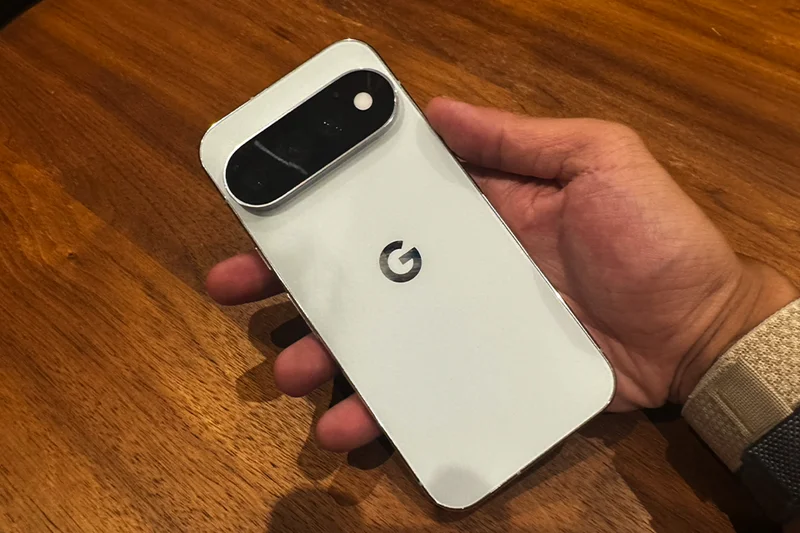
Another year, another series of déjà vu-inducing Google Pixel phones. The Pixel 11, Pixel 11 Pro, Pixel 11 Pro XL and Pixel 11 Pro Fold have just launched, but I wouldn’t say they’re filled with surprises.
I’ve spent the past week testing the Pixel 11 Pro, and well, it’s about what I expect from a Pixel phone. Everything is a little bit better than it was last year – the display is brighter, the cameras have been upgraded, the battery lasts longer and the processor is faster.
And while the camera bar has had a glow-up, with some flashy new HiLight LEDs and a thinner, edge-to-edge glass design, as always with a Pixel, it’s the software that steals the show. There are loads of new Gemini-powered tricks, but it’s one new camera feature in particular that has literally changed how I take photos. I’ve been putting the Pixel 11 Pro through its paces to see if it’s worth the upgrade.
Read more: **Best Android phones, reviewed **
Google Pixel 11 Pro: Price and deals
The Google Pixel 11 Pro starts at £1,079 for the 256GB model. You can also get the Google Pixel 11 Pro XL, which has a larger 6.8in display, starting from £1,279. To put that into context, the iPhone 17 Pro starts from £1,099 and the iPhone 17 Pro Max starts from £1,199, making the Pixel 11 Pro £20 cheaper than its Apple rival, but the larger Pro XL £80 more expensive.
That Google Pixel 11 Pro XL price could soon look a little less steep, however. The upcoming iPhone 18 Pro Max is heavily rumoured to get a price hike this year, with rising memory costs putting pressure on smartphone prices.
If you’re looking to bring the price down, Google is currently offering up to £850 off the Pixel 11 Pro and Pixel 11 Pro XL when you buy directly from the Google Store. The deal runs until 1 September. You’ll get at least £400 off the new Pixel 11 Pro by trading in any phone, on top of the current valuation.
And to sweeten the deal even further, you can get up to £80 off a new Pixel Watch 5 until 1 September when you buy one with a Pixel 11 smartphone. This brings the 45mm Pixel Watch 5 LTE model down to just £419. You can also trade-in your current smartwatch to bring the price down even further.
Google Pixel 11 Pro: Design and display
There’s something iconic about the Google Pixel – a big thumping camera bar on the rear; rounded corners; unmistakable Pixel colourways. You’ll know a Google Pixel phone when you see it.
The Pixel 11 Pro is almost a copy-paste of the Pixel 10 Pro, which itself looked like the Pixel 9 Pro. And that’s fine – it’s iconic for a reason. It’s still a handsome phone, with Gorilla Glass Victus 2 on the front and back, sandwiched around a polished aluminium frame.
What’s different about the design, however, is that the big camera bar has gone on a trip to the barber’s and asked for a shape-up, sides and back. The camera bar is 40 per cent thinner (and noticeably so). The black glass now stretches across its entire face, swallowing up the flash, which previously sat in its own little metal area. It protrudes a whole lot less and looks sleeker as one glass slab.
The most noticeable addition to the design is something called HiLight. Google’s put a ring of colourful LEDs around the camera flash. It lights up when the phone is face down, and looks like the entire flash is glowing. You can assign one of five different colours to contacts so you know who’s calling without picking up your phone. The lights also spring to life when Gemini is listening, thinking or responding. It looks almost like a waveform when Gemini is active and talking.
It’s basically Google’s take on Nothing’s Glyph Interface, except right now it can’t do anywhere near as much. At launch, HiLight can only light up for calls and Gemini, which is kind of... useless. Google says message notifications are coming later, but compare it to Nothing’s Glyph interface and it’s still nowhere near as good.
Nothing’s version can show you notifications from individual apps, keep important alerts permanently lit until you check them, act as a camera countdown and even show things like volume and charging progress. Are there really that many times you need a colourful light just to tell you who’s calling?
Like the Pixel 10 Pro, the Pixel 11 Pro features a soft-touch matte glass back and polished aluminium frame, with a shiny reflective edge around the camera bar and Google logo. The colours are new, though, with canyon, olive, fog and obsidian. The new obsidian colourway also has an all-matte finish, with a matte Google logo and matte trim around the camera bar. I’ve been testing the fog model – it looks sleek with the polished accents.
Flip the Pixel 11 Pro over and you’ll find a nice 6.3in LTPO OLED Super Actua display. The size hasn’t changed, and neither has the adaptive 1Hz-120Hz refresh rate. Google has cranked the peak brightness up to 3,600 nits, which is 9 per cent brighter than last year. It’s sharp and wonderfully smooth to scroll on.
Google has also added a new coating to the Pro display that it says is twice as scratch resistant as before. I’m not about to start scraping a £1,079 review unit with my keys to find out, but one week in, my naked screen protector-free Pixel 11 Pro has no scuffs.
Google Pixel 11 Pro: Cameras
Google Pixel phones have always had some of the best cameras on any smartphone, and that’s still the case with the Pixel 11 Pro, despite not having many changes. Its triple-camera array features a 50MP main camera, 48MP ultrawide and 48MP 5x telephoto, plus a hefty 42MP selfie camera on the front.
The main snapper takes great photos, and while it’s not to everyone’s taste, I love Google’s saturation-heavy pics. They just make any photo pop, and always come out looking fantastic.
The biggest hardware upgrade this year is to that telephoto camera. Google has fitted it with a larger 1/2in sensor that captures 30 per cent more light than the Pixel 10 Pro. You can now also zoom all the way up to a frankly ridiculous 120x, up from 100x last year.
Sure, 120x sounds completely bonkers, but there is a catch. Once you zoom to 30x or beyond, Google uses an on-device generative AI model to reconstruct and sharpen details that the camera can’t capture on its own, so it’s not exactly a true 120x zoom. It saves that AI-enhanced image with a version without the generative processing, so you can compare the two and decide which one you prefer.
It’s also quicker to take photos at night, too. Instant Night Sight is essentially a much faster version of Google’s already excellent Night Sight. It uses the improved sensors and extra processing power to take faster low-light photos without making you stand completely still for what feels like an eternity. In my testing, it snapped photos in a second, rather than several seconds.
I took the same shot at 0.5x, 1x, 2x, 5x and 10x as the sun was going down, and the Pixel 11 Pro did a great job of keeping the bright sky under control and still pulling plenty of detail out of the brickwork. The 5x telephoto was particularly impressive, retaining loads of texture and detail despite the fading light.
There was an inevitable drop in sharpness once I pushed it to 10x, however, with the brickwork looking a little more processed. The picture was still decent, though, and colours and exposure were consistent.
While that’s all well and good, the camera feature that’s absolutely changed the way I take photos is the new Magic Capture feature. Rather than taking a single photo, one tap of the Magic Capture shutter starts capturing both video and high-quality stills. The Pixel then automatically pulls out some of the best shots and edits them so they look their best. The thing I love most, however, is that it solves one of the biggest gripes I have about taking photos.
If you’ve ever set a timer on a phone to try and get a group photo, you’ll know my pain. You rush into the frame, wait for a few seconds, rush back to see if it was any good, realise your pal had their eyes closed, then set another 10-second timer. Rinse and repeat.
Or maybe you’ve got a dog (or baby) who always looks away at the exact moment you hit the shutter button, ruining the picture you had spent minutes framing. Magic Capture fixes all of those annoyances. It’s genuinely made taking photos so much more hassle-free, and even saves the video, so you can pick your own frame if you prefer. Total gamechanger – in the settings, you can even set it so that the camera app always uses Magic Capture.
My social media editor Niki captured me spinning around in the office as one of my Magic Capture tests, and it captured some great stuff, with really decent image quality. It generally favours moments where the subject is looking towards the camera, giving me several different poses and expressions to choose from. It maintains the sharpness and detail in my face and clothes, despite me spinning quite fast. Exposure seems good too, especially with the bright windows and lights behind me.
It looks like a picture the Google Pixel would take even without Magic Capture turned on, with lots of colour and detail, and – crucially – they don’t look like random screenshots taken from a video.
Now, I can see why some people might not like it. You’re essentially giving away your photo-taking abilities to a robot. But as someone who – hands up – doesn’t care much for the integrity of their photography prowess, it’s the exact thing I’ve needed. My apologies to all the photography purists out there.
There’s also a new Camera Looks feature, which lets you give your photos a particular aesthetic before you’ve taken them. You can choose to highlight the shadows, pump up the warmer tones or choose different film styles. You can even adjust the amount of grain and set your favourite as the default every time you open the camera.
Unlike applying a filter on after you’ve taken a photo, Google says the Looks work directly within the camera’s imaging pipeline. I think the camera’s default settings are the best, so it’s not something I’ve found myself using very often.
In terms of video, the Pixel 11 Pro can now shoot 4K video in portrait, and there’s a new Pro Stable Video mode that uses something Google calls Video Boost to smooth out your footage when you’re moving around.
Google Pixel 11 Pro: Features and performance
As ever with a Pixel phone, though, the hardware isn’t why you buy one. Google has absolutely stuffed the Pixel 11 Pro with new software features, and while there’s the usual smattering of Gemini AI stuff I could probably live without, there are some features I’ve loved using.
The feature that has literally made me go “wow” is the new upgrade to Live Translate. It can now translate the actual audio from videos, podcasts and voice messages in real time. It essentially dubs whatever you’re listening to into another supported language. I tried this with a French language news service on YouTube and it kept the newsreader’s exact voice, but if they were speaking English instead of French. I can imagine this becoming so useful when watching a TV show that hasn’t yet been dubbed into English. It’s astonishing, and once Chinese is supported, I’m going to enjoy testing this out with the relatives I struggle to communicate with. It’s quite eerie seeing it work in real time as well.
It’s not perfect, however. I translated an interview with Timothee Chalamet talking French, and it got a few things wrong and went silent when it should’ve been translating. It’s cool, but it still needs a little work.
There’s also another neat new dictation feature. Rambler, which is powered by Gemini, lets you ramble your dictation instead of dictating every single word and punctuation. So you can talk naturally, and it’ll dictate what you actually want it to say. As a test, I dictated a shopping list text to a friend with lots of ums and pauses. I said things like “scrap that, we need milk instead of orange juice” and purposefully stumbled over my words. It fixed it all.
Now, I’m not a big fan of dictation generally, but for those who struggle with text, Rambler will have your messages typed out perfectly. I can picture it being a godsend for my mother, whose first language isn’t English and is always fretting about how her grammar or her word choice comes across over text.
You can correct yourself halfway through a sentence and Rambler will tidy everything up, stripping out the ums and ahs. It will also fix stutters, then add the correct punctuation where needed. Once you’ve finished, you can even carry on talking. It’ll edit what you’ve already written, so you can ask it to change a word, add something you forgot or rewrite the entire thing in a different tone of voice.
Circle to Search now works directly inside the camera as well, so you can point your Pixel at something and search for it or translate text without having to take a picture first.
Disappointingly, however, UK users don’t get Google’s new Proactive Assistance features at launch, which are the most powerful Gemini features on the Pixel 11. Active in other countries, it proactively surfaces useful information and actions based on what you’re doing on your phone, or what’s on the screen. Google showed how it can even react to your notifications and your location.
Google says those in the UK will get similar functionality through a feature called Magic Cue, but that’s not new – it debuted on the Pixel 10 last year. It’s not exactly the same.
As for performance, the Pixel 11 Pro is powered by Google’s new Tensor G6 processor and comes with 12GB of RAM on the 256GB model or 16GB on the 512GB and 1TB models. Google says the new chip makes web browsing 25 per cent faster and that apps launch 15 per cent quicker, with the phone using up to 20 per cent less power. I found that to be the case in my week with the Pixel 11 Pro. It’s never overheated when using RAM-intensive apps and games, and is buttery smooth to browse and scroll.
The Pixel 11 Pro launches with Android 17 and, as with recent Pixels, Google promises seven years of operating system, security and Pixel Drop updates. That means a Pixel 11 Pro bought today should still be receiving software updates in 2033.
Google Pixel 11 Pro: Battery life and charging
The battery life on the Pixel 11 Pro has also been improved. It now boasts a larger 4,850mAh battery, up from 4,700mAh on the Pixel 10 Pro. You get more than 30 hours on a single charge, up from the 24+ hours it promised with last year’s model. I found that to be broadly the case – in daily use, I could get it to last until the next morning. Heavier days of usage did require a plug in by the time I got to bed, however.
Charging has improved, too. The Pixel 11 Pro can reach 55 per cent charge in around 30 minutes with a 30W charger, although you’ll need to buy your own as there isn’t one in the box.
The Pixel 11 Pro also supports even faster magnetic wireless charging. The Pixel 11 Pro now supports Pixelsnap charging at up to 25W, up from 15W on the Pixel 10 Pro. In my tests, it reached around 50 per cent in just 30 minutes, meaning wireless speeds are finally almost as good as wired speeds.
A neat new screensaver feature is also visible when the phone is charging. You can turn the display into a clock, show the weather or your Google Photos, or have it display detailed charging stats. It’s possible to set up several screensavers and swipe between them when the phone is docked on a Pixelsnap stand.
Key specifications:
- Screen size:6.3in
- Resolution:1,280 x 2,856 LTPO OLED, 1-120Hz
- Processor:Google Tensor G6
- RAM:12GB/16GB
- Storage:256GB/512GB/1TB
- Rear cameras:50MP main, 48MP ultrawide, 48MP 5x telephoto
- Front camera:42MP
- Battery:4,850mAh
- Charging:30W wired, 25W Pixelsnap wireless
- Operating system:Android 17
- Colours:Canyon, olive, fog, matte obsidian
- Water resistance:IP68
- Dimensions:152.8 x 72 x 8.5mm
- Weight:204g
I hate to say it, but the Google Pixel 11 Pro is a fairly boring upgrade. Google hasn’t revolutionised smartphones, or anything like it. The design is largely the same, the display is only a little brighter and most of the camera hardware hasn’t changed. Even that new HiLight feature feels half-baked at launch.
But there’s no denying that Google is still hitting it out of the park when it comes to software. Live Translate genuinely blew me away, Rambler is a clever feature and Magic Capture has completely changed the way I take photos. These are all AI features that are actually improving those small daily annoyances, whether that’s with taking pictures, dictation or communication.
If you already own the Pixel 10 Pro, there probably isn’t enough here to justify spending £1,079 on an upgrade. But if you’re coming from an older Pixel or looking for one of the best Android phones you can buy, the Pixel 11 Pro is a great phone, though not quite remarkable.
How I tested the Google Pixel 11 Pro
I spent a week using the Google Pixel 11 Pro as my daily driver. I swapped to using Magic Capture for most of my photos, snapped pictures in daylight and after dark and tested the new 120x Pro Zoom. I streamed videos on YouTube and put Live Translate through its paces, tried out Rambler for dictation and used the phone for all my usual day-to-day tasks. I also tested battery life on lighter and heavier days and compared wired and Pixelsnap wireless charging speeds.
Why you can trust IndyBest reviews
Alex Lee is IndyBest's tech editor. He's been reviewing smartphones, tablets and consumer technology for a decade and has put hundreds of devices through real-world testing from fitness trackers to headphones. Every product is used as part of his everyday routine and judged on how it performs in daily life, helping readers find the gadgets that are worth buying.
For more, we’ve found the best cheap phones in 2026