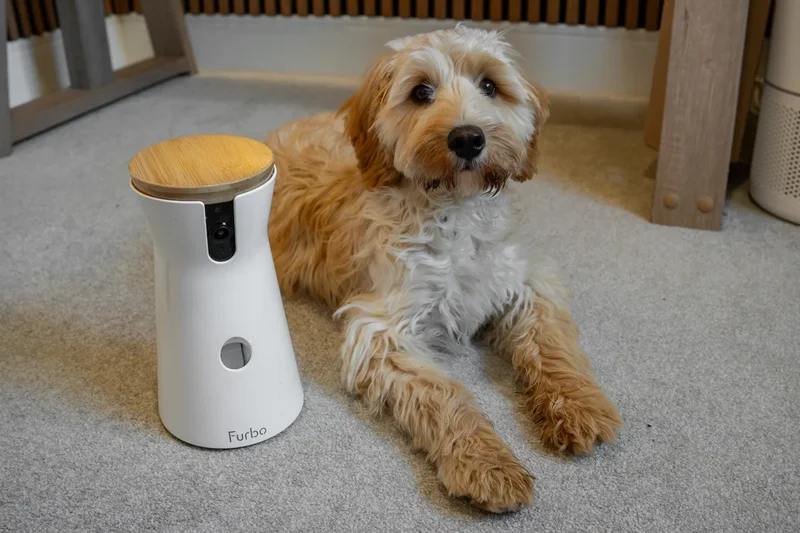
Security cameras are commonplace in modern homes, but what if it’s your pet - and not your shed – you need to keep an eye on? That’s where a dedicated pet camera like Furbo comes in, with all the features you expect from an indoor camera, but with pet-centric extras like dog and cat monitoring, and even a treat-tossing system to keep Fido happy while you’re out.
Furbo offers a range of dedicated pet cameras designed for both cats and dogs. I recently reviewed the smallest and cheapest member of the family, the Furbo mini 360, and now it’s time to step up to its full-size sibling.
Core functionality is unchanged. This is a camera that pans left and right for wide coverage, tosses treats on your command, and has a clever AI assistant that logs what your pet has been doing, alerts you to any concerns, and even answers any questions you might have about your furry best friend.
What’s different between the full-size Furbo and the smaller Furbo is the much larger treat capacity and a larger overall size that raises the camera and tilts it downwards for a better view of your dog and their bed or crate. With help from my cockapoo Enzo, I put it to the test.
- Rating:4.5/5
Furbo is widely regarded as the gold standard of pet camera, and with its flagship product, this is easy to see why. Aggressively priced (and practically always reduced), the Furbo 360 takes what I already liked from the Furbo mini 360 and scales it up. The extra size means improved camera location for a better view and, most importantly of all, lots more space for treats.
These treats can be bigger too, making the full-size Furbo better suited to larger dogs, and since the mechanism has more space, there’s less of a chance of it getting blocked.
As with the smaller model, the Furbo rotates through 360 degrees and can automatically track your dog around the room, panning then zooming in for a closer look at what they’re doing. Colour night vision and two-way audio mean you can check in on them at any time of day or night, and Furbo claims the status lights of the camera use colours dogs can see.
Without paying for Furbo’s subscription service, called Furbo Nanny, the camera only works when you open the app and view its live video stream. Pay for the subscription, and the camera works whenever you switch it on, responding automatically to your dog’s behaviour and alerting you to actions like barking, crying and signs of illness. Furbo says the system can alert you to emergencies like continuous vomiting and seizures, and the Pet ID system helps it refer to your pets by name – helpful if you have more than one.
Furbo Nanny also includes an AI chatbot, to which you can type questions and seek advice on dog training and behaviour. You can ask questions like: “Did my dog eat while I was out?” and: “How long did they nap this afternoon?”
Other Furbo Nanny features include the automatic playing of calming sounds when your dog is agitated, plus daily summaries, highlight reels and activity report. The system is quite smart at identifying certain behaviour, and uses natural language to send you messages like “Enzo is playing with his toy in the kitchen”
Furbo can’t guarantee that a treat-tossing, lullaby-playing camera will improve your dog’s behaviour. But barking notifications are a handy tool to have while puppy training, and it’s always fun to toss a treat at your dog while you’re away. My puppy always ate the treats – and quickly learned to anticipate them whenever he heard the Furbo preparing to throw some food – but this didn’t necessarily help him settle while alone. As with all Furbo cameras, the subscription is a practical necessity to get the most out of the camera. But the costs are fairly low – £67.12 per year at the time of writing – and subscribing up front massively lowers the cost of the camera itself, down from £159 to £29 as I write this in July 2026.
Hardware
The cylindrical Furbo 360 measures 22.3cm tall and 12.5cm wide. It’s designed to be placed on a tabletop, kitchen counter, shelf or any other flat surface. It plugs into a wall outlet for power and rotates 360 degrees to gather a complete view of its surroundings. The camera doesn’t tilt vertically, but is angled down slightly to help keep your dog in view.
A removable bamboo lid provides access to the treat storage, and treats are fired out of the hole below. Furbo says up to 100 pieces of food can be loaded into the camera, and having already reviewed the Furbo 360 mini, I found this was the biggest difference – the full-size camera can store lots more than the smaller version.
A speaker and microphone facilitate two-way audio, so you can hear your dog and they can hear you through the Furbo smartphone app. The microphone is also used to detect barking and alert you, if wanted, and a status indicator light glows from under the device.
Video quality
This is where the full-size Furbo falls a little behind its smaller sibling, since it records at 1080p Full HD resolution, compared to the mini 360’s 2K QHD. The difference is small – comparing 1920 x 1080 video with 2560 x 1440 – but means the larger Furbo has a digital zoom of up to 4x, compared to 8x for the smaller but newer model.
This doesn’t make a huge difference during regular use, since the bigger Furbo’s video quality is still good. It’s sharp and clear while streaming, and downloaded footage looks especially good when viewed on a phone or tablet. Only on a big screen like a computer or TV would Furbo footage start to lose its sharpness.
During my testing, connecting to the camera usually took just a few seconds and I had no issues with drop-outs or the connection failing to load.
Treat throwing
Since you can arguably set up many indoor security cameras to act as a dog camera, treat throwing is arguably the Furbo 360’s biggest feature. Take off the airtight lid and there’s space for around 100 small treats; load them up, then simply swipe at the treat icon on the camera’s live video feed, and it’ll chuck one out.
The Furbo 360 can be set to play a little jingle before throwing, as a way of teaching your dog to stop what it’s doing and associate the noise with an imminent treat. You don’t have any control over how far the treat goes, or which direction it’s thrown in – unless you pan the camera to one side in advance – but that doesn’t really matter. It throws them quite far, so in my case several small treats would skip across the kitchen counter and land on the floor, ready to be chased and eaten.
Plainly, this will never stop being fun. For both you and your dog. I also found it helped alleviate my concerns about my puppy being unhappy when left alone. He’s clearly never been distraught enough to ignore a treat, and when the jingle plays, he stops barking, whining or crying and runs eagerly to the Furbo 360, ready to chase some food with a wagging tail. Then, more often than not, he’d continue whining, but at least with me knowing he’s not quite as upset as he sounds.
The Furbo 360’s treat capacity is the biggest reason to buy it over the smaller mini 360. That one can only hold about 10 very small treats, whereas the full-size dog cam can swallow up loads, making it compatible with dogs of all sizes.
App and AI
I covered this extensively in my review of the Furbo mini 360, and it’s exactly the same software here. The app works well, and the cost of the Furbo Nanny subscription (£67.12 for 12 months at the time of writing) feels justified.
The accuracy of the AI and its ability to use natural language surprised me and, on occasion, made me feel like I was being spied on. It’ll often let you know what your dog’s getting up to, but sometimes comments on your actions too. Once, it commented on the fact I was making a cup of tea, because it had seen my partner pouring water from a kettle. You might think it’s cute, but I felt it was unnecessary, and served as a reminder to turn the Furbo off when we’re home. Not that I fear someone is actually watching us, but because I don’t need observations on my activity cluttering up the timeline of a dog camera.
The rest of the app and Furbo’s AI is great. Daily highlights are a particular highlight, as the app edits together video clips into an amusing reel, and even adds some music too. I imagine these videos are extremely useful for monitoring a dog struggling with illness or recovery from injury. Activity and barking events are plotted on a graph over time, and the app shows when the camera played its automated calming sounds to help with whining and crying.
Storage, subscription and value
Like a lot of home security cameras, Furbo devices don’t record video unless you pay for a subscription, and there’s no option to store footage locally. The camera still works without paying the monthly or annual fee, and you can toss treats, talk through the speaker and receive barking alerts. But video can only be viewed through a live stream, and you lose access to the AI tools and chatbot.
Furbo’s subscription prices vary, but at the time of writing in July 2026, the standard plan starts at £5.59 a month, with the premium plan from £6.99 a month. The only difference between these is how the former stores video for three days and the latter extends this to seven days. The fees increase by £2 a month for each additional Furbo camera you want to use.
Subscriptions are reduced when bought alongside a camera. As of July 2026, the Furbo 360 is £29 (reduced from £159) when bought with 12 months of the Standard subscription tier for £67.12.
The verdict: Furbo 360 dog camera
The Furbo 360 works exactly like the smaller mini 360, but with more treat capacity; something your dog will be thrilled by, naturally.
It also makes it more useful, since the mini 360 only accepts very small pieces of food and runs out very quickly. The full-size Furbo accepts larger treats and more of them, so it can go for days at a time without needing a refill. Good news for you and your dog.
The rest is as good as ever, from the strong value and video streaming quality to the treat-tossing, the barking alerts, the daily highlights and the AI assistance. It’s a nice package that has been thought out well and offers good value, especially during Furbo’s frequent sales.
How I tested
I set the Furbo up on my kitchen windowsill. This gave it a good, elevated view of the whole room and of where Enzo, my five-month-old cockapoo, has his crate. The camera was used for a couple of weeks before I wrote this review, and was switched on every time I left Enzo at home on his own.
During those times, I checked in via the smartphone app to assess the video streaming quality, throw him some treats, and make sure he was behaving himself. Given he’s still a puppy and doesn’t much enjoy his own company, the Furbo’s bark detection and app notifications were given a thorough workout.