- Adobe releases three new AI audio tools on Firefly
- Creators can now use Generate Music, Generate Speech, and Generate Sound Effects
- I tried them out to see how they perform in video creation
After sitting in beta for sometime, Adobe Firefly has now made three new AI audio tools promising "studio-quality sound" available for all creators. I had a play with each one to see if the results were as good as promised - and on the whole, they delivered, with a few quirks.
Generate Music, Generate Sound Effects, and Generate Speech are the latest audio features to hit Adobe's browser-based AI platform (no prizes for guessing what each of these do (sorry)). From my experimenting with all three, Generate Music is the high-point here, it's way better than I thought it'd be and I can see marketers and creators getting serious use from it.
The launch coincides with a recent survey conducted by Adobe alongside Berklee College of Music, 32.7% of video creators, musicians, and marketers confirmed they use AI-generated music "as the final track in their published work." And it's that sizeable figure, I suspect, driving this particular update.
So, what's new?
There are three AI tools now available to everyone. They're all pretty self-explanatory, but here's what you need to know.
- Generate Musiclets you create licensed tracks matching your videos' length and mood.
- Generate Speechtakes scripts and turns them into voiceovers.
- Generate Sound Effectsgenerates - you guessed it - sound effects that match the action and timing of a video.
But are they any good?
I've written before about my agnosticism towards AI in general, and my issues using it for creative work. It's a facsimile of art.
Still, Adobe's tools have impressed even the hyper AI-sceptics on my team - notably features like Generative Extend in its video editing software. And I'm nothing if not open minded. So, I decided to try these tools out for myself to find out what's really going on here. You can try them yourself by clicking here.
The focus here, at least for now, is around speeding up creative workflows for the likes of marketers and content creators.
Creating AI music
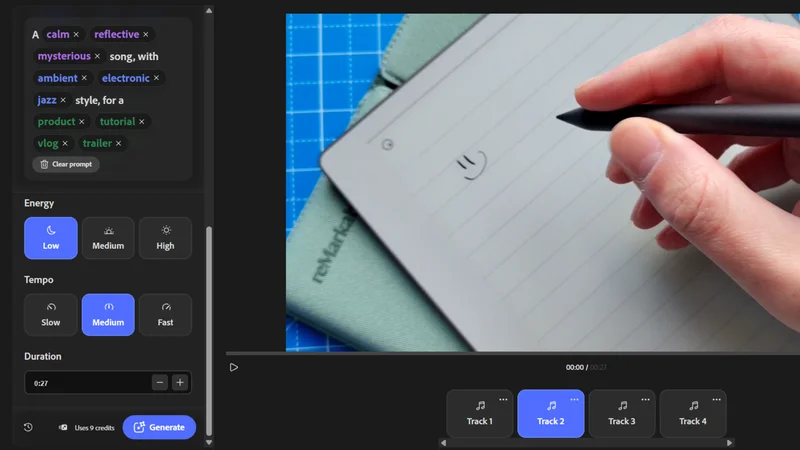
I started with Generate Music, where you have two methods for creating tracks. First, you can upload a video - I used a short 27-second clip I filmed for my reMarkable Paper Pure review (mostly because it was still in my download folder).
Based on that, Firefly suggested a prompt for "a calm, thoughtful song with ambient electronic style for a product demonstration."
I hit Generate, and in a couple of seconds - it's actually impressively fast - I was served four tracks to choose from, all different but with the same vibe. They were...ok. A bit generic, but they'd do in a pinch. Or to rush a project to completion.
I decided to add a few more terms to the prompt, like "jazz", "cinematic", for use in a "vlog" and "trailer". I changed the Energy from "low" to "medium." The results were a big improvement.
Like all AI tools, the more prompting, the better the output, and there is an option to describe the vibe, style, and purpose yourself if you have an idea in mind.
You can download the music and video, or just the music from here.
Creating AI voiceovers
Switching over to Generate Speech, I first used the side-bar to determine which AI model to use - at the time of writing, there's Adobe's commercially safe Firefly and the ElevenLabs Multilingual V2 partner model.
I then picked a speaker from a list of 45, each variably described as male, female, non-binary, young adult, middle-aged, senior, and so on.
Finally, I pasted in my text into the text field - Firefly can figure out what language I'm using, but you do get the option to choose it yourself. I used the poem Ozymandias (with my greatest apologies to Shelley).
What I liked here was that with your text in place, you can choose to add additional text, or tell the AI to pause in certain places. To actually preview, I had to select the entire passage and use the context menu to (it's where you also fix pronunciation and adjust the tone of voice.
For all the talk of speeding up workflows, this feels like a misstep to me. It just needs a play button at the bottom of the screen, as it was with generating music.
I had to tweak the pauses to give my text room to breathe, and once in place, I could alter the timings by clicking the pause on the preview screen. And for some reason, the word "land", of all things, is what tripped up the AI, where it was pronounced "lan."
Creating AI SFX
For this test, I again used a video filmed for my reMarkable review - this time a 12-second clip comparing the reMarkable 2 with the Paper Pure.
This process is a lot more in-depth, in the sense that the AI isn't going to guess what the likely SFX should be. I had to manually describe what I wanted. After that, I clicked the "Enhance Prompt", which added more descriptions.
We end up, then, with "A sliding whistle descending softly with a metallic timbre and gentle resonance." Clicking Generate, the service rapidly produced four ear-piercing variations. I won't subject you to those results. It's not fair on anyone.
Instead, I changed the prompt to a more soothing "crickets in a field" for a duration of 12 seconds, to fill the video length.
What's nice about the SFX option is that you can add multiple audio tracks and use the handles to adjust its positioning.
With a timeline sprawled across the bottom of the screen, it feels more like a real audio editor (to a degree, at least). Tug in the handles of the audio and you can further adjust volume or delete the track.
Worth it?
Overall, there are some UI tweaks I'd like to see here to make production workflows faster. And I don't think they'll substitute professional sound designers, composers, and musicians any time soon. But having worked in marketing, I can see they have their place for marketers and everyday video creation.
Speech is a world away from the days of robotic Microsoft Sam sound-alikes, but for nuanced line delivery, nothing's going to beat a performer in a booth. Sound Effects has a lot more utility, though. Across a spectrum of generations, I couldn't tell the difference between the AI sounds and those playing on an old SFX CD I own.
The real winner here is Generate Music. Even the base prompt delivered audio that wouldn't feel out of place in a product demo, review, business explainer, or similar. And it got better with every generation I created. An update worth exploring, then, for fast-moving video production.
Steve is B2B Editor for Creative & Hardware at TechRadar Pro, helping business professionals equip their workspace with the right tools. He tests and reviews the software, hardware, and office furniture that modern workspaces depend on, cutting through the hype to zero in on the real-world performance you won't find on a spec sheet. He is a relentless champion of the Oxford comma.