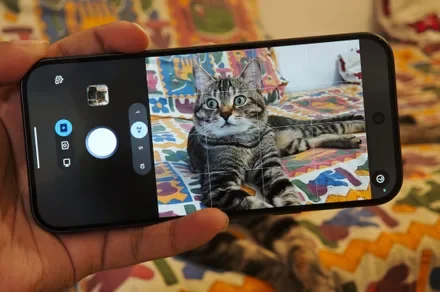
My phone is filled with pictures of my cat—shocker, I know! From some perfect frames to their funny moments, you cherish each shot you take of them. But my cat has two settings whenever I point a phone at him. He either becomes completely uninterested in whatever adorable thing he was doing, or suddenly moves quickly enough to make pressing the shutter at exactly the right moment almost impossible.
This is exactly where the Magic Capture on the Pixel 11 Pro came in. It took the challenge of photographing my cat without me having to do much. Google designed the new camera mode around fleeting moments such as babies smiling, action shots, and specifically, playful pets. After spending a little time chasing my cat around with a feather, I can see why it was made.
Consider this a preview rather than an in-depth evaluation. My first sessions were indoors under fairly ordinary lighting, with a subject moving extremely quickly and very little interest in cooperating with my photography. Several of the resulting pictures consequently have motion blur. And yet, I still feel like the pictures that were drawn from the videos caught the vibe.
I could just point and forget
Whenever you’re taking a video, you get a camera shutter button on the side that lets you take a couple of stills while recording. Magic Capture changes this approach. You just have to start a session, and the Pixel records video while looking for photographs worth saving along the way. Google offers the same manual shutter, so you’re not locked to Google’s selection. But I barely touched it during these tests.
I just followed my cat as he stalked, swatted at, jumped toward, and occasionally tried to bite the feather being waved around in front of him. The two short Magic Capture clips I shot here lasted for around 10 seconds each. Across that brief period, the phone gave me several different stills without requiring me to repeatedly stab at the shutter button while also trying to keep a fast-moving cat inside the frame.
One image catches him with his mouth open as the feather passes directly in front of his face. Another freezes him mid-swat with one paw stretched toward it and the other raised in the air. A later frame catches him sitting upright and reaching down toward the feather. I am not winning any awards for these pictures. The entire point was to get him being adorable and funny, and the results speak for themselves.
According to Google, a Magic Capture session analyzes around 400 frames using on-device intelligence and Gemini models before delivering high-quality 12MP photographs. It can also automatically apply edits, including cropping and unblurring, while preserving the video from the session.
It didn’t magically freeze every movement
Indoor light and an animal moving at full speed are a rough combination for any phone camera. Look closely at some of my images, and you can see exactly where the Pixel struggled. A paw becomes a blur while my cat swings at the feather. The feather itself turns into a streak in several shots, and one particularly energetic frame has obvious motion around his face.
I actually like having those imperfect results in this first look because they keep my expectations grounded. Magic Capture isn’t handing me immaculate action photographs, even though that kind of sounds perfect if I’m being honest. In my experience so far, using the Pixel 11 Pro like this is all about the good moments. But I feel like there’s plenty of room for optimization here, especially in video stabilisation.
This might be one of Google’s smartest camera ideas
Pixel phones have been helping people rescue badly timed photographs for years. A great example of this is the Top Shot feature, which records additional frames around a shutter press and recommends alternatives afterwards. Magic Capture expands that philosophy by letting the entire short video become the pool from which the Pixel searches for photographs.
With pets, you need the perfect timing or just a good amount of luck to get the picture you want. My cat doesn’t care that I’ve framed him perfectly, and he certainly isn’t waiting for me to decide whether I want a photograph or a video. So I see Magic Capture and me getting along really well in the coming days, as we run behind the cat. I have plenty left to test, and I want to take Magic Capture outdoors to see what happens with much better light and a different subject.