Tom's Hardware Verdict
Dell strikes a good balance with battery life, design, and price, but productivity performance comes up a bit short.
Pros
- +Premium-feeling chassis
- +20+ hours battery life
- +OLED touch display option
- +Good port selection
Cons
- -Productivity performance at the back of the pack- Mediocre webcam
Why you can trust Tom's Hardware
If you want the performance of Dell’s XPS family but don’t want to lay out the cash to step up to a slightly snazzier design and higher resolution display, the Dell 14S is a cheaper alternative. The 14S is Dell’s mainstream 14-inch laptop, starting at $1,269 compared to $1,589 for the XPS 14.
A nearly $300 difference is nothing to sneeze at in this economy, so we’ll take a look at the 14S and what it offers for a cost-sensitive audience. And with an as-tested price of $1,469, we’ll see whether it still represents good value compared to its more expensive sibling.
Design of the Dell 14S (2026)
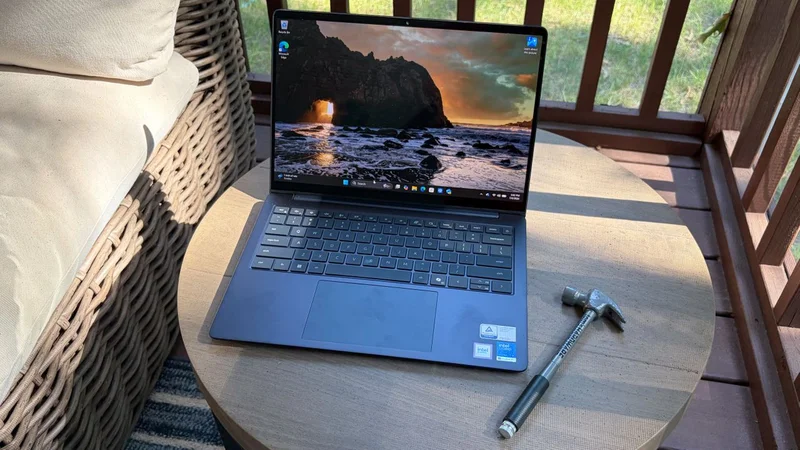
Although the 14S is a lower-priced alternative to the XPS 14, it doesn't skimp on features or build quality. Like the trendier XPS 14, the 14S features an aluminum chassis finished in celestial blue on our review unit. The keyboard deck, lid, and bottom of the chassis feature a matte finish, while the edges of the chassis and lid are highly polished.
The only hint of cost-cutting to my eyes is the use of a plastic bezel around the screen. However, I wouldn’t have even noticed the material difference if Dell hadn’t explicitly pointed it out. Build quality is impeccable, with no flex in the chassis and no floppiness in the firm display hinge.
While the XPS 14 goes for a minimalist approach on the port front with just three Thunderbolt 4 ports, the 14S gives you a lot more variety. You’ll find an HDMI 2.1 port, a USB-A 3.2 Gen 1 port, and two Thunderbolt 4 ports on the left side of the chassis. On the opposite side, there’s another USB-A 3.2 Gen 1 port and a 3.5 mm jack. There’s really nothing to complain about here, and it’s nice to see that we have both USB-A and USB-C support for legacy and newer devices alike.
Our 14S review unit features a 1200p OLED touchscreen, weighs 3.28 pounds, and measures 12.35 x 8.82 x 0.61 inches. For comparison, the XPS 14 is 12.19 x 8.26 x 0.58 inches and weighs just 3 pounds. The Asus ZenBook A16 measures 13.92 x 9.54 x 0.65 inches and weighs 2.87 pounds, while the Apple MacBook Air (M5) weighs 2.7 pounds and measures 11.97 x 8.46 x 0.44 inches.
Dell 14S (2026) Specifications
|
| Intel Core Ultra 7 355 |
|
| Intel Graphics (Integrated) |
|
| Up to 49 TOPS |
|
| 16GB LPDDR5x-7467 onboard |
|
| 512GB M.2 PCIe Gen 4 NVMe SSD |
|
| 14-inch, 1920 x 1200, OLED, 60 Hz, Multi-touch |
|
| Intel BE213 (Wi-Fi 7), Bluetooth 5.4 |
|
| 2x Thunderbolt 4, 2x USB-A, 1x HDMI 2.1, 3.5 mm headphone jack |
|
| 2MP RGB+IR |
|
| 70 WHr |
|
| 65W, USB Type-C |
|
| Windows 11 Home |
|
| 12.35 x 8.82 x 0.61 inches |
|
| 3.28 pounds (1.49 kg) |
|
| $1,469.99 |
Productivity Performance on the Dell 14S (2026)
The Dell 14S uses an Intel Core Ultra 7 355 processor, featuring 4 performance cores, 4 low-power efficient cores, and a maximum turbo frequency of 4.7 GHz. This is the same processor used in one of the XPS 14 models we tested. The Zenbook A16 uses a Snapdragon X2 Elite SoC, Qualcomm’s flagship Arm chip and an excellent all-around performer, while the MacBook Air uses Apple’s entry-level M5 Arm SoC.
Get Tom's Hardware's best news and in-depth reviews, straight to your inbox.
Our review unit came equipped with 16GB of LPDDR5x-7467 memory and a 512GB PCIe 4.0 SSD. 512GB is rather small at this price point, considering most laptops we test come with a 1TB SSD as the baseline.
In the Geekbench synthetic CPU benchmark, the 14S's single-core performance closely mirrored that of the XPS 14 featuring the same CPU, with the former achieving a score of 2,704 versus 2,685 for the latter. However, there was a significant discrepancy between the two in the multi-core benchmark, with the 14S hitting 11,064 compared to 7,964 for the XPS 14. The Zenbook A16 proved to be an exceptional performer with its Snapdragon X2 Elite processor, with 3,807 and 22,733 on the single-core and multi-core benchmarks, respectively.
The 512GB SSD on the 14S was relegated to the back of the pack in our 25GB file transfer test, finishing at an average speed of 1,378.71 MBps. This was well behind the XPS 14 (1,730 MBps) and the chart-topping MacBook Air (1,924 MBps)
It was a similar story on our Handbrake test, in which we transcode a 4K video file to 1080p. Here, the 14S finished the test in 7 minutes and 22 seconds, nearly 40 seconds behind the XPS 14. However, the Zenbook A16 absolutely smoked all of the laptops in this test, finishing in just 2 minutes and 8 seconds.
During the Cinebench 2026 stress test, the 14S started at just over 1,600, before dipping to 1,465. It then recovered to a peak of 1,735 before settling in the 1,550 to 1,650 range for the rest of the runs.
The Ultra 7 355 P-cores averaged 2.61 GHz, while the low-power E-cores averaged 2.45 GHz.
Graphics on the Dell 14S (2026)
The Dell 14S uses integrated Intel Graphics with 4 Xe cores. On the 3DMark Steel Nomad test, the 14S achieved a score of 505, which was just below that of the XPS 14 (532).
However, the Zenbook A16 once again flexed its muscle with a score of 1,262, while the MacBook Air came in at 1,005, nearly double the result of the 14S.
Display on the Dell 14S (2026)
Our 14S review unit came optioned with a 1920 x 1200 (FHD+) 60 Hz OLED touchscreen. This is a step up from the base system and features an FHD IPS display.
The display was overall quite colorful, with vivid colors and inky blanks; something that I’ve come to appreciate with OLED displays. I watched a few movie trailers, including the most recent trailer for The Odyssey and Spider-Man: Brand New Day. The trailer for Spider-Man looked especially brilliant, with the suit's iconic red and blue and the seismic destruction left by Hulk's Thunderclap.
My one complaint about the display is that it wasn’t particularly bright. Dell specs the OLED panel at 300 nits, and our lab instruments measured an average of just 269 nits. The displays on all of its competitors broke the 400-nit mark, with the XPS 14 hitting 466 nits.
As for color performance, the display on the 14S reached 84.5 percent of the DCI-P3 space by volume and 119.3 percent of the sRGB space. Those numbers were right on top of the numbers we recorded for the other three laptops in this test, with just a few percentage points separating them.
Keyboard and Touchpad on the Dell 14S (2026)
The Dell 14S features an island-style backlit keyboard with springy keys and near-silent actuation. The exception to this rule was the spacebar, which seemed to bottom out easily and rewarded me with a grating “clank” every time I pressed it with my thumb.
With that said, I used Keyhero.com to measure my typing speed, which was 87 words per minute with 97 percent accuracy.
Unlike the XPS 14, the 14S doesn’t feature a haptic trackpad (after all, cost-cutting has to come from somewhere). Instead, it features a top-hinged trackpad, meaning that “clicks” performed near the top of the surface, above the hinge, don’t register. You’ll need to keep your thumb near the bottom of the touchpad, where your thumb should naturally rest anyway if you’re using proper hand positioning.
Audio on the Dell 14S (2026)
The 14S uses dual 2-watt speakers, which sound reasonable enough. They’re not particularly powerful or worthy of high praise. I played the City of Angels soundtrack, culminating with the four heavenly instrumental tracks performed by Gabriel Yared.
While the strings sounded quite good, the angelic vocals that come in about a third of the way through in An Angel Falls sounded dull and lifeless. This was especially disappointing as the voices dropped into the lower registers. However, this is me being nitpicky about audio using one of my favorite albums of all time; for typical productivity-related tasks, the speakers on the 14S will do just fine. I didn’t find any third-party software to fine-tune the speakers.
Upgradeability of the Dell 14S (2026)
There are six screws (two of which are captive) that hold the Dell 14S' bottom panel in place. Once the screws are removed, the whole panel lifts off from the back.
There are two upgradeable pieces of hardware inside our review unit (besides the battery, which can be replaced): there’s an M.2 PCIe Intel BE213 Wi-Fi 7 card and a Kioxia 2230 PCIe 4.0 512GB SSD. While our unit had a 2230 SSD, the M.2 slot can accommodate up to 2280 modules.
Battery Life on the Dell 14S (2026)
One of the remarkable accomplishments of the XPS 14 that we previously tested was its battery life. The 14S also delivers on that front, lasting 20 hours and 41 minutes on our battery test, consisting of browsing the web, streaming video, and running OpenGL tests at 150 nits of brightness. This was just one minute shy of the XPS 14’s performance. Also, keep in mind that the 14S has an OLED display; our previous XPS 14 review unit used a non-touch IPS panel, so a similarly equipped 14S would likely post even better battery numbers.
For comparison, the MacBook Air, which has long been one of the reigning champs of battery life, could only muster 15 hours and 28 minutes of runtime. And the Zenbook A16, which was a performance monster in our productivity tests, couldn’t quite hit 10 hours and 30 minutes.
Heat on the Dell 14S (2026)
While running our Cinebench 2026 stress test on the 14S, we measured external surface temperatures and processor temperatures via its internal sensors.
The Core 7 Ultra 355 hit 106 degrees Fahrenheit on the keyboard between the G and H keys, around 82 F on the touchpad, and 108 F on the hottest point on the bottom. The processor measured 88 degrees Celsius.
One thing to note is that while the XPS 14 has two system fans, the 14S has just one.
Webcam on the Dell 14S (2026)
Dell's 14S uses an entry-level acceptable 2MP camera. It is by no means as clear or crisp as the 8MP unit in the more expensive XPS 14, but we weren't expecting that given its positioning. Color was quite good on the webcam, but the images were neither sharp nor grain-free. There was a lot of noise in the images, and details were quickly lost, as my facial hair looked a bit "muddy."
The camera also struggled with the overhead LED lights in my home office, causing blooming effects that marred the images.
Like many laptops, the 14S also incorporates an IR sensor for Windows Hello facial recognition.
Software and Warranty on the Dell 14S (2026)
The 14S is relatively light on included bloatware. Dell Optimizer and Dell Support Assist are installed by default. The former lets you optimize settings for the display, battery, and thermal management. The latter allows you to scan your system for issues, update software/firmware, optimize your network connection, and obtain assistance from customer service.
There are also the usual Intel utilities for graphics and security; however, I didn’t see the app shortcuts typically featured in a fresh Windows 11 installation (e.g., Dropbox, LinkedIn).
The 14S comes with one year of what Dell calls Basic Onsite Service. You can optionally add Accidental Damage Service (covering drops, spills, and power surges) for $59/year (currently on promotion for $29/year).
Dell 14S (2026) Configurations
The 14S is available with four processors (Core Ultra 5 322, Core Ultra 7 355, Core Ultra X7 358H, and Core Ultra 9 386H), Intel Graphics or Arc Graphics, 16GB or 32GB of memory, 512GB or 1TB SSD, and a 14-inch 1200p IPS or OLED display (in touch or non-touch options). You can also choose between Celestial Blue and Frost Blue for the chassis color when ordering directly from Dell.com.
The base configuration with a Core Ultra 5 322 processor, 16GB of RAM, a 512GB SSD, and a 14-inch non-touch IPS display costs $1,269.99. That is a very attractive entry point for the 14S, but options can quickly ratchet up the price. For example, a config with a Core Ultra 9 386H, Intel Graphics, 32GB of memory, a 512GB SSD, and a 14-inch touch OLED display retails for $2,019.99, while a Core Ultra X7 358H with Arc Graphics, 32GB of RAM, a 1TB SSD, and a 14-inch touch OLED display sells for $1,869.99. In the $1,800 to $2,000+ price range, you’d probably be better off going with an XPS 14.
Our review unit, featuring the Core Ultra 7 355, Intel Graphics, 16GB of RAM, 512GB SSD, and a 14-inch touch OLED display, landed about in the middle at $1,469.99.
Bottom Line
The Dell 14S attempts to mimic some of the perks of its flashier relative, the XPS 14, with a high-quality aluminum chassis, OLED display options, and stellar battery life (over 20 hours in our testing). It also adds in features you don’t get on the XPS 14, like an HDMI 2.1 port and USB-A ports.
However, you also give up a bit. You don’t get the quad speakers, 8MP webcam, Gorilla Glass screen cover, or the option for a 2.8K 120 Hz OLED touch screen.
If those features aren’t important to you, consider this: our 14S review unit retails for $1,469.99. An XPS 14 with the same processor, memory allotment, storage size, and a 14-inch 2.8K 120 Hz OLED display costs $2,249.99. That’s a nearly $800 upcharge. In the grand scheme of things, the 14S is definitely living up to its “mainstream” positioning in the Dell laptop family.
Brandon Hill is a senior editor at Tom's Hardware. He has written about PC and Mac tech since the late 1990s with bylines at AnandTech, DailyTech, and Hot Hardware. When he is not consuming copious amounts of tech news, he can be found enjoying the NC mountains or the beach with his wife and two sons.