Writing a (valid) C program without main()
Why C?
Most programming languages start execution from a main() function. Go has func main(), Java has public static void main(), and C has int main(). So why did I pick C for this tutorial?
C is the closest you can get to the operating system without writing assembly. The Linux kernel itself is written in C, and the system call interface that every program relies on is designed with C conventions in mind. When you learn how C programs are compiled, linked, and executed, you are learning how the Linux API actually works.
A typical C program starts with a main() function. But where does main() come from? The compiler? The linker? The operating system?
In this tutorial, you will walk through the entire C compilation pipeline. You will start with a normal hello world, watch the preprocessor expand a macro, watch the compiler turn C into assembly, and watch the assembler and linker turn assembly into a binary. Then you will remove main() from the picture and still produce a working executable.
The playground is a vanilla Ubuntu 24.04 machine with gcc, as, ld, and friends already installed.
Step 1: Hello World
Create a file named hello.c with the following content:
```
include
int main(void) {
printf("Hello, world!\n");
return 0;
}
```
Compile it and run it:
gcc hello.c -o hello
./hello
You should see the familiar greeting. Now ask yourself: how many separate tools ran when you typed that single gcc command?
Behind the scenes, gcc is a driver that runs several tools in sequence:
- Preprocessor(-
cpp) - handles-#include,-#define, and conditional compilation. - Compiler(-
cc1) - turns C source into assembly. - Assembler(-
as) - turns assembly into an object file. - Linker(-
collect2/-ld) - links object files and libraries into the final executable.
The rest of the tutorial visits each of these stages.
The four stages of the C compilation pipeline.
Step 2: The preprocessor
The preprocessor is a text processor. It does not understand C types or control flow; it only expands directives and macros. The -E flag tells gcc to stop after preprocessing.
Add a macro to hello.c so it looks like this:
```
include
define GREETING "Hello, preprocessed world!\n"
int main(void) {
printf("%s", GREETING);
return 0;
}
```
Run the preprocessor and read the expanded output:
gcc -E hello.c -o hello.i
Open hello.i and try to find the line where GREETING used to be. What happened to it? And why is the file so much larger than the original source?
Step 3: From C to assembly
The compiler turns C into assembly. The -S flag tells gcc to stop after that stage.
gcc -S hello.c -o hello.s
Open hello.s and look at the function labeled main. The exact instructions depend on the architecture, but on x86_64 you will see something like a function prologue, a call to printf, and a return.
To see how optimization changes the output, create a file named loop.c with this function:
int sum(int n) {
    int s = 0;
    for (int i = 0; i < n; i++) {
        s += i;
    }
    return s;
}
Generate three versions of the assembly:
gcc -O0 -S loop.c -o loop-O0.s
gcc -O2 -S loop.c -o loop-O2.s
gcc -Os -S loop.c -o loop-Os.s
Compare the files. With -O0, the compiler is literal: it keeps the loop, the counter, and the addition exactly as written. With -O2, the optimizer may unroll the loop, vectorize it, or even replace it with the closed-form formula n * (n - 1) / 2. With -Os, the optimizer tries to keep the code small while still being fast.
Optimization is not magic. It is the compiler applying a set of transformations to the intermediate representation of your program. The more information the compiler has, the more aggressively it can optimize.
Step 4: From assembly to object, from object to binary
The assembler turns the .s file into an object file, and the linker turns object files into an executable. You can drive these steps manually.
Assemble the hello-world assembly:
gcc -c hello.c -o hello.o
The -c flag tells gcc to stop after assembling. Inspect the object file:
nm hello.o
objdump -d hello.o
You will see the symbols main, printf, and perhaps references to the .rodata section. printf is an unresolved symbol because the object file does not contain the implementation of printf. The linker will resolve it from the C library.
Link the object file into a binary:
gcc hello.o -o hello
Now look at the dynamic dependencies:
ldd ./hello
You will see libc.so.6 and the dynamic loader. The C library is not the only thing the linker adds silently. It also adds startup code, usually from object files like crt1.o, crti.o, and crtn.o. The startup code sets up the environment, calls the constructors, and finally calls main().
The crt files are the C runtime startup files. crt1.o contains the _start entry point, which is what the kernel actually jumps to when the program starts. _start eventually calls main().
So here is the question: if _start is the real entry point, and _start is just a symbol the linker can satisfy, what happens if you provide your own _start and skip the startup files entirely?
Step 5: A C program without main()
5a: The obvious attempt
Create a file named my_entry.c with a custom function that calls printf:
```
include
void my_entry(void) {
printf("Hello from my_entry!\n");
}
```
Compile it to assembly without startup files:
gcc -nostartfiles -S my_entry.c -o my_entry.s
Look at my_entry.s. The compiler generated a normal-looking function with a my_entry: label and a call to printf (or puts, which is what gcc often substitutes for a simple format string).
Now append your own _start to the assembly file. This is the symbol the kernel will jump to when the program starts. Add a .text directive first so the new code goes into the executable section:
.text
.globl _start
_start:
    call my_entry
    movq $60, %rax
    xorq %rdi, %rdi
    syscall
The last three instructions invoke the x86_64 exit syscall directly. Syscall number 60 is exit, and the value in %rdi is the exit code. Setting %rdi to zero means the program exits successfully.
Link the object file without the C runtime:
gcc -nostartfiles my_entry.s -o no-main
./no-main
echo $?
It compiled. It linked. It even started. But it does not print anything.
Operating system architecture: Userspace application, libc, System Call Interface, Kernel, and Hardware.
Why? printf is part of glibc, and glibc needs to be initialized before it can be used. The initialization normally happens in the startup files that -nostartfiles removed. Without that setup, stdout is not ready, so printf silently does nothing.
5b: The pure version
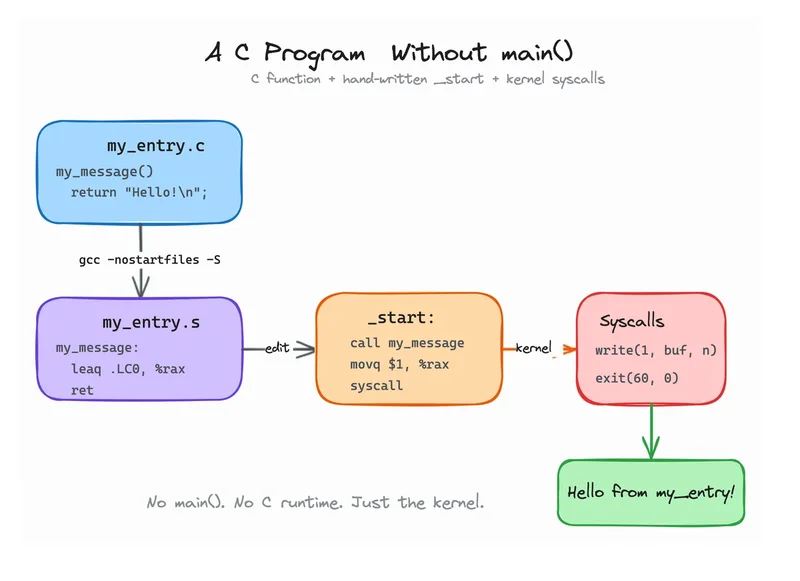
If we want a program with no main() and no startup code, we cannot rely on glibc. We have to talk to the kernel directly.
Rewrite my_entry.c so it only does work that does not touch libc. For example, it can just return a pointer to a message:
const char *my_message(void) {
    return "Hello from my_entry!\n";
}
Compile it again:
gcc -nostartfiles -S my_entry.c -o my_entry.s
Now append a _start that calls my_message, uses the raw write syscall to print the result, and then uses the raw exit syscall to stop:
.text
.globl _start
_start:
    call my_message
    movq %rax, %rsi          # buffer
    movq $21, %rdx           # length
    movq $1, %rdi            # stdout
    movq $1, %rax            # sys_write
    syscall
    movq $60, %rax           # sys_exit
    xorq %rdi, %rdi          # exit 0
    syscall
Link and run:
gcc -nostartfiles my_entry.s -o no-main
./no-main
echo $?
This time it should print the message and exit with code 0.
The pure no-main architecture: custom function, hand-written _start, and kernel syscalls.
You now have a binary that does not contain a main() function. It has no C library dependency, and it is a valid ELF executable that the kernel can load and run.
Conclusion
You have walked through the full C compilation pipeline:
gcc -Eshows what the preprocessor produces.gcc -Sshows what the compiler produces.gcc -cand-asshow what the assembler produces.ldshows what the linker produces.
You have also seen that main() is a convenience, not a requirement. The real entry point is _start, and the standard C runtime is the code that calls main(). If you provide your own _start and stop the process yourself, you can write a C program without main().
Want to drop the compiler altogether?
Now that you've bypassed main() and talked directly to the Linux kernel using raw assembly and system calls, take the next step. Drop the compiler abstraction entirely and gain full control over CPU registers, memory layouts, and instruction sets in the next tutorial:
You'll explore CPU architectures, compare CISC vs RISC, and write your first pure x86_64 assembly program from scratch.
About the Author
Writes about
Frequently covers