Google Health ruined my Pixel Watch — but this $170 alternative saved the day
Jul 28, 2026 — 5:00 AM ET
I’m a big fan of Google’s Pixel Watches. Although the first model didn’t really click with me, the Pixel Watch 2 made me a believer in Google-made smartwatches — and the Pixel Watch 3 is so good that I still use it to this very day, nearly two years after its release.
As such, it brings me no joy to say that the current Pixel Watch experience is a mess. Not necessarily because of anything to do with the watches themselves, but because of the overhauled Google Health app that was introduced in May.
The new Google Health experience is so frustrating that it’s made me actively dislike wearing the Pixel Watch. It got so bad, in fact, that I started going through my drawers of smartwatches to find something else to wear. And in doing so, I stumbled across a budget $170 Amazfit watch I completely forgot I had. After a couple of weeks with it, I’m not missing my Pixel Watch one bit.
Are you happy with your Pixel Watch experience in 2026?
Google Health was ruining my Pixel Watch
As I’m sure is the case for many of you reading this, health/fitness tracking is the primary reason I wear a smartwatch in the first place. Whether I’m tracking outdoor runs or strength training sessions at the gym, keeping tabs on my sleep, or ensuring vital health metrics are in order, all of that data is why I like wearing a tiny wrist computer.
While the Pixel Watch still tracks these things just fine, the problem is that viewing all of this information in the Google Health companion app is a nightmare.
One of the biggest reasons I can't stand Google Health is its over-reliance on AI summaries.
Complaints about Google Health aren’t anything new. My former colleague Rita said she hated Google Health after her first week with the app, and even after a couple of updates here and there, many of her original issues still hold true a couple of months later.
One of the biggest reasons I can’t stand Google Health is its over-reliance on AI summaries. This is supposed to be one of the big selling points of the revamped Google Health app, to the point that Google is charging $10/month for the privilege of having its AI provide feedback and insights into your health.
In reality, these AI summaries vary from useless to annoying. After completing a run, a four-paragraph AI overview of the workout took up the entire page just to tell me my total workout time, my cardio load during the run, and my max pace. The next morning, another full page of AI-generated writing showed me my sleep score, readiness score, and the previous day’s cardio load — most of which I could already see much more clearly in the health widgets at the top of the app.
There’s something to be said about the accuracy of these AI summaries (which is regularly off), but that’s not even my biggest issue with them. Fundamentally, this is just bad design and a horrible use of space. About 1/3 of the Google Health homepage is dedicated to glanceable, easy-to-read widgets. As you scroll down the page, all you see is AI summary after AI summary. The Fitness page makes it far too difficult to view past workouts, and while the Health tab has loads of widgets for your health data, it feels like a dumping ground for everything Google didn’t want to put on the homepage — but should have.
Every time I opened Google Health, I felt like I was constantly fighting with it just to view basic health or fitness data. And as someone who wants to see that data rather than long-winded AI-generated summaries, I couldn’t take it anymore.
Why I was immediately sold on Amazfit
Rather than continue to suffer through this, I went looking through the dozen or so smartwatch review units piling up in my office. And upon doing so, I stumbled across the Amazfit Active Max.
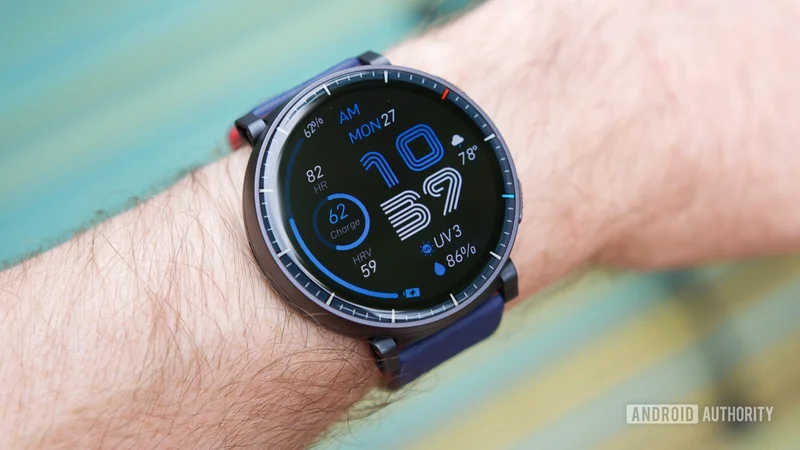
The Amazfit Active Max launched at the very end of 2025, and I got a review sample at CES this past January. The Active Max has been sitting unused in my office since then, and my experience with previous Amazfit watches has been pretty limited. But anything had to be better than what Google Health was putting me through. So, I took off my Pixel Watch 3, set up the Amazfit Active Max, and started using it as my daily smartwatch.
It’s been over two weeks since that happened, and almost immediately after setting up the Amazfit watch, there was one thing, in particular, that hooked me: the companion app. All Amazfit watches use the Zepp app to manage watch settings and to view your health/fitness data. And compared to Google Health, it’s a night-and-day difference.
The main Overview tab on the Zepp app’s homepage is the polar opposite of Google’s ham-fisted AI approach. At the top are your three primary goals, all of which can be customized (including two layout views to choose from). Below that are your Insights, which are very brief summaries of workouts, sleep, and more. They’re never more than a couple of sentences at most, and when you’re done reading an Insight, you can dismiss it with a single tap.
Compared to Google Health, the Zepp app is a night-and-day difference.
What’s going on with the rest of the homage? Whatever you want it to be. There are 16 widgets/tiles to choose from, and you can hide and rearrange these however you see fit.
My Zepp app shows my daily focus at the top, indicating if I should prioritize a strength or endurance workout. Below that is a list of core metrics I want to keep an eye on, all of which are also fully customizable. I then have additional widgets for my food tracking, recent activities, heart rate, and more.
The dedicated Workout page is just as good. It puts my workout history front and center, unlike Google Health, and all of the data on this page is completely customizable, too. Don’t care about the Zepp Coach feature? You can hide it. Want to see your training calendar higher up on the page? You can do that. Amazfit throws a lot of information and tools at you, then lets you decide which ones you want to interact with and how you want to view them.
And that’s exactly how apps like this should be. When I open my smartwatch’s companion app, I want to see the health data I care about — not what an AI decides is most important for me to see at any given time. I want to glance at raw numbers and graphs to quickly get an overview of my health. What I don’t want to do is read multiple paragraphs full of filler and fluff.
The Zepp app feels like a smartwatch app from four years ago, and I mean that in the best way possible. It’s not burdened with unhelpful AI slop. It’s just my health information front and center, laid out exactly how I want it. It’s perfect.
I’m not going back to my Pixel Watch
While a vastly more enjoyable companion app has been the biggest highlight of switching from the Pixel Watch to the Amazfit Active Max, that’s not the only reason I’ve enjoyed having Amazfit’s watch on my wrist.
The Active Max’s battery life is outstanding. I can easily go a week before needing a recharge, and that’s with regular workouts, using the always-on display, and receiving a ton of notifications. The watch’s software is snappy and easy to navigate, and it’s just as customizable as the companion app. And despite its large display, the Active Max is surprisingly comfortable to wear all day and even to bed at night.
I have no intention of taking off the Amazfit Active Max anytime soon.
Does the plastic design feel a bit cheap? Sure. Have I already scratched the mineral glass covering the 1.5-inch AMOLED panel? Unfortunately, yes. Do I wish there were a rotating bezel or crown of some sort? Absolutely. The Amazfit Active Max is not a perfect smartwatch, but for $170, I wasn’t expecting it to be. In fact, I was expecting to dabble with the Active Max for a week at most and promptly switch to something else — maybe right back to my Pixel Watch.
Instead, I have no intention of taking off the Amazfit Active Max anytime soon. In a world where Google Health is in the state it’s in, and the Samsung Health redesign is a bit of a mess too, I think Amazfit watches find themselves in a really interesting position.
I’m certainly glad I gave Amazfit a shot, and if you’re equally fed up with your Pixel Watch/Google Health experience, I’d encourage you to do the same. I think you’ll like what you find.