I have been using Android for more than a decade, but I was never as enthusiastic about custom launchers as my friends.
I was indifferent because I kept believing that launchers were only meant to beautify the home screen.
I changed my stance after trying the Niagara launcher on my phone. It showed me that a launcher app can help users become more productive on Android and be less focused on customization.
Switching to Niagara changed my perspective on launcher apps, and it finally pushed me to replace my default home screen with more such apps. I tried one called Smart Launcher, and I liked it.
I didn't settle on either of the two and kept hunting for more launcher apps that focus more on productivity than customization. After days of scouting, I am relieved that I've found the one I was looking for.
I ditched my custom Android launcher for this productivity-first alternative called Minimalist Launcher–Flow.
Minimalist Launcher–Flow has a unique approach to helping you stay focused
It keeps distractions away without trying too hard
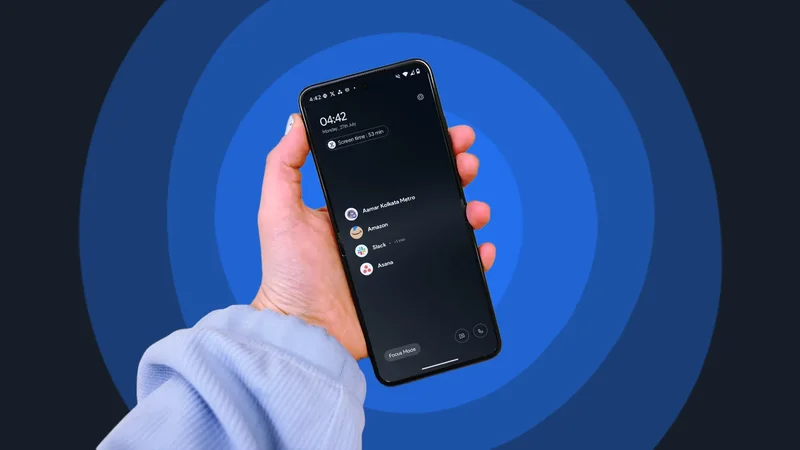
I've never seen an Android launcher showing a home screen that has a black background, with mention of my screen time. It also shows a Focus Mode button, which allows you to block distractions for a specified time.
The minimum is 15 minutes, and two hours is the maximum you can set. During this session, your notifications are blocked, and you only have access to the Phone, Messages, and Clock apps.
If you have a Samsung Galaxy or Motorola phone with Sidebar enabled, it prevents you from opening the panel.
The focus mode screen also shows a countdown clock, so you know exactly how much time is left until the end of the focus session.
It also has a feature called Digital Detox, allowing you to block the use of certain apps during a specific time period of the day.
Sure, you can do pretty much all of this without installing the launcher on your phone, but the real USP of this app is how easily accessible it makes them without trying anything fancy.
The Minimalist Launcher has a boring home screen
It doesn't compromise on convenience
This is probably the most boring home screen I've ever used, but the lack of visual excitement is what makes the minimalism so effective.
The launcher has the power to make any phone into a non-nonsense device, without trying hard.
I haven't kept the black background empty. Instead, I added seven apps that I use almost every day to my home screen. These apps appear in a vertical list, much like Niagara.
To access all apps, you'll swipe up from anywhere on the screen. To go back to the home screen, swipe from either edge of the screen.
The apps on your home screen also show how much time you have spent on each app, making you more aware of your app habits.
I was shocked to discover that I had spent two hours on Instagram by last night. Who knows how many days had gone by without me realizing my excessive Instagram usage.
Unlike Niagara, in the Minimalist Launcher–Flow, you can swipe horizontally to access what the launcher calls My Feed. I like it this way.
Instead of extreme minimalism, the My Feed page tries to make the launcher feel more practical. By default, it shows Screen Time, tasks, and Calendar events. On top of these, you can add widgets to this My Feed page.
Minimalist Launcher–Flow also offers advanced customization tools
But not everyone will be able to use them
The developer of the launcher calls it a "Productivity Launcher" on the Google Play Store. After testing it for weeks, I would call the launcher the same way for all its handy productivity features.
However, this doesn't mean the app is completely out of touch with what draws most people to custom launchers: customization.
The Minimalist Launcher–Flow app packs some seriously powerful customization tools that can make your home screen look beautiful.
For example, you can go to its Settings and apply custom icon packs. It also has the option to change the shape of the icons and track your habits. You can also get colorful wallpapers to customize your home screen.
However, these features don't come for free, unlike its productivity features. Most of its customization tools are behind a paywall, so you'll pay a monthly or one-time fee to access all its features.
I didn't expect to enjoy such a boring home screen
If I jumped straight to the Minimalist Launcher–Flow from the One UI Home, I wouldn't have liked the home screen at all, as the differences between the two are huge.
The Minimalist Launcher takes a very radical approach to minimalism, and I wasn't ready for it. So, what changed?
I'm now more accustomed to vertical layouts than the traditional app grids, thanks to months of using Niagara as my default launcher.
That's the only way I can explain my affinity for a launcher that doesn't let users set a decent wallpaper without paying for a Premium subscription.
I'm glad that this played out well. If it hadn't, I would've quit on the first day after installing the Minimalist Launcher–Flow.