State of multi-player Wayland
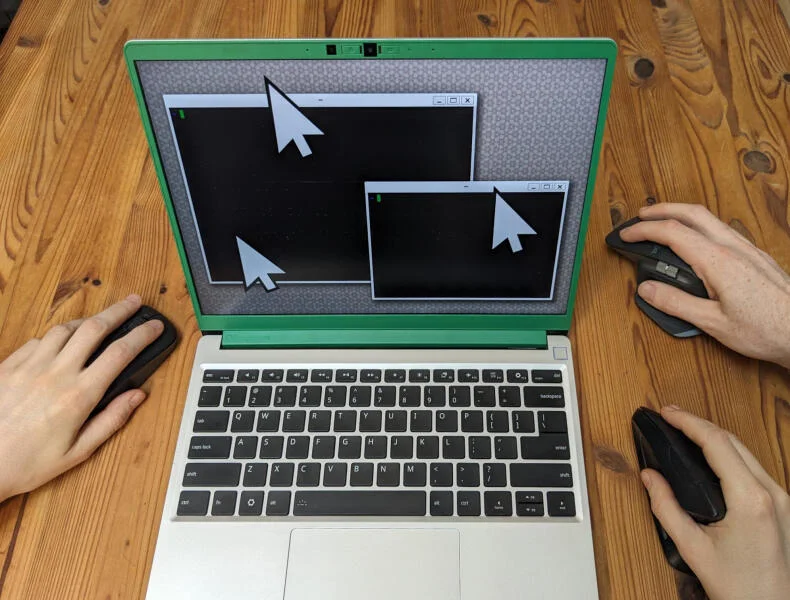
Iâve been fascinated by the idea of attaching multiple mice to one computer, and then having multiple mouse cursors inside of one desktop environment!
I just spent three weeks investigating how well thatâs currently supported on Linux & Wayland. Let me tell you what I found! The results are surprisingly cool.
Together with this blog post, Iâm publishing a number of little tools and patched libraries that add or improve âmulti-seatâ support. But many pieces in this puzzle are still incomplete or missing. I marked some âopen projects ideasâ with a ð emoji throughout the blog post. By publishing this post, I hope to find people who are interested in exploring and expanding this space together. If thatâs you, reach out!
(Yes, my default mouse cursor is a turtle.)
Why would you even want this?
I admit that this is a somewhat esoteric way of using computers. But hear me out:
- Itâs convenient for pair programming: One person can fix a bug in one window, while the other browses the documentation!
- Itâs fun for games! Using multiple controllers is the norm, why not multiple mice?
- This style of multi-player computing facilitates collaboration inside of applications very naturally, without the need for complicated synchronization algorithms.
Summary
Hereâs an overview of how well âmulti-seatâ is currently supported in various software:
| Core waylandprotocol | 5Â â â â â â Â Â | Deeply integrated! |
| Weston | 3Â â â â ââ | No easy way to dynamically reconfigure seats. |
| sway | 4Â â â â â â | Canât detach devices from seats (#3491). |
| niri | 1Â â ââââ | No support yet (#3159). |
| River | 4Â â â â â â | No support for ext-transient-seat-v1(#1497). |
| GTK | 4Â â â â â â | New seats are not registered while app is running. |
| SDL | 3Â â â â ââ | No seat information in absolute mouse mode (#16027), seat information only via device name. |
| wayvnc | 5 â â â â â | Supports ext-transient-seat-v1. |
Table of contents
Terminology
Iâm going to use the term âseatâ a lot in this post. It describes input devices that are grouped together, to be used by the same person. For example, you could have two people in front of one computer, and each one has their own mouse and their own keyboard. In this setup, there would be two âseatsâ, and every seat has one mouse and one keyboard:
- seat0
- Laptop touchpad
-
Laptop keyboard
-
seat1
- External mouse
- External keyboard
Careful though â people use this term in two different ways:
Logical seats
The type of seat Iâm interested in is sometimes called a âlogical seatâ.
This is where multiple people are in front of one computer, and each have their own mouse/keyboard, but they control the same desktop environment.
As in, the desktop shows multiple mouse cursors!
The people can âhand overâ windows to each other, draw together into a whiteboard application, or directly collaborate within the same software.
(Not that all of these things would be possible right now, but, you know, conceptually!)
I think there could be a term thatâs describing this concept even better â in the title of this post, I picked âmulti-playerâ, to make clear that itâs mostly about multiple people who are collaborating.
Iâve also seen âmulti-cursorâ or âmulti-pointerâ (which are missing the keyboard component).
Physical seat
The term âseatâ can also mean something else, which is called a âphysical seatâ:
This refers to setups where there are multiple people who all have their own independent setup: A screen, a keyboard, a mouse.
They donât really interact with each other, but the input and output devices are connected to a single computer.
This is what Wikipedia is referring to in the Multiseat configuration article.
But this is not what this post is about.
If you know more about the current state of support on Linux, Iâd encourage you to write your own blog post on it!
Overview
I only investigated the situation on Linux, and specifically on Wayland (a modern graphical display system). X11 (the X Window System) has its own multi-seat extension called Multi-Pointer X (MPX), which I also had a lot of fun with a couple of years ago.
But at this point, Iâve moved on to Wayland compositors in my everyday computer usage.
And it turns out that Wayland has great built-in support for multiple seats!
Iâll talk about how to set up a multi-user system, what Wayland protocols are involved, and finally, what the current application support looks like.
The tricky thing is that multi-seat support has to be present at every layer:
- The Wayland compositor (which usually contains the window manager).
- The
waylandprotocol. - The GUI library used by the graphical application.
- The graphical program itself.
Optionally, if you want to allow people to collaborate with you remotely, the program you use to allow them to connect (like a VNC server) requires multi-seat support, as well. Iâll later show how to set this up!
So weâre going to look at all of those layers, starting with the wayland protocol itself.
The wayland protocol
This rabbit hole was the first time I looked deeper in what Wayland actually is!
At its heart, itâs a collection of protocols.
I was really happy to find that the core wayland protocol (that graphical programs and the Wayland compositor use to talk to each other) has deeply integrated multi-seat support:
Every input event is connected to a wl_pointer or wl_keyboard, which in turn are connected to a wl_seat.
You can then use this information about the seats to âgroupâ input events together!
There are also events that are triggered when seats appear/disappear.
Wayland Compositors
But how well do compositors (the programs that manage the windows and draw their contents) use these concepts to speak with the client applications? I tried some:
Weston
Weston used to be the reference implementation of a Wayland compositor, and is being maintained by the Wayland team at freedesktop.org.
It was the first compositor I realized had real multi-seat support! You can have multiple mouse cursors, and each one can move around windows, independently from each other!
Weston also implements per-seat window focus, which means that if a seat has a mouse and a keyboard, the mouse can focus a window, and the keyboard will hen send its keystrokes to it â and different seats can focus different windows at the same time.
There are some fun edge cases that I found playing around with this:
- Once a cursor starts to resize/move a window, those actions are not possible for the other one.
- One cursor can open a menu, and the other one can use it, that one works pretty well!
- Closing a window with one cursor, while the other drags it, makes the second cursor disappear! :D
These are really hard (and fun) UI questions to solve! Often, itâs not clear to me what the correct behavior should be!
How to set up multiple seats on Weston
Setting up seats on Weston is quite involved. Later compositors will make it much easier!
To separate input devices into multiple seats, you need to use udev rules to set the ENV{WL_SEAT} property.
Assign the same seat name to a mouse and a keyboard to make them work together!
The default seat is âdefaultâ.
Detailed instructions:
- Use
sudo libinput list-devicesto find the device file of your input device (like â/dev/input/event12â) - Use
udevadm info -a /dev/input/event12to find the parent device with a catchyATTRS{name}. -
Create a file
/run/udev/rules.d/00-multiseat.ruleslike this:ATTRS{name}=="Name of your mouse" ENV{WL_SEAT}="second"(Note that thereâs two=characters for testing, but a single=character for assigning.) - Run
sudo udevadm triggerto apply the new rules.
Now check sudo libinput list-devices again.
The deviceâs âSeatâ should now say âseat0, secondâ!
sway
sway is the Wayland reimplementation of i3.
Support for multiple seats was added to wlroots in version 0.1 (released in 2017),
and subsequently added to sway 1.0.
sway also has excellent multi-seat support, including per-seat window focus!
How to set up multiple seats on sway
You can list all inputs using swaymsg -t get_inputs
and list all seats using swaymsg -t get_seats.
Then, use swaymsg seat <name> assign <input_identifier> to assign an input device to a specific seat.
The seat will be created if it didnât exist before.
Right now, this seat management has a surprising property: If you assign a device to one seat, and then to another, instead of replacing that seat assignment, it will add it.
That means that you will then have two mouse pointers being controlled by a single mouse!
ð Thereâs an open issue to discuss solutions for that, and I made a patch to fix this issue for myself.
If youâre running that patch, you can use my multi-seat-configurator tool to quickly assign input devices to seats using a TUI!
I havenât tried other wlroots compositors yet, if you have experience with them, please tell me about it!
River
River is a non-monolithic Wayland compositor that provides the compositor part, and allows you to write your own window manager! I think itâs a very cool idea.
The multi-seat capabilities are pretty good, itâs pretty much baked into everything.
River also has its own river-input-management-v1 protocol that can notify you when new input devices become available, create/destroy seats, and assign devices to seats.
I wrote a little Rust tool (river-multi-seat-configurator that uses this protocol to assign devices to seats on demand.
I only tried the tinyrwm example window managers for River, which even somewhat support per-seat window focus!
ð It would be a fun project to write a new window manager for River with first-class multi-seat support! Window focus could be highlighted with multiple colors; edge cases of interacting with the windows could be handled in a reasonable way; and there could be per-seat clipboards?
niri
niri is my Wayland compositor of choice these days. <3 Last year, multi-seat support was requested, but the lack of application support was quoted as a reason not to add it.
I think it would be great.
Some months ago, I hacked in some multi-seat support, see the multi-seat branch of my fork here.
ð Currently, my âhacked versionâ only supports two seats, and there are some hardcoded device names in the code. Adding a proper âseat managerâ would be the next step.
Graphics libraries
GTK
To my surprise, the GUI toolkit GTK seems to have great support for multi-seats, conceptually!
Events have a get_seat method, which directly tell you which Seat an event belongs to.
There doesnât seem a way to get the seatâs name, but you can compare them to tell whether theyâre different, which seems good enough.
Iâve only tested this on GTK4, but the types and methods seem to have existed in GTK3, as well.
Most GTK widgets donât really respect multi-seat input, and mostly act as if all inputs would come from the same device. But I wrote an experimental MultiSeatText widget in Rust, see below!
ð A bug I noticed is that while GTK notifies you when seats are removed, it doesnât seem to notice when seats are added. Thus, for devices in a seat to do anything, they must already be attached before the program launches. This bug should be reproduced, reported, and fixed!
SDL
The Simple DirectMedia Layer supports some multi-seat features since v3.3.4 (released in 2025).
When you try this, make sure to set the SDL_VIDEODRIVER environment variable to wayland.
SDL seems to fall back to XWayland otherwise in my tests.
Events like SDL_MouseButtonEvent or SDL_KeyboardEvent have a which field, thatâs different if the events come from different seats.
You can also tell when devices are plugged in or out from SDL_MouseDeviceEvent and SDL_KeyboardDeviceEvent, which carry the same which field.
The device IDs are arbitrary unique IDs that are not reused when plugging devices out and back in.
To learn which seats the devices belong to, you can use the SDL_GetMouseNameForID and SDL_GetKeyboardNameForID functions.
They will report names like âVirtual core pointer (default)â or âVirtual core keyboard (second)â, for example, where the part in the parentheses is the name of the seat.
ð Thereâs a caveat: The which field in mouse events will be forced to 0 when the mouse is in the (default) absolute mode.
You have to activate relative mode in order to get which fields with actual device IDs.
I opened this issue to find out why that is, and the answer was âfor consistency, to match the behavior on other platformsâ.
The patch to also get the which field in absolute mouse mode is simple: Just comment out all lines that say mouseID = SDL_GLOBAL_MOUSE_ID; in src/events/SDL_mouse.c.
Hereâs a snippet of Nix code that you can use to make a patched version of this yourself (if this seems confusing, feel free to email me, and Iâll help/expand this!):
pkgs.sdl3.overrideAttrs (old: {
  postPatch = ''
    substituteInPlace src/events/SDL_mouse.c --replace-fail "mouseID = SDL_GLOBAL_MOUSE_ID;" "//mouseID = SDL_GLOBAL_MOUSE_ID;"
  '';
});
LÃVE
Iâm a big fan of the LÃVE 2D game engine, and I wanted to make some multi-seat games with it.
LÃVE is based on SDL, so I made a patched version of LÃVE where the which field is forwarded to the event callbacks in Lua!
My repo contains a Nix flake that also bundles my patches to SDL.
You can try it by installing Nix and running nix run github:blinry/love/multi-seat (it will need to compile both SDL as well as LÃVE).
You can find an example of a game made with this further down in this post!
Qt and others?
ð I havenât investigated any other GUI frameworks yet! If you know something about them, please let me know!
Applications
Iâm not aware of any existing end-user applications that make use of multiple seats at the moment.
For X11, there was Gromit-MPX, a screen annotation tool, but it doesnât seem to support native Wayland.
So I wrote a couple of prototypes myself! What fascinates me about multi-seat applications is how they very naturally facilitate collaboration, without the need for algorithms like CRDTs or Operational Transform.
Multi-seat GTK text widget
This is a rough prototype for a multi-seat aware text widget written with Rustâs GTK bindings. You can click multiple cursors by clicking, and text input from that seat will then be inserted at that cursor position. You can also press the arrow keys to navigate.
ð This widget is missing a lot of features: Proper Unicode support, text selections, or being able to press the down arrow key. :P
LÃVE physics playground
I wrote this using my patched SDL and my patched LÃVE game engine: All mouse cursors can pick up blocks and move them around. Multiple cursors can also grab the same block, and carry it together. Lots of fun!
Terminal emulators
In my testing, the Kitty terminal emulator only ever reacts to inputs coming from the first seat, and ignores input from all others.
Alacritty, on the other hand, accepts inputs from all seats.
ð For collaboration sessions, it would be great to fix Kitty to accept input from any seat.
Thereâs an open issue about that here.
It looks like it those changes would need to go in its glfw/wl_init.c file.
Browsers
In Firefox, I observed the same issue I had in any GTK application: It only reacts to events from seats that have existed when the application started. But if you start Firefox after setting up the seats, you can browse the Web together pretty well! Things like selections still act as if all events are coming from one input device, same as web-based whiteboards.
Chromium doesnât seem to react to events from additional seats at all.
ð What would a browser with excellent multi-seat support look like? Would it go into split-screen as soon as the people want to navigate in different directions? :D Could we fork a simple browser to make a prototype
VNC setup
Attaching multiple mice/keyboards to one computer is cool, but sometimes, the person youâd like to collaborate with is in another place. So, a way of allowing them to join your computer remotely would be nice.
Iâve figured out a way to do this, and want to share the setup here.
wayvnc
wayvnc is a VNC server for Wayland.
Since v0.8.0 (released in 2024), it has a very useful feature:
It can create a new seat for each incoming connection, so that joining people get their own virtual mouse and keyboard device.
You can activate this feature using the command line flag -t / --transient-seat.
This is using the ext-transient-seat-v1 protocol, which is implemented by sway.
ð Iâd love to see this protocol also be supported by River! I opened an issue about it, and Isaac thought it was in scope to add it!
Iâd also recommend the flag -r / --render-cursor, so that all mouse cursors are rendered into output streams as overlays.
If you donât specify this flag, joining people will (at most) see their own mouse cursor.
Browser-based VNC client
To allow people to join your VNC server quickly, Iâve been using novnc.
Hereâs a summary of how to do use these tools together:
-
Create a configuration file at
~/.config/wayvnc/configthat contains:enable_auth=true username=<username> password=<password> relax_encryption=trueTherelax_encryptionsetting will apparently enableRFB_SECURITY_TYPE_APPLE_DH(1, 2), which, as I understand it, enforces authentication via username and password, but doesnât have transport encryption. I wasnât able to connect to it withnovncusing the default security types. Not having transport encryption seems fine however, as the traffic going through the Internet will be handled bynovncin a later step. - Run
wayvnc --transient-seat --render-cursor --verboseto start the VNC server. - Create a self-signed certificate by running
openssl req -new -x509 -days 3650 -nodes -out self.pem -keyout self.pem -nodes -subj "/C=XX/ST=StateName/L=CityName/O=CompanyName/OU=CompanySectionName/CN=CommonNameOrHostname". - Run
novnc --listen 8080 --ssl-only --cert "path/to/self.pem" --file-onlyto start both a forwarder from regular VNC to WebSockets, as well as the web VNC client. - Set up your home router to forward the port 8080 to your local machine.
- People should now be able to visit
https://<your-home-ip-address>:8080/vnc.htmlfor a web frontend, and use the username and password from above to connect to you. They will get a âself-signed certificateâ warning.
(You could also use proper certificates, and use a DynDNS service to point a domain at your machine, but thatâs out of scope of this blog post.)
ð This is obviously not a great solution, and VNC in general feels like ancient technology. Itâs what works for me right now. But integrating this with more modern streaming approaches like Sunshine might be worth it?
Closing thoughts
Overall, Iâm pretty pleased that sway has such good multi-seat support out of the box, and that you can just use wayvncâs âtransient seatsâ feature to invite remote people into that setup!
Even just using different windows in parallel is quite fun!
The âlowest hanging fruitâ in this space is writing some applications that make use of multiple seats, I think. I had a lot of fun writing multi-seat games in LÃVE, for example!
If any of the ð open problems on this page speak to you, Iâd be super excited if youâd take them on. Happy hacking!
Finally: I worked on this project while attending the Recurse Center, a programming retreat where I could allow myself to go deep on investigations like these, while being surrounded by creative and supportive peers. If you enjoyed this blog post, chances are that youâd like it there. Consider applying!
Thanks to
Raf,
Sophia,
Reed,
Jahan,
Emanuel,
Jared,
Winston,
Dave,
and piko
for helping me with this project in many different ways! It wouldnât exist without you.