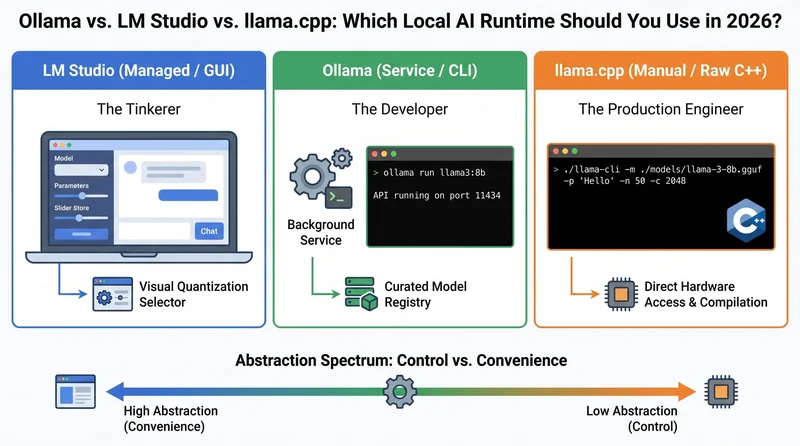
In this article, you will learn how Ollama, LM Studio, and llama.cpp differ across the dimensions that matter most to practitioners, and how to choose the right one for your workflow.
Topics we will cover include:
- How the three runtimes compare across five key axes: interface, API compatibility, quantization control, model discovery, and update cadence.
- How to match your working style to the right tool using three practitioner personas.
- The natural progression most practitioners follow as their needs grow more demanding.
Introduction
In our Introduction to Small Language Models, we covered why local, small-footprint AI is changing the development stack. We followed that up with a look at the most capable hardware-friendly models in our Top 7 Small Language Models You Can Run on a Laptop. Then we walked through the fastest way to get inference running locally in Run a Local AI Model in 15 Minutes: Your First Ollama Setup.
By now, you probably have a 3B or 8B parameter model running quietly in your terminal. Spend enough time in the local AI ecosystem, though, and you’ll notice Ollama isn’t the only option competing for your hard drive. Three tools dominate the local AI runtime landscape: Ollama, LM Studio, and llama.cpp.
Choosing between them can feel like guesswork, but all three are running the same core inference engine under the hood. What actually differs is developer experience, abstraction level, and how much control you want over the process. To make that concrete, let’s start by looking at each tool doing the exact same job.
The Code Contrast: One Task, Three Abstractions
The fastest way to understand how these tools differ in philosophy is to see them side by side. Here’s the exact same task — asking a local Llama 3.2 model to say “Hello” — across all three runtimes.
| 1 2 3 4 5 6 7 8 9 10 11 12 13 14 | # --------------------------------------------------------------- # The Same Task: Asking a local Llama 3.2 3B model to say "Hello" # --------------------------------------------------------------- # 1. LM Studio (Assuming the GUI is open and the local server is toggled ON) curl http://localhost:1234/v1/chat/completions \ -H "Content-Type: application/json" \ -d '{"model": "llama-3.2-3b", "messages": [{"role": "user", "content": "Hello"}]}' # 2. Ollama (Via its dedicated, background-daemon CLI) ollama run llama3.2 "Hello" # 3. llama.cpp (Via the raw, compiled C++ binary in your terminal) ./llama-cli -m ./models/llama-3.2-3b-q4_k_m.gguf -p "Hello" -n 50 -c 2048 -ngl 33 |
Notice the progression. LM Studio wraps everything in a graphical interface and exposes a friendly API endpoint. Ollama tucks the complex parameters behind a single CLI command. And llama.cpp puts everything on the table: model file path, token prediction limit (-n), context window size (-c), and how many neural network layers to offload to your GPU (-ngl), all of which you define explicitly.
That spectrum from “managed” to “manual” runs through every dimension of how these tools work. Let’s break each one down.
The 5 Axes of Practitioner Comparison
Marketing bullet points don’t tell you much about how a tool actually feels when you’re deep in a development cycle. Here’s how the three runtimes compare across the dimensions practitioners actually notice.
1. GUI vs. CLI (The Interface Layer)
- LM Studiois a full desktop application built on Electron/React. It includes a ChatGPT-style chat interface, a visual model browser, and sliders for adjusting inference parameters.
- Ollamaruns as a silent background service. You interact with it through the command line or HTTP requests. It’s designed to stay out of your way.
- llama.cppis a raw CLI. There’s no background service unless you explicitly compile and run the-
llama-serverbinary, and every action requires typing out execution flags by hand.
2. OpenAI API Compatibility (The Integration Layer)
The interface layer matters for day-to-day use, but the integration layer determines whether a tool fits into your existing codebase. When you’re building applications, you want local models to drop in as a replacement for OpenAI’s cloud API without rewriting your existing logic.
- Both Ollama(port 11434) andLM Studio(port 1234) expose
/v1/chat/completionsendpoints out of the box. Change the base URL in your Python or Node.js SDK and your app thinks it’s talking to GPT-4. - llama.cppalso provides an OpenAI-compatible server, but getting it running requires manual shell scripting and a solid grasp of the available parameters.
3. Quantization Control (The Hardware Layer)
Once you’ve sorted out how you’ll connect to the model, the next question is how well it fits on your machine. Quantization shrinks large models to laptop-friendly sizes by reducing the precision of their internal weights, and the three runtimes handle this very differently.
- Ollamamanages quantization for you. Pull a model and it defaults to a well-tuned 4-bit quantization. If you want something different, you append a specific tag via the CLI (e.g.-
:8b-instruct-q8_0). - LM Studiostands out here: it shows a visual list of every available quantization for a given model, with a color-coded indicator telling you whether it’ll fit in your RAM before you commit to the download.
- llama.cppgives you full control. You download the exact-
.gguffile you want, and you have access to the underlying Python scripts to quantize raw PyTorch tensors into custom formats yourself.
4. Model Library Breadth (The Discovery Layer)
Control over quantization is only useful if you can find the models you want to run. Here’s how each tool handles discovery.
- Ollamamaintains a curated central registry, similar in feel to Docker Hub. It’s clean and reliable, but it can lag a few days behind major model releases.
- LM Studiohas a built-in Hugging Face search bar. You get access to thousands of community models, fine-tunes, and experimental variants the moment they go live.
- llama.cppdoesn’t care about registries. If the-
.gguffile is on your hard drive, it’ll run.
5. Update Cadence (The Bleeding Edge)
The discovery question connects naturally to a final, often-overlooked dimension: how quickly does each tool keep pace with the rapidly moving model landscape?
Because llama.cpp is the foundational open-source engine powering both other tools, it picks up updates, bug fixes, and support for new model architectures on a daily basis. Ollama folds in those upstream changes on a weekly or biweekly release cycle. LM Studio, being a full GUI application, generally ships updates on a slower monthly cadence.
Summary Comparison
With those five axes in mind, here’s the full picture at a glance.
| Feature / Axis | LM Studio | Ollama | llama.cpp |
|---|---|---|---|
| Primary Interface | Desktop GUI | CLI / Background Daemon | Raw CLI / Compiled Binary |
| OpenAI API Support | Yes (Port 1234, GUI Toggle) | Yes (Port 11434, Always On) | Yes (Requires llama-server) |
| Quantization Control | Visual Selection & RAM Estimator | Tag-based (Defaults to Q4) | Manual File Handling & Creation |
| Model Discovery | Built-in Hugging Face Search | Curated Docker-style Registry | Bring Your Own File (.gguf) |
| Update Frequency | Monthly (GUI Release Cycle) | Weekly (Fast Follower) | Daily (The Bleeding Edge) |
| Best For | Prototyping, Chatting, Tinkering | App Development, Automation | Total Control, Production Serving |
Persona Matching: Which One Are You?
A feature table tells you what each tool can do. What it can’t tell you is which one fits how you actually work. Find yourself in one of the personas below and you’ll have your answer.
The Tinkerer (Pick LM Studio)
You read an AI research paper, want to immediately download the model they mentioned, and see how it performs. You like visual feedback, want to adjust system prompts in a clean text box, and want to know how much VRAM a model will use before committing to the download. You treat local AI like a high-end desktop application.
The Developer (Pick Ollama)
You’re not here for chat interfaces. You’re building Retrieval-Augmented Generation (RAG) pipelines, wiring up autonomous agents, or automating workflows. You want a reliable API endpoint that starts with your computer, runs quietly in the background, and plugs cleanly into frameworks like LangChain or LlamaIndex. You treat local AI like a persistent database service.
The Production Engineer (Pick llama.cpp)
You’re squeezing every last drop of performance from your hardware. You need continuous batching to serve 20 concurrent users, want to apply custom LoRA (Low-Rank Adaptation) weights on the fly, and are comfortable compiling C++ from the terminal for a 5% speed gain. You treat local AI as raw infrastructure.
The Migration Path
If none of those personas felt like a perfect fit, don’t worry. Most practitioners don’t stay in one category forever. There’s a well-worn progression in the local AI community that maps almost exactly to the three tools covered here: LM Studio → Ollama → llama.cpp.
Most people start with LM Studio. The visual feedback is reassuring, and it proves your hardware can actually run real AI before you commit to anything more complex.
Signs you’ve outgrown LM Studio: You keep minimizing the GUI just to keep the local server running while you write code. You want to run models inside a Docker container, or you need to deploy on a headless Linux VPS with no monitor attached.
That’s when Ollama becomes your daily driver. It’s fast, stable, easy to script, and stays out of your way.
Signs you’ve outgrown Ollama: You’ve picked up a 24GB VRAM GPU and Ollama’s default memory allocation isn’t using it well. A new experimental model architecture just dropped on Hugging Face and Ollama’s registry hasn’t caught up yet. You need fine-grained control over how the Key-Value (KV) cache behaves when processing long documents.
At that point, you move to llama.cpp: compile the binaries yourself, drop the abstractions, and work directly with your hardware.
There’s no wrong choice here, and no pressure to rush the progression. Pick the tool that matches where you are now, build something real with it, and move down the stack only when the abstraction starts getting in your way. Since all three tools share the same inference engine underneath, nothing is wasted when you do make the jump. The knowledge transfers cleanly.