In less than two years, the entire market for PC hardware has erupted into a high-priced inferno. Catastrophic might seem hyperbolic, but if you’re trying to build or buy a PC, the impact of the AI boom on prices has been immense, with costs consistently bolting upwards. Buying RAM, SSDs, traditional hard drives, and graphics cards, along with the PCs and laptops that require them, is now significantly more expensive than it was in 2024 and 2025, which makes finding a great deal an almost essential part of the process.
That’s easier said than done, of course. Like Sasquatch or the Loch Ness monster, a truly great deal on PC hardware can feel like an impossible myth. As somebody who spends their days looking for deals, however, I can say that’s not the case. There are plenty of good deals out there each week, if you know where to look and what to avoid. Here are some of the places you should be checking to find the gear you need at a better price.
Bundles, bundles, and more bundles
Why you can trust Tom's Hardware
A component bundle isn’t a new concept; we’ve seen retailers offer combo deals that throw together various bits you’ll need to build a PC for years. Newegg’s bundle deals, however, have been a lifeline for PC builders over the last few months. If you’ve been a regular Tom’s Hardware reader, you’ll have seen a fair few of them yourself.
There’s a good reason why: value for money. Newegg’s RAM bundles, while not universally good value, allow buyers to pick up RAM at an effective cost that is significantly lower than buying it separately in many cases. While the RAM deals have been among our favorites lately, Newegg also combines SSDs, monitors, GPUs, and other components into bundles, although you’ll need to carefully review the deals to see if they’re worth the value.
Other retailers offer combo deals, too, including Amazon (in rare cases) and B&H Photo, but with less frequency than Newegg. If you need a bargain for your budget, refresh Newegg’s Combo Deals page on a daily basis, because the deals are always changing.
Microcenter is a PC bargain powerhouse if you can visit one
Microcenter often advertises deals on PC hardware that are in-store only. While this is inconvenient for those who prefer to shop online, it does mean that scalping bots can’t just hoover up any great deals on kit. You need to physically go to a store to pick up the best prices.
Like Newegg, it also runs combo deals that combine RAM, CPU, and motherboard together for a great price. You’ll also find open box and clearance stock on sale, with prices hugely marked down compared to buying new, as well as in-store exclusives that can’t be beaten via its online rivals.
The biggest problem with Microcenter is location: it has only 30 stores across the United States, with plenty of states missing out on the action. If you’ve got one nearby, however, make sure to pop in regularly to see what you can pick up.
Buying second-hand can sometimes save your money
Buying used isn’t always a bad idea. While plenty of second-hand scams exist, if you’re savvy with your purchases, you can save money on building or upgrading your PC. This is especially true for the components that require a little less care, like cases, peripherals, fans, and coolers.
You don’t need to buy from individual sellers to do this, either. Certified refurbished hardware, straight from manufacturers or trusted third-party resellers, can also get you a tidy discount on parts or full-blown builds. Woot, Amazon’s budget marketplace, is a great place to find sales on refurbs from brands like MSI and Dell on a regular basis. Some brands also offer their own refurbished products, including Apple, which offers up to 15% off and includes an additional warranty.
Don’t dismiss the private sellers, but make sure you use your best judgement if you decide to buy gear this way. Our full guide on buying second-hand PC hardware will help you bypass the scams.
Woot is Amazon, but cheaper
Woot is a website that, as a deals writer, I check on a daily basis. As it's owned by Amazon, you can take some assurance in the fact that the company isn’t just going to go bankrupt overnight. It’s a tried and, for many people, trusted retailer.
That’s not why I like Woot. I like Woot because it’s cheap. You can pick up serious bargains on PC hardware at Woot. Laptops, PCs, peripherals, and components can all be found at varying discounts, some as high as 75-80% compared to their highs. The deals aren’t universally great, but when they’re good, they’re good. A good example is with RAM, where we’ve seen DDR5 RAM kits drop $70-100 below anything you’ll find elsewhere.
As with all good discount warehouses, the deals on Woot will ebb and flow. Sales on certain brands will appear and disappear. The best deals will sell out in hours, if not minutes. If you’re planning a build or upgrade, make sure to look at Woot first.
Check the price before you buy
A huge price cut can seem like the deal of the century, but don’t be fooled. You need to perform due diligence on deals before you jump in, even if you’re being bombarded by ‘limited-time only’ labels. This can let you narrow down a shortlist of products to buy or, in some cases, force you to change your plans and look at buying another product entirely.
Unfortunately, most retailers aren’t hugely open about their historical pricing for products, so you have to look elsewhere. A good tool to keep in your arsenal is Camelcamelcamel, which gives you historical price data for products sold on Amazon. The graphs allow you to see immediately how good a ‘discount’ really is.
For example, Amazon has an LG monitor listed on sale right now. Camelcamelcamel’s data shows that the price has steadily dropped since it launched, from as high as $850. The most recent Camel data shows a price of $484.99, but the new price, $399, is a new record low. That’s a deal worth grabbing, and Camel’s data makes it easy to understand.
Use Newegg’s PC Builder to help you put together a bargain build
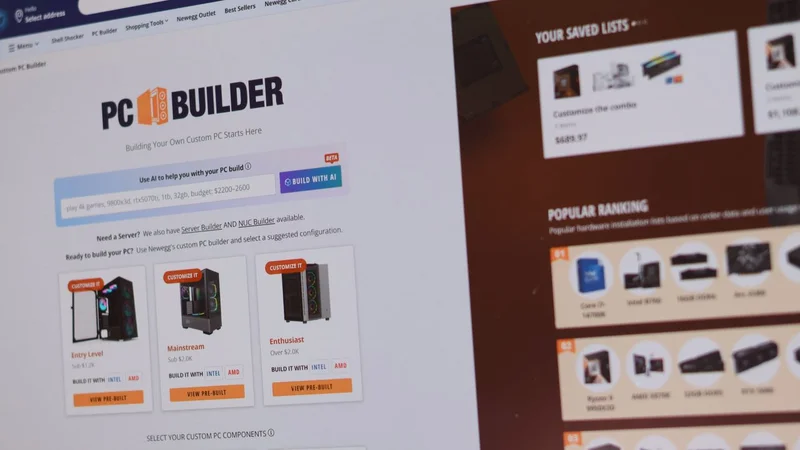
Other PC building sites exist, but I like Newegg’s custom PC builder tool. It lets you find all of the parts you’ll need for different projects, whether it’s a 4K gaming PC or a budget 1080p rig, and gives you the immediate price you’ll need to pay. In some cases, it’ll also apply additional combo discounts, as well as extra coupons, to help you bring the prices down further.
It works in a few different ways, depending on how comfortable you are putting a build together. You could start by selecting your individual components. I’d probably start by picking out my CPU first, as this will help you determine the type of RAM you’ll need, as well as the motherboard.
If that seems too difficult, you can use Newegg’s AI search to put something together for you, or use the popular ranked builds, with all of the products you’ll need grouped together. The ranked builds are useful, as they can give you an idea of the type of build you can get for your money right now. If it’s too high, you can always mix-and-match by buying new with used, or by carefully picking up deals as you go.
Patience, luck, and compromise
Unfortunately, you can’t go back in time to 2024. PC hardware is more expensive now than it was, and with the AI revolution showing no signs of stopping, that’s unlikely to change for the time being. If you can’t stick with your existing rig, a great deal on an upgrade could be your only option, as long as you don’t rush out your build.
The limiting factor, of course, is that you might end up paying more if you wait around. There isn’t a way around that. Components are getting more expensive, but if you follow these rules, you should find reasonable deals pop up each week. Some weeks do feel slower for deals, most noticeably before or after a big sales event like Black Friday, but that doesn’t mean they stop completely.
You’ll have to compromise, however. 2024 and 2025 pricing is long gone. That’s a hard, bitter pill to swallow for all of us. Judgmentally, you’ll need to look at the value of products right now, not three or six months ago, and decide whether you’re comfortable with the prices on offer. With luck, you’ll find some of the diamonds in the rough.
Get Tom's Hardware's best news and in-depth reviews, straight to your inbox.
Ben Stockton is a deals writer at Tom’s Hardware. He's been writing about technology since 2018, with bylines at PCGamesN, How-To Geek, and Tom’s Guide, among others. When he’s not hunting down the best bargains, he’s busy tinkering with his homelab or watching old Star Trek episodes.