If you have a smart home, or if you don't, you'll come across the same problem I have.
For months, I'd leave home only to wonder whether I'd switched off the lights, the air purifier, or a handful of other smart devices plugged into my smart switches or even directly connected to Google Home.
I could open the Google Home app and turn them off remotely, but doing that every day is not just annoying. It defeats the purpose of having a smart home.
So around six months ago, I fixed that problem with a simple Google Home household automation.
Now whenever anyone leaves the house, Google Home automatically switches off the smart plugs I've selected, and as soon as someone comes back home, it turns them back on.
I haven't manually toggled those devices in the last six months, and it's worked reliably for me. It's become one of the most useful smart home features I rely on every day.
Five minutes to set up; time savings every day
A simple routine replaces my entire daily checklist
As complicated as it might sound, setting up the automation was surprisingly straightforward.
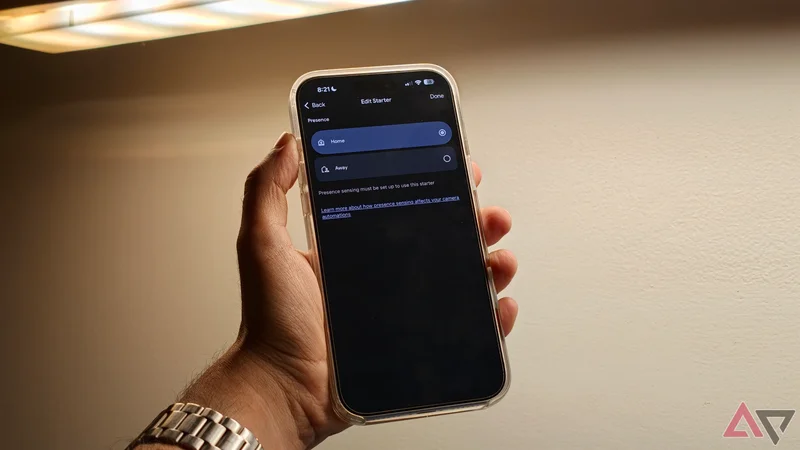
Inside the Google Home app, I switched to the Automations tab and created a new automation with the starter set to Presence.
Next, the app presented me with an option to choose between Home and Away. Here, I selected the Away option so that the trigger would initiate whenever everyone leaves home.
From there, I switched to the Actions tab and selected all the smart switches and lights that I wanted turned off.
I then created a second automation using the Home option within Presence and assigned the opposite actions.
Google Home uses presence sensing, which relies on the location of household members' phones and compatible devices, so everything happens automatically without schedules or voice commands.
That's all it took to make sure that unnecessary lights and switches automatically turn off when my family is no longer at home.
The biggest benefit isn't only saving electricity, though that is a welcome side effect. It's been removing one more thing that I have to think about.
Before I set up this automation, every morning I'd go through a quick mental checklist to make sure the air conditioning was off, and I turned off the coffee machine.
I also had to make sure that all the lamps and lights were switched off. Most days I'd remember it, but sometimes I'd realize that I'd forgotten something by the time I was halfway to my car.
In 2026, if you're running a smart home, you shouldn't have to bother with all of that, and now I don't have to.
My home prepares itself for my arrival
Presence-based detection beats schedules every single time
Setting up the simple presence-based automation means I no longer have to think about all these switches and plugs first thing in the morning.
Also, my home prepares itself for my arrival as I get closer to home. The home automation switches on the air purifier and switches on all the lamps I like switched on when I get home in the evening.
It feels a little bit like living in the future. The best part about all of these automations is that they aren't tied to a schedule. My workday doesn't always begin at the same time, and some days I might get home late as well.
A timer can't anticipate all of that. Presence detection, on the other hand, reacts to somebody's presence at home, making it far more reliable than any schedule can ever be.
Moreover, the automation scales beautifully. While I first tested it with a few smart plugs and switches, I've added a lot more since.
I've also added conditional features, like, say, if it is past sunset, then coming back home might not switch on the air conditioner in the living room, simply because I'll probably go to bed.
After spending a lot of money and time with smartphone gadgets, I've come to realize that the best automations are the ones you do not have to tinker with too much.
While voice commands still play a fairly big role in my home, I regularly ask Google to switch on a fan while I'm working or dim the lights. These are simple requests that naturally happen in the moment.
The best automations are the ones that happen automatically.
I don't want to remember to issue a voice command every morning or every night, nor do I want to reach for my phone after I've already walked out the door.
This is very much a trigger, and using that trigger paired with automations lets me remove several tiny interactions that add friction to my mornings and evenings.
The best automations are the ones you rarely see
The mark of a good routine is that you barely notice its existence, and six months later I can confirm that I have practically forgotten I set up this presence-based routine.
The lights switch themselves off when nobody's home, and the air purifier starts before I walk in. The smart plugs toggle on schedule, with the schedule being my presence or lack of it in the house.
That's ultimately what I want from a smart home; not more ways to control my devices, but fewer reasons to think about them in the first place.
When an automation handles the repetitive parts of my day without asking for input from me, it's doing exactly what I expect it to do.