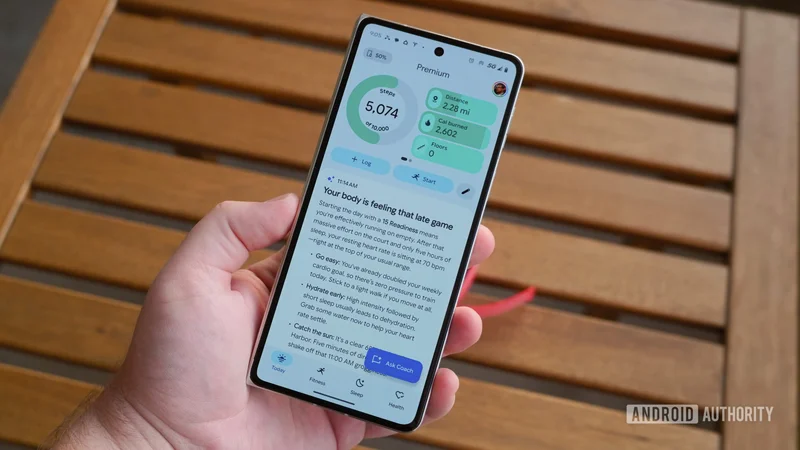
Google Health could finally fix its most annoying feature: AI Coach
Jul 31, 2026 — 10:24 AM ET
- Many Google Health users have expressed frustration over unprompted, lengthy AI Coach commentary cluttering their app dashboards.
- New strings in Google Health v5.04.1 reveal upcoming coaching preferences that will allow users to disable AI Coach insights.
- Selecting the “No Coach insights” option will restore a clean layout with basic fitness metrics and no extra commentary.
Ever since Google overhauled its health ecosystem with its AI-powered Health Coach, many users have felt that using the new Google Health app is a frustrating experience. Instead of clean, easily scannable fitness metrics, users were suddenly greeted by paragraphs of unprompted AI commentary every time they opened the app. Fortunately, Google seems to be acknowledging the pushback. New strings discovered in the Google Health app v5.04.1 reveal that the company is preparing dedicated preference controls that will finally let users mute AI Coach insights and return to viewing their raw data.
You’re reading an Authority Insights story. Authority Insights brings you all the latest exclusive reports, app teardowns, leaks, and in-depth tech coverage from the Android Authority team that you won’t find anywhere else.
Frustrations over the feature have been mounting for weeks across community platforms. Users on Reddit and the official Google Support forum have complained about long walls of text cluttering their dashboards, calling the AI advice intrusive and unnecessary.
Users also pointed out that downvoting recommendations or asking the AI to stop didn’t alter its behavior, leaving them stranded with unrequested essays when all they wanted was to check basic stats. For many, forced AI commentary made Google’s health subscription feel like a downgrade.
To address these complaints, Google is preparing to introduce a new “Coaching” preferences section within the Google Health app’s settings menu. According to the discovered strings, this section will allow users to customize their coaching experience.
<string name="coaching_preferences_title">Coaching</string>
<string name="coaching_preferences_info_description">Changes will apply to future messages. Updating these settings won’t delete previous messages and insights.</string>
The chosen settings will affect future messages, and not messages that have already been generated and received. So don’t expect an immediate cleanup right after toggling the setting, though you should expect relief from that point onwards.
<string name="coaching_preference_standard_title">Standard</string>
<string name="coaching_preference_standard_description">Full messages from Coach</string>
<string name="coaching_preference_off_title">No Coach insights</string>
<string name="coaching_preference_off_description">Basic updates, without commentary from Coach</string>
Within this menu, users will be offered two distinct toggles:
- Standard: Full messages from Coach
- No Coach insights: Basic updates, without commentary from Coach
As is self-explanatory, selecting “No Coach insights” will strip away the conversational AI summaries and leave you with basic metrics, effectively silencing the AI coach for those who find it redundant.
While Google has not officially announced when these options will go live for everyone, their inclusion in the app code suggests a cleaner, less talkative health interface is right around the corner. We’ll keep you updated when we learn more.
⚠️An
APK teardownhelps predict features that may arrive on a service in the future based on work-in-progress code. However, it is possible that such predicted features may not make it to a public release.