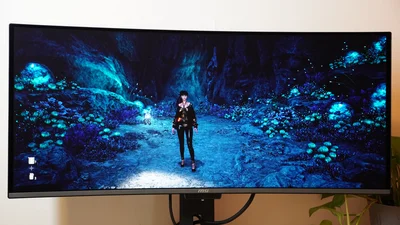
MSI is continuing its push into high-quality QD-OLED gaming monitors with the MSI MPG 341CQR QD-OLED X36. At $899, it serves as a true successor to one the MSI MPG 341CQPX QD-OLED I tested in late 2024. It comes with some upgrades to the design, extra features, and an updated panel that just gives you more of a great thing while still fitting right into that 34-inch, 3440x1440 ultra-wide curved screen format. With the latest tech and a competitive price, it’s worth a look next to earlier favorites like the Acer Predator X34 OLED or Samsung Odyssey G8, and it can go head to head with the new Alienware AW3426DW.
MSI MPG 341CQR QD-OLED X36 – Hands-on Photos
MSI MPG 341CQR QD-OLED X36 – Design and Features
Like the MSI MPG 341CQPX QD-OLED before it, the MPG 341CQR QD-OLED X36 features a large, 34-inch ultra-wide display with a 3,440x1,440 resolution and a gentle 1800R curve that boosts immersion a touch without looking too funky for regular use. MSI has refined the design a bit, shrinking down the chin below the display and adding a special sensor, but otherwise it’s not so different. The monitor still has a basic RGB-lit segment on the back that adds little to the tame overall design, an easy-to-use five-way joystick for controls, and a power and shortcut button beside the joystick. The latter button annoyingly still defaults to launching MSI Intelligence Center (which tries to install itself automatically over USB or DisplayPort) and can’t be customized to do anything else without the app installed.
One smart change MSI made was in the stand. Rather than the wide-legged base of the earlier model, the MPG 341CQR QD-OLED X36 includes a flat, hexagonal base that doesn’t dominate so much desk space. Though it would seem less supportive at first, the stand is heavy enough in comparison to the monitor that it holds steady even while I make adjustments to the screen position. The stand supports a pretty typical range of movements with a 20-degree vertical tilt range, a 60-degree swivel range and 110mm of height adjustment. It has just a little pivot, but since the monitor is wider than the stand is tall, you can’t plan on pivoting it 90 degrees for a vertical setup. If you don’t like the stand, you can swap to 100x100mm VESA mounting. The stand has a convenient cable-routing hole in the middle to tidy things up, though it’s too small to support every cable if you filled every port on the monitor.
On the underside of the MPG 341CQR QD-OLED X36, you’ll find two HDMI 2.1 ports and a DisplayPort 2.1a port that all support the full resolution and refresh rate of the monitor. Alongside the DisplayPort and HDMI inputs, the MPG 341CQR QD-OLED X36 has some USB ports that prove highly useful. There are two USB-A ports that can link back to a desktop with a USB-B backhaul or link to a full-featured USB-C port. That USB-C port is a rockstart, supporting the full display resolution and 360Hz refresh rate while also providing up to 98 watts of power delivery. That’s incredibly handy if you ever use the monitor with a laptop. The monitor also includes a 3.5mm jack for audio output, but it doesn’t have any speakers of its own.
Just below the display is a sensor that can enable a handful of extra features. The monitor can automatically turn off the screen to conserve energy and protect the panel when you step away, and it can wake back up when you return (though it takes a few seconds to start back up). It can also automatically adjust the brightness and other settings based on ambient conditions. With all of these enabled, I found the monitor a little tedious to use, with it adjusting the picture too much and the boot-up taking a little too long for my taste, but these can be dialed in to work with the way you use a monitor. One setting could simply dim the display when I wasn’t looking at it seemingly based on eye sensing, and this seemed perfectly practical.
MSI MPG 341CQR QD-OLED X36 – Testing
The MSI MPG 341CQR QD-OLED X36 performs wonderfully in testing. By default, it runs at 70% brightness with Eco settings and an ultra-low power mode, but this still allows it to hit 205.9 nits with 100% coverage of the sRGB color space and 98% coverage of the DCI-P3 color space. The color accuracy is also impressive in this setting, with a dE Max of 2.02. Dialing up the settings to 100 percent brightness sees the display reach 308 nits while maintaining its color gamut and comfortable 6600K white point. Color accuracy dips a little, but the display still hits an average dE1976 of 1.17 and a max dE1976 of 2.21. It may not be perfect for color critical work like photo and video editing, but it won’t be far off the mark either.
As the MPG 341CQR QD-OLED X36 has an OLED panel, it naturally has infinite contrast. It also enjoys very fast pixel response times. When the display is set to 360Hz, I can’t see any ghosting in Blur Busters’ UFO test.
HDR settings give the MPG 341CQR QD-OLED X36 even more means to impress. I measured a peak white point of 366 nits for a full screen window and 603 nits for a 10% window using the True Black 500 HDR setting. With the Peak 1000 setting, the fullscreen and 10% windows didn’t change by more than a few nits, but I measured as high as 1,551 nits for a small highlight comprising less than 4% of the screen area and 900 nits for a window less than 9% of the screen area. Combine these dazzling highlights with the deep black levels, and you get remarkable visuals.
MSI MPG 341CQR QD-OLED X36 – Gaming and Performance
Gaming on the MSI MPG 341CQR QD-OLED X36 is a joy. The ultra-wide, 21:9 format gives games an extra level of immersion, by filling that much more of my field of view while the 3440x1440 resolution remains a lot easier for gaming hardware to handle than 4K. That’s important, because the MPG 341CQR QD-OLED X36 runs at up to 360Hz and supports variable refresh rates to help ensure every frame is delivered in full and screen tearing never crops up.
In practice, it delivers on that promise. 007 First Light was all the more cinematic on the wide-screen, and though it took DLSS and multi-frame generation to even come close to scratching that 360Hz ceiling, the game appeared buttery smooth, helping me dash through the higher-octane action sequences of the game with ease.
The rich contrast and bold color really help present the moody, dark scenes and explosive firefights of 007 First Light well. And the 360Hz refresh rate and ultra-fast pixel response time of the OLED panel make snapping to targets much easier as there’s basically no blurring to impede me. All that speed became even more beneficial in fast-paced games like Trepang2, helping me zip through levels and put the moves on enemies that never knew what hit them.
The display can still have some trouble with glare, which spreads out wide thanks to the curve of the monitor, but the panel has a new coating that helps keep reflected light a bit darker than MSI’s prior monitors. As long as you’re not fighting with strong direct lighting or sunlight, it’ll be pretty great looking. In my office, with overhead lighting on and some daylight trickling into the space, the screen treatment was enough to make reflections very hard to see even on a completely black screen.
Another improvement the MPG 341CQR QD-OLED X36 brings is a RGB stripe sub-pixel layout. Early OLED monitors suffer from uncommon subpixel layouts that create issues in fine details, especially text. This presents as color fringing, which can be very distracting. On the MPG 341CQR QD-OLED X36, that issue is gone. It had already been largely solved in the earlier MSI MPG 341CQPX QD-OLED, but here it’s not even a risk.
Purchasing Guide
The MSI MPG 341CQR QD-OLED X36 is available from MSI for $899, making it fairly competitive with other options on the market.
Mark Knapp is a contributing freelancer for IGN covering everything electronics and gaming hardware. He has over 10 years of experience in the tech industry with bylines at PCMag, Reviewed, CNET, and more. Find Mark on Twitter @Techn0Mark or BlueSky at @Techn0Mark.