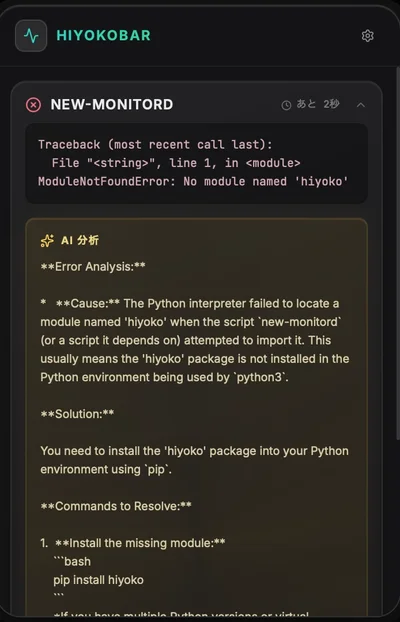
When a monitored script fails, most tools just show you a red icon.
HiyokoBar does something better: it automatically sends the error output to Gemini AI and displays a diagnosis — no copy-pasting logs, no context switching.
Here's how I built it.
The Problem
Engineers spend a surprising amount of time doing this:
Script fails
Copy error output
Open browser
Paste into ChatGPT/Claude/Gemini
Read diagnosis
Switch back to terminal
This is 2026. The AI should come to you.
Architecture
Each monitor card in HiyokoBar has an analyze_errors toggle. When enabled:
Script runs via std::process::Command
Non-zero exit code detected
stdout + stderr sent to Gemini API
Response displayed as "AI Insight" panel in golden color
The entire flow is automatic. Zero user interaction required.
Implementation
The Gemini API Call
rustuse reqwest::Client;
use serde_json::json;
pub async fn analyze_error(
error_output: \&str,
api_key: \&str,
) -> Result> {
let prompt \= format!(
"You are a senior engineer analyzing a script error. \
Provide a concise diagnosis (2-3 sentences max) and the most likely fix.\n\n\
Error output:\n{}",
error_output
);
```
let client = Client::new();
let response = client
.post("https://generativelanguage.googleapis.com/v1beta/models/gemini-2.5-flash:generateContent")
.header("X-goog-api-key", api_key)
.json(&json!({
"contents": [{
"parts": [{"text": prompt}]
}],
"generationConfig": {
"maxOutputTokens": 256,
"temperature": 0.3
}
}))
.send()
.await?;
let data: serde_json::Value = response.json().await?;
let text = data["candidates"][0]["content"]["parts"][0]["text"]
.as_str()
.unwrap_or("Analysis unavailable")
.to_string();
Ok(text)
```
Enter fullscreen mode
Exit fullscreen mode
}
Key decisions:
gemini-2.5-flash for speed and cost efficiency
maxOutputTokens: 256 — engineers want diagnosis, not essays
temperature: 0.3 — factual, not creative
Triggering the Analysis
rustasync fn run_monitor(monitor: \&Monitor, api_key: Option\<\&str>) -> MonitorResult {
let output \= Command::new(\&monitor.command)
.args(\&monitor.args)
.output()
.await;
```
match output {
Ok(out) if out.status.success() => MonitorResult::Success(
String::from_utf8_lossy(&out.stdout).to_string()
),
Ok(out) => {
let error_text = format!(
"stdout: {}\nstderr: {}",
String::from_utf8_lossy(&out.stdout),
String::from_utf8_lossy(&out.stderr)
);
    // Only analyze if AI is enabled and key is available
    let insight = if monitor.analyze_errors {
        if let Some(key) = api_key {
            analyze_error(&error_text, key).await.ok()
        } else {
            None
        }
    } else {
        None
    };

    MonitorResult::Error { error_text, insight }
}
Err(e) => MonitorResult::Error {
    error_text: e.to_string(),
    insight: None,
}
}
```
Enter fullscreen mode
Exit fullscreen mode
}
The AI Insight UI
On the React side, the insight panel appears with a golden glow when an AI diagnosis is available:
tsx{result.insight \&\& (
\<motion.div
initial\={{ opacity: 0, y: -8 }}
animate\={{ opacity: 1, y: 0 }}
className\="mt-2 p-3 rounded-lg border border-yellow-500/30 bg-yellow-500/10"
<div className="flex items-center gap-2 mb-1">
  <Sparkles className="w-3 h-3 text-yellow-400" />
  <span className="text-xs font-bold text-yellow-400">AI INSIGHT</span>
</div>
<p className="text-xs text-yellow-200/80">{result.insight}</p>
)}
Storing the API Key Securely
Never put API keys in config files. I use macOS Keychain via the keyring crate:
rustuse keyring::Entry;
pub fn save_gemini_key(key: \&str) -> keyring::Result\<()> {
Entry::new("hiyoko-bar", "gemini-api-key")?.set_password(key)
}
pub fn load_gemini_key() -> keyring::Result {
Entry::new("hiyoko-bar", "gemini-api-key")?.get_password()
}
The key lives in Keychain, never touches disk as plaintext.
Result
The AI Insight feature turns HiyokoBar from a "pretty dashboard" into an actual engineering tool. When your Docker container crashes at 2am, you want a diagnosis in your menu bar — not another tab to open.
HiyokoBar: https://hiyokoko.gumroad.com/l/hiyokobar
🇯🇵 日本語版: https://hiyokoko.gumroad.com/l/hiyokobar_jp
🐤 Launched on Product Hunt today — would love your support!
https://www.producthunt.com/products/hiyokobar
X: @hiyoyoko