TL;DR
- Samsung is making it much easier to run apps directly on the Galaxy Z Flip 8’s outer screen.
- In addition to allowing 16 apps straight out of the box, Samsung is improving the flow for installing and running required tools to run virtually any app.
- With this change, the app launcher experience on the Galaxy Z Flip 8’s cover screen is also getting upgraded.
The Samsung Galaxy Z Flip is moving into its eighth generation, and some even speculate it might be its last. Despite that, Samsung isn’t just offering a lip-service upgrade over last year’s Flip 7; it’s stocking the new Galaxy Z Flip 8 with a more reliable Snapdragon chip (for some markets) and making the Flip even slimmer than before. Aside from that, the outer display may look the same, but it’s getting a major utility upgrade, with expanded app support and a more seamless app-launching experience without ever having to open the screen.
The Galaxy Z Flip series typically receives biennial design updates, and since Samsung updated the cover screen only last year, we aren’t seeing any other major changes. Apart from some bulk shedding, the Flip 8 is largely the same as the Flip 7 from the outside, though Samsung claims a big improvement for the previously messy cover screen.
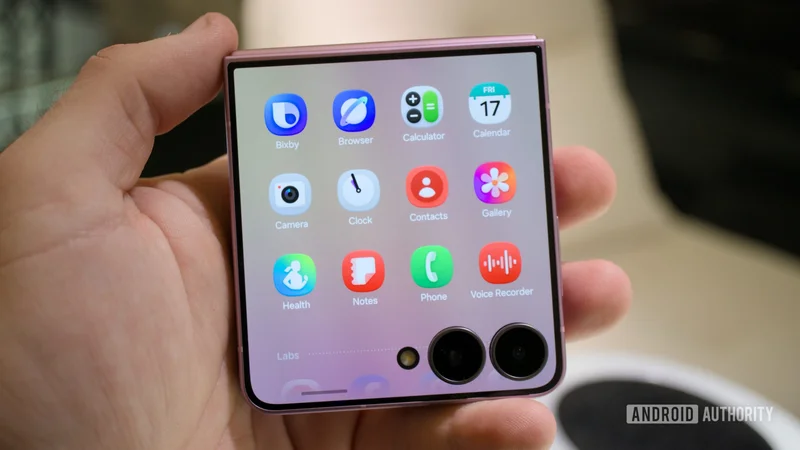
Among these updates, the biggest one is enhanced usability of the Galaxy Z Flip 8’s cover screen. Samsung claims the outer display, officially called “FlexWindow,” on the latest clamshell can now run 16 apps directly on the cover screen, finally narrowing the gap to the Motorola Razr.
Hadlee Simons / Android Authority
Out of these, the following 12 are system apps that Samsung appears to have fully optimized to run on the cover screen:
- Bixby
- Samsung Browser
- Calculator
- Calendar
- Camera
- Clock
- Contacts
- Gallery
- Samsung Health
- Notes
- Phone
- Voice Recorder
These apps are accessible through a native app drawer that’s now customized for the Galaxy Z Flip 8’s cover screen. Besides these apps, Galaxy Z Flip 8 also gets better support for Now Bar and Now Nudge.
The remaining four are third-party apps, including Google Maps, Google Messages, Netflix, and YouTube. These apps are grouped under “Labs,” which means they get Samsung’s official endorsement to run on the small screen, but you might still run into issues.
In addition to these 16, you can enable more apps to run on the outer screen, even if they aren’t optimized — or officially certified. This can be accomplished using a Good Lock module called MultiStar. The process itself is not new, but Samsung is making it easier to install MultiStar by prompting users directly from the screen outside.
Zac Kew-Denniss / Android Authority
Previous Flip phones also prompted you to install MultiStar, but only while viewing cover screen Settings with the phone unfolded. The change with the Flip 8 not only makes the process slightly simpler and more convenient by placing a CTA right at the site of action, rather than burying it, but also elevates the phone to its next level.
Samsung Galaxy Z Flip 8Samsung Galaxy Z Flip 8
Most Pocketable Flip ever • Flagship processor • More Apps for Cover Screen
Samsung's sleekest flip phone gets smarter
The Galaxy Z Flip 8 refines Samsung's iconic flip phone with a thinner, lighter design, a larger 4,300mAh battery, and a smarter FlexWindow that supports more apps, and Gemini AI. It's also the most pocket-friendly way to experience Samsung's foldable vision.
Thank you for being part of our community. Read our Comment Policy before posting.