You can stream programmes, channels and apps in various ways. Smart TVs come with built-in apps, and there are streaming boxes and sticks from brands such as Amazon and Roku that offer a cheap and easy way to upgrade older sets. So why would you spend £200 on an Apple TV?
For Apple, you’re paying for more than just a streaming box for Netflix binges. The Apple TV 4K provides a faster, smoother experience, a premium remote and seamless integration with other Apple devices, but whether those extras justify the higher price is another question.
And while the current Apple TV 4K has been around for a while now, a newer version is expected to launch later this year. Until then, however, it's still Apple's flagship streaming box. I've put it to the test to see if it's still worth buying in 2026.
Read more: Best surround sound systems to pair with your TV, reviewed
Read more: **Best TVs, reviewed **
- Why we love it- Dazzling remote
- Great ease of use
- Variety of apps
-
Audio and video strengths
-
Take note- Not the newest Apple product around
Apple TV 4K: Design
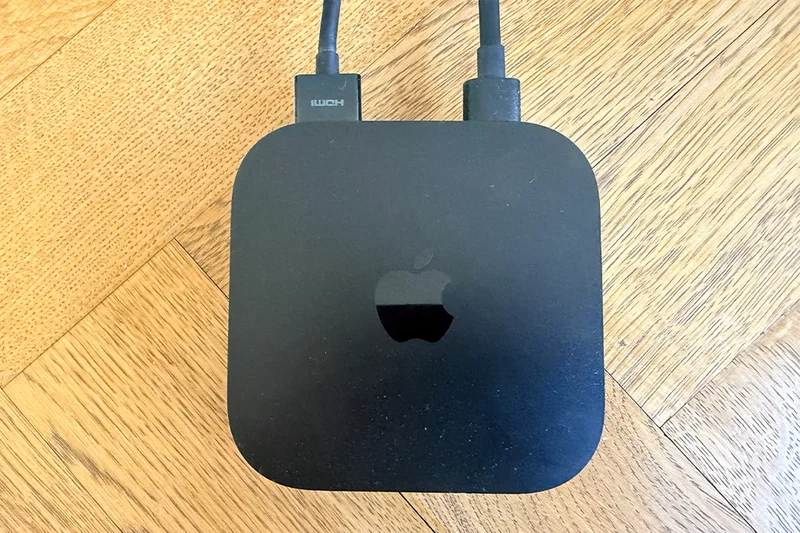
The tiny Apple TV 4K box is a roughly 4in square device with rounded corners. It comes in one colour: shiny black. It connects to your television using an HDMI cable (not supplied) but can sit out of sight: the remote doesn’t need line of sight to the box because the connection is made by Bluetooth, not infra-red as it may be on your TV remote.
Apple has two versions of Apple TV, though the only visible difference is round the back: choose the model with 64GB storage and it’s a wifi-only device, with a single HDMI socket alongside the power socket. The pricier model with 128GB storage adds a Gigabit Ethernet connection as well. Since most apps are designed to stream content, you don’t need extra storage unless you’re planning to use the box for gaming – which is where the fast connectivity provided by the Ethernet port comes in.
The box supports HDR10+, which wasn’t available in the previous model, as well as ongoing compatibility with 4K (obviously), Dolby Vision, High frame rate HDR, and Dolby Atmos. If your TV already supports Dolby Vision, this benefit may be less useful, but if it doesn’t (Samsung TV owners, I’m looking at you), this is a definite bonus.
Apple TV 4K: Remote control
The remote control is a slim block of aluminium with a circular control ring, five front buttons and a side button for voice control.
Ever since the very first Apple TV box, the company has made simplicity the key focus with its remotes – it has a volume rocker, a play/pause button, a mute button, a back button and a home button. On this latest model, easily the best remote Apple has created, you use the circular navigation ring to move up, down, left and right in menus and between apps in the home screen. Press the central button in the ring to confirm a choice. And press the Siri button on the side to command the box with your voice. It’s exceptionally simple, quick to learn and a joy to use.
One earlier version had a touch panel which provided usability issues, but this is sublime (and if your current Apple TV box has that earlier remote, the latest remote is compatible with it, too).
You don’t need to worry about replacing the batteries with the AAAs you never seem to have enough of (or is that just me?). The battery is sealed inside and rechargeable using the USB-C socket in the base. You’ll need a USB-C cable and charging plug of your own as the only cable in the box is the power cable for the main device.
The elegant simplicity of the remote is one of the standout successes of the Apple TV.
Apple TV 4K: Features
The onscreen interface is slick and easy to use, inspired by smartphones, with a dock where you can place your favourite six apps. As well as streaming apps such as Apple TV, Disney+, Netflix and Amazon Prime (all of which involve a monthly subscription), there are Apple staples such as FaceTime, which uses your iPhone camera so your caller can see you while you see them on the telly.
There are also lots of games, which you can play with the remote or, better, a dedicated console controller like the PS5 controller.
If you have an Apple Watch and a Fitness+ subscription, you can use the TV to broadcast fitness workouts (with your heart rate, as recorded by the Watch) shown on screen.
You can also use the Apple TV colour balance system, where you use a compatible iPhone (it needs to be one with Face ID, running iOS 14.5 or later) to calibrate the TV’s colour and adjust it for optimum output.
As you’d expect with Apple, there’s seamless and deep integration with other products from the company. So, you can play the audio through Apple HomePod speakers or AirPods, for instance.
If you have headphones such as AirPods or AirPods Max, it’s a breeze to set them up to listen to the TV — handy if the other people in your home have gone to bed, for instance. These headphones offer personalised spatial audio.
Apple TV 4K: Performance
The current box and remote were released in 2022, with an A15 Bionic processor which at the time seemed overkill (it had first been released in the iPhone 13 Pro). This release also saw an increase of operating memory from 3GB to 4GB. Together, these components mean that even now, the Apple TV box is one of the fastest and slickest performers around.
Audio and picture quality are very strong, thanks to the wide compatibility with different formats, from Dolby Vision, HDR10+, HDR10 and HLG for video and multiple formats for audio, including Dolby Atmos and Apple Lossless.
Key specifications
- Processor:H2
- Active Noise Cancelling:Yes
- Personalised Spatial Audio:Yes
- Battery life:20 hours
- Dimensions:93 x- Weight:Wi-Fi 208g, Wi-FI + Ethernet 214g
- Colour:Black
- Remote:136 x 35 x 9.25mm, 66g