I won't ever leave the country without the Timekettle X1 Meeting Interpreter Hub translator
Aug 6, 2026 — 7:43 AM ET
It is said that the Tower of Babel signified the limitless capabilities of human unity and ambition. Truly, language is one of the biggest barriers, but modern technology is breaking it down. AI, translation apps, and certain devices are more accessible and easy to use than ever. Enter the Timekettle X1 Meeting, a device that promises to make multi-language meetings and general translation simple, even when offline.
I’ve seen Timekettle translators for some years, usually at technology conventions like CES, which is a pretty good place for them, given the usual mass of multilingual attendees at such events. I always wondered how well they worked outside of such showcases; testing them for a few minutes on the show floor certainly isn’t enough to form an opinion.
Now I’ve had the chance to test the Timekettle X1 Meeting Interpreter Hub ($849 at Manufacturer site) in the real world for a couple of weeks. How did it hold up, and will I keep using it? Let’s find out.
Sleek and professional looks
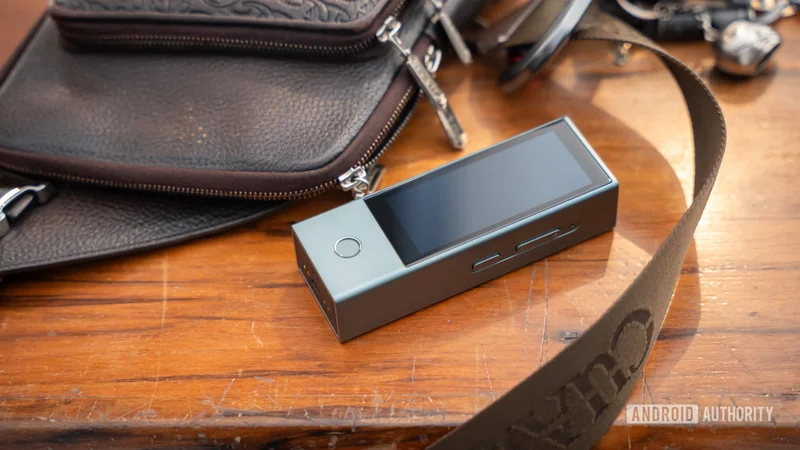
At first glance, the Timekettle X1 Meeting looks a lot like a mid-sized power bank, but it is much lighter. It measures 5.04 x 1.77 x 1.18 inches and weighs in at 7.02 ounces.
While understated, the design is nice and sleek, offering the right look for a professional setting. Timekettle mentions it is pocketable, and while it technically fits in most pockets, it won’t do so comfortably. I prefer carrying it in my satchel or backpack. It will feel bulky in a pants pocket.
That said, it feels good in the hand, and while technically made of plastic, the chassis feels metallic, which adds a premium touch. Buttons are clicky, so feedback is pretty nice, too. The only inclusion is the capacitive button on the front, but the device vibrates when that one is activated, so you will still notice it when you use it.
And here’s a cool design quirk: the bottom part doesn’t just house the USB-C charging port and pins. Pressing the area will reveal a section where a couple of earbuds are stored and charged. This adds a whole other level of usage, which we will discuss in a bit. These earbuds have a very similar design and build quality to the main device. They attach magnetically and offer a secure connection.
There are no rubber tips on these earbuds, but they fit comfortably in my ears. So far, they haven’t fallen out, no matter how much I shake my head.
So, what can the Timekettle X1 Meeting Interpreter Hub do?
The Timekettle X1 Meeting is pretty simple to use. The initial setup took about 10 minutes, including upgrading the software on both the system and the earbuds. After the initial setup, you’re off to the races.
One thing to keep in mind is that the device’s meeting features are the main lure. It’s part of what makes it the most expensive offering from Timekettle at $849. The feature is also front and center on the homepage. You can create or join meetings here. Joining a meeting requires another Timekettle X1 Meeting user to have created one first, so I didn’t get to test that. By the way, up to 10 units can join meetings, which is quite handy if you have multiple units at an office or conference room.
You’re not limited to using other Timekettle X1 Meeting devices, though. If you create a meeting, up to 50 people can join from any device. Guests can use an on-screen QR code, or go to meet.timekettle.co and enter the meeting ID to join the multilingual conversation. Everyone can speak into their devices and listen to translations. It requires a bit of setting up and likely some guidance, but I found it worked quite seamlessly once up and running.
From there, you get access to multilingual presentation support and live transcription with onboard storage of 32GB. Keeping meeting records on device is, of course, far more confidential than cloud-based alternatives, so this is a good pick for anyone looking to transcribe confidential meetings.
There are four other modes, and you can access them by swiping to the right on the homepage. Here’s how they work.
Timekettle X1 Meeting Interpreter Hub translation modes:
- One-on-One:Two people can speak and listen, using one earbud each.
- Listen & Play:The main unit will use its mics to listen to another language, and the translated audio will play in the earbuds.
- Media Translation:Translates video and other content. Additionally, it can connect to your phone over Bluetooth and translate audio for both parties.
- Ask & Go:Press the main button to speak, and let go. The device will translate into another language. Great for short sentences when communicating in another language.
How well did the Timekettle X1 Meeting work in real life?
I live a couple of hours from the Mexican border and actually had to go there for a few days, which was a great time to test the Timekettle X1 Meeting Interpreter Hub. I first put it through its paces with my girlfriend. I would speak English, and she would speak Spanish. I also got to test it with some baristas from my favorite coffee shop there. They are pretty much friends by now, so it was a good chance to test different voices and speaking habits. This is where I mostly used the One-on-One and Ask & Go modes.
The results? Well, the Timekettle does a really good job of translating, but there are a few things to keep in mind. The conversation naturally starts getting more casual as you get deeper into it. The Timekettle X1 Meeting does better when people speak clearly and at a constant, moderate pace. If you start speaking faster and merging words, it will have a hard time keeping up perfectly. Of course, things get even more complicated if people start using more slang, so the Timekettle X1 Meeting will also translate better if people avoid colloquialisms.
This was mainly a concern when using the One-on-One feature, which allowed the conversation to flow more casually. That said, Ask & Go worked very well because I mostly used it for shorter, to-the-point sentences without complex structures. This mode is great for things like asking where the bathroom is, ordering something, or getting directions.
We also got another chance to test it in a real-world scenario while watching a Korean movie. It only had English subtitles, and my girlfriend is still more comfortable with Spanish. I thought: “No problem! Put these earbuds on!” It worked well most of the time, but it did make more mistakes than usual, but you have to consider that in movies, actors tend to speak naturally and faster. Also, it kept mistaking the word “cremation” with “putting on makeup”. I later did some research, and apparently, in Korean, these are exactly the same word. People mainly identify the correct meaning based on the context, which, in this case, the Timekettle X1 Meeting didn’t seem to catch, though on the whole, it did still get most sentences right.
The thing is, I used the Listen & Play mode for this. This uses the device’s microphone to listen, which will inevitably result in more mistakes. There is also the Media Translation mode, which connects to your device via Bluetooth and captures audio through said connection, not just what the microphone hears.
I tested Media Translation, and it works much better. Additionally, it can translate anything your device plays, which also includes calls, video chats, voice messages, and more. Sure, it still had the occasional slight mistake (especially when the tone was more casual), but not as often as with Listen & Play. I used this to translate between English and Spanish. I like horror stories, and the Timekettle X1 Meeting worked great in Media Translation mode, as those tend to be spoken more slowly and clearly. When I translated some prank video audio, things got a bit more rocky, though. Those videos use a lot of random words and slang, and faster-paced talking. Overall, it definitely did better than Listen & Play.
The Time Kettle X1 Meeting can connect to any device over Bluetooth, and translate any audio it transmits.
Just keep in mind that translation requires quite a bit of processing power. Regardless of the mode, there will be a slight delay. And depending on how long sentences get, things may take a bit to translate. The device seems to wait until a sentence is complete before translating it, which makes sense, as context can easily change in long conversations.
Another relatively minor complaint I have is the screen orientation. The whole UI is in landscape, which is fine. The issue is that one of the modes is set to portrait orientation (Ask & Go). Not that big of an issue, but certainly a bit annoying when the rest of the experience is horizontal. It just seems like a bit of an oversight that could have been easily fixed. Hopefully, it will be refined with an upcoming update.
Languages and offline use
I mainly tested the Timekettle X1 Meeting in English, Spanish, and Korean. I also played around a bit with Japanese and Portuguese, with the few words and sentences I know. That said, the Timekettle X1 Meeting can do much more than I did, with support for 52 languages and 106 accents. It can also support simultaneous translation in five languages, which is what makes it such a standout pick for multilingual meetings.
Because this is meant to be a standalone device, it uses no app. It can connect to Wi-Fi directly to use all its features and capabilities. That said, it doesn’t always require a data connection. It supports 13 language pairs for offline use. You can download these pairs, and they include combinations of English, Spanish, Chinese, Japanese, French, Russian, German, and Korean. If you download these pairs, you can continue using the Timekettle X1 Meeting even when off the grid.
The Timekettle X1 Meeting works offline, offering 13 downloadable language pairs so you can translate even when off the grid.
I tried it a bit, and it seems to work just as fine as connected translation. Of course, the available pairs are much more limited; it doesn’t work with all modes (only works with One-on-One and Listen & Play), and many features are missing offline, but it’s nice to know you can still do some translation when disconnected.
Battery life that won’t let you down
Battery life is certainly another important factor. You don’t want to be left without communication in the middle of a trip or an important meeting. The good news is that its 3,200mAh battery was enough to keep the device alive for a whole day and then some. Timekettle says it can deliver up to nine hours of continuous translation, and I wouldn’t doubt it based on my experience.
Translating that long is not normal, though. The time I used it most in one go was during that Korean movie, and it was under two hours long. In all other instances, I would use it for quick translations here and there or for short conversations lasting 5-15 minutes.
Earbuds are said to last three hours on a full charge. Honestly, these never died on me, even while watching that movie. But if you run out of earbud juice, the good news is that a 5-minute charge can get you ~90 minutes of translation time. Pretty convenient, and you can also opt to use only one at a time, depending on the mode.
And when you do need a top-up, fully charging the hub takes about two hours via USB-C.
Should you buy the Timekettle X1 Meeting Interpreter Hub?
The Timekettle X1 Meeting Interpreter Hub isn’t perfect. It can make mistakes if people speak too fast or start using slang. That said, this is often mitigated in real-world use, as people tend to speak more slowly and consistently when multiple languages are in play.
Despite the downsides, it worked very well most of the time, and I think it can definitely get you around in a foreign country. Especially if conversations won’t be too elaborate. The meeting functions work well if you provide instructions to avoid getting too comfortable or too speedy with your speech. Most people naturally speak more clearly in a meeting, anyway. It will serve its purpose.
The $849 retail price is certainly on the high side, but it is a very convenient and immensely helpful device when language is a significant barrier. People who frequently need translation services will definitely appreciate it, especially given its compact size, light weight, and offline capabilities. Not to mention, it needs no app, making it a self-sufficient solution.
Everyone I showed the Timekettle X1 Meeting Interpreter Hub to was totally marveled by it.
Perhaps the best verdict I can give is that everyone I showed it to was amazed by it, and a few of them are now actually planning to buy a Timekettle device. And thankfully, there are a bunch of cheaper options for those that aren’t focused on meeting capabilities.
The base Timekettle X1 goes for $699.99. And if you prefer something smaller, there is also the Timekettle T1 for $299. The latter is more like a small smartphone, with a larger screen. It lacks earbuds and isn’t as capable, but it still supports 44 offline language pairs. And if you’re connected to Wi-fi, it handles 43 languages and 93 accents, covering most people’s needs.