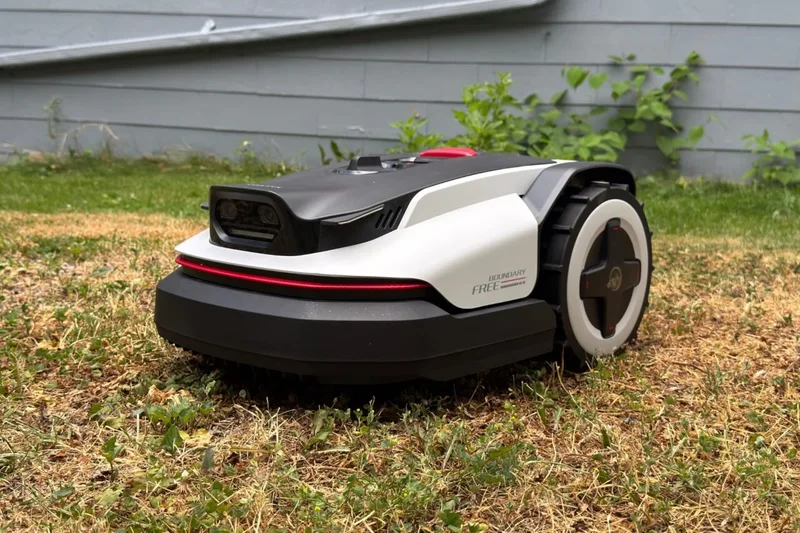
In June, I reviewed my first robotic lawnmower: the GPS- and satellite-connected Segway Navimow X430. It was good! But it felt like overkill for the little lawn I sicked it on. So when Roborock, which makes robot vacuums that many people swear by, offered to let me try one of its first mow-bots, the much more reasonably sized and specced RockNeo Q110H, I jumped on the opportunity.
At $1,300, the RockNeo Q110H is the cheapest robot mower that Roborock sells in the U.S., and it shows. Itâs a two-wheel drive model with swiveling front wheels and a manual dial for adjusting mowing height, and Roborock advertises it as requiring you to jam an RTK antenna (real-time kinematic) into your lawn. Itâs comparable to Segwayâs $1,600 Navimow i210 LiDAR, which I received alongside the X430 but didnât have time to fully test.
Are the quality-of-life features that Roborock dispensed with to bring costs down, such as automatic height adjustment, a reasonable sacrifice? It depends on the yard you have. After a week of testing, Iâm not fully sold on the RockNeo Q110H for lawns like mine, which includes obstacles such as tall garden plants and paving stones, as well as a sharp incline that thwarts the robotâs plasticky wheels. But for other folks, the Q110H could be a reasonable package. It’s a more user-friendly option than auto-mowers of the past, since it doesn’t require you to dig guide-wire trenches. If you have a simple, flat yard and can’t swing the much pricier Segway Navimow i210, it could very well offer all the functionality you need.
Roborock RockNeo Q110H
Roborockâs first entry-level robot mower is a great option for small, simple yards with good satellite coverage.
Pros
- Generally solid object avoidance
- Supports antenna-free NRTK navigation
- Easy-to-use app
- Affordable, for what it is
Cons
- Can get stuck on uneven terrain
- Setup process forces RTK antenna installation
- Not good for steep slopes
Two wheels and a sandy pit
Setting up the RockNeo Q110H isnât quite as simple as getting started with the Navimow X430, but itâs close. At 27 pounds and 25 inches long, the Q110H is nowhere near as chonky as the X430, making it easier to move around. Youâll plug in the dock, set the robot on it, then connect the device to the Roborock app by scanning a QR code on its butt. The big difference is the RTK antenna, which the setup process takes you straight to and doesnât let you skip. Near the end of testing, I noticed an update had brought NRTK support. I asked in an email whether Roborock plans to make that the default for setup going forward, and company representative Ruben Rodriguez replied that Roborock doesn’t plan to for now, as NRTK isn’t available everywhere. It worked for me, though. After I activated the feature, the app spent some time calibrating its map, and then I was able to continue mowing as usual.
Speaking of mapping, that was the next step after antenna setup. The Q110H can apparently do this all on its own, but only in a simple yard, and the Roborock app performs some behind-the-scenes calculation to determine whether the mower will even try. Clearly, my yard was deemed too treacherousâit didnât offer the auto-mapping option, so I did it the more fun, manual way: walking behind the Q110H while driving it around the perimeter of the area I wanted to map via the app’s onscreen controls. Having learned my lesson during my first auto-mower review, I didnât bother trying to map the whole yard at once; instead, I broke it into sections and created channels to pass between them. The app lets you turn off the Q110Hâs camera-based obstacle avoidance, which is key for getting through pavers and hanging vegetation that can thwart the mower between zones. All in all, setup took about 45 minutes, from unboxing to my first mow.
When the Q110H runs, it stripes your yard up and down in an orientation it chooses. (You can adjust this in the Roborock app if youâd rather it go a different direction or change its orientation every time it mows.) Itâs mostly quiet when itâs on grass, although the whining of the motors in its rear wheels was louder than what I heard from the Navimow X430 and i210 LiDAR, both of which I found totally silent when I wasnât right next to them. When the Q110H got to the pavers between sections of my yard, though, it sounded like someone was tumbling an empty plastic tote around. Still, you wouldn’t notice it while inside your house.
I knew the two-wheel-drive setup might cause problems for the Q110H, and it did. The mower regularly dug little ruts in my yard when it tried to mount certain uneven pavers with its little shopping-cart-style front wheels, and I had to rescue it multiple times from a sandy pit near its dock. For comparison, the Navimow i210 cruised right over the same pavers and sand pit that stymied the Q110H. I was surprised by how well the Q110H handled the slope in my front yard, which is well beyond its 24-degree incline max, but I still wouldnât recommend using it there. It skittered and slid on its way down, and its two large wheels churned dirt up from beneath the grass on its way back up. Nevertheless, Iâm sure it would do just fine on the gentle slopes itâs rated for. The i210 also skittered down my front yardâs slope but couldnât make the return trip without stopping in its tracks when its lift sensors were triggered.
Getting around well took some time
The Q110H navigated the area Iâd mapped out for it reasonably well, but there were issues with the RTK antenna. For one, at the start of many runs, the mower had to spend a couple dozen seconds driving this way and that to calibrate its position, and I found it needed lots of room to do so. I still have the X430 set up in the same area, and if it bumped that, it would give up, stop, and require rescue. The Q110Hâs map also seemed prone to drifting, and early on, the device knocked over a tall garden plant in an area Iâd specifically told it not to enter. On two occasions, the RTK antenna couldnât even get a signal, though that was forgivable, considering that the only place I could install it was between two two-story houses.
All that said, the Q110H did fine even in areas where it didnât have a direct line of sight to the antenna, such as a patch of backyard around the corner from where Iâd installed the beacon. It mowed well at night, too, and I found I never had to worry about it ramming the poor, wire garden fence that the X430 maimed during an earlier review process.
More than once, I had to redo a mow because the Q110H ignored whole sections of the yard, like on its first go at my front lawn. And it missed smaller bits on most mows, the way a lot of robot vacuums can inexplicably ignore certain parts of your home. When I ran it again within a day, however, it would clean up, specifically hitting the spots it had skipped before. Realistically, thatâs not an issue if you run the mower regularly; these products are best used to shave a yard every couple of days anyway, rather than to chop grass down after a week or two of growth.
The good news is that navigation seemed to improve over time. By the end of testing, the Q110H got stuck less and more consistently covered my lawn. That was also true of the runs I did after I ditched the RTK antenna and switched the robot to NRTK (network real-time kinematic) mode. By the end of the review, Roborockâs mower was navigating about as well as the two Navimow products I tested, and its small size meant it could go places the behemoth X430 couldnât.
The Q110Hâs two cameras work well enough for obstacle avoidanceâthe bot regularly drove around plants, my pets, and other random yard obstaclesâbut it didnât always handle surprises well. When I put my foot directly in its path several times during the day, the robot mostly stopped and went around, but it bumped my leg once and drove over my foot another time. I wouldnât let it run with small pets or children nearby, but otherwise, it was solid.
Roborock says the RockNeo Q110H can mow up to a quarter acre in a day, which is more than enough to cover most U.S. lawns. I wouldnât expect it to do that all in one go, though: it tended to lose around 60 to 70 percent of its battery dealing with the mowable areas of my front and back yards, which are altogether about 1/20th of an acre.
Intuitive, but somewhat limited control
Roborockâs app looks and works similarly to Segwayâs Navimow app. On its main screen, you get a map of your yard with controls to start the mower, send it home, start a remote control session, and access settings. I found some of its layout to be slightly more intuitive than Segwayâs app, though. For instance, tapping the âPreferencesâ button on the main screen lets you control the mowerâs âefficiencyââwhich primarily seems to affect how fast it movesâand adjust the orientation of its passes. You can set those either for everywhere the Q110H goes or on a per-zone basis.
Down in the settings menu, youâll find a smattering of other configurations. Thatâs where youâll set the mower to run on a schedule, decide whether you want it to wait when it detects rain with its onboard sensor, and choose whether it goes right after the rain or waits a few hours. You can also set it to avoid mowing at specific times using its âWildlifeâ mode, which is intended to prevent harm to nocturnal animals. One setting I found particularly handy was a toggle that turns off obstacle avoidance when the mower passes between zones. That helped the Q110H get through my open gate to the front yard and areas where late-season garden plants were hanging over the pathway.
The Roborock app lacks some of my favorite Navimow options, like the ability to adjust the boundaries of your map by drawing on your phone; Roborock only allows you to tweak boundaries by moving the Q110H itself. And although you can turn off camera-based obstacle avoidance in passing areas, you canât do so in specific areas within mowing zonesâwhich is a shame, because that feature can be handy in spots where pavers or tall vegetation might confuse the robot.
Solid effort from the robot vacuum champs
The Roborock RockNeo Q110H is a great first effort from Roborockâas you might hope it would be, given the companyâs robot vacuum pedigree. The mower has good satellite-based navigation that worked well for meâeventuallyâwhether I was using the included RTK antenna or the NRTK mode that does without it.
A few things did give me pause during testing. The mowerâs initial struggles with loose terrain and its trouble transitioning onto pavers, particularly when turning, make it perhaps not the best candidate for certain lawns unless you have the patience to create multiple distinct zones and continually adjust its virtual boundaries until itâs mowing the way you want. Iâd like to see a more fleshed-out app that includes options like the camera-off zones found in the Navimow app. Folks with lots of tree cover or who live near tall buildings should also look elsewhere, as the Q110H needs good satellite exposure to work.
Like Segwayâs auto-mowers, the RockNeo Q110H is a capable robot thatâs at its best on simple, uncluttered lawns. It wonât totally save you from yard work, as youâll still have to do your own edge trimming, and you may find that there are areas where it just doesnât function, especially if satellite coverage is iffy on your property. And it could be unacceptably finicky in more complex environments unless youâre willing to put significant work into getting its maps right.
Iâd recommend the Navimow i210 over the RockNeo Q110H if it werenât for pricing. The i210 is the better mower, but only in certain narrow ways. And although both are about as cheap as satellite-connected, guide-wire-free autonomous mowers get, theyâre still pricey. If it would save me $300, Iâd gladly pull the RockNeo Q110H out of the dirt now and again.