When I started extending Smart Home Cinema - Voice Control to Jellyfin, the goal sounded straightforward: speak a command on one side of the system and make the expected action happen on a television running a Jellyfin client.
The project had started as
Jellyfin changed the shape of the problem.
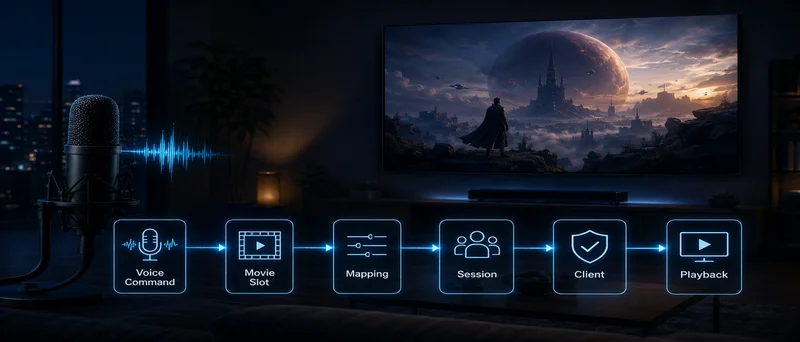
Playback could now happen on a television or streaming device while the server ran elsewhere. The command had to move through several layers before reaching the screen:
voice command`` ↓`` Windows control layer`` ↓`` Jellyfin server`` ↓`` live Jellyfin session`` ↓`` television client
That introduced questions I had not needed to solve with a local media player.
Which movie should a short spoken command refer to? Which session belongs to the television the user wants to control? What should happen when several sessions are active? Can a successful server response be trusted as proof that the client actually performed the action?
Building the control path turned into an exercise in reducing ambiguity, preserving state and testing the complete route all the way to the television.
Giving a Voice Command One Media Target
A personal Jellyfin library can contain hundreds of movies. Building voice commands around every title was one possible approach, but it would have changed the nature of the system.
A request such as:
Play Avatar: The Way of Water from 2022
looks reasonable until the control layer has to deal with alternate titles, sequels, remakes, punctuation, pronunciation differences and speech-recognition errors. Multiple matches would require ranking or clarification.
I wanted a smaller and more predictable command surface.
The solution was a dedicated Jellyfin playlist whose first twenty positions became numbered voice slots:
Playlist position 1 → Play Movie One`` Playlist position 2 → Play Movie Two`` Playlist position 5 → Play Movie Five`` ...`` Playlist position 20 → Play Movie Twenty
The user could still keep a large Jellyfin library. Only the voice-controlled subset was deliberately constrained.
At a high level, the selection rule became:
numbered command`` ↓`` requested playlist position`` ↓`` item at the same position`` ↓`` valid playable media?`` yes → continue`` no → reject the command
That gave each accepted number a stable meaning.
Play Movie Five did not need title matching, search ranking or a guess about what the speaker intended. It referred to one position in one known playlist.
That simplicity later became important in places I had not anticipated.
The Command I Removed Even Though It Worked
During development, I added a Remove Movie command.
Its job was simple. If a movie was currently playing, the system could find its entry in the controlled playlist and remove that playlist entry. The media file stayed intact and the movie remained in the Jellyfin library.
Technically, the command worked.
Then I looked at the state it left behind.
Suppose the playlist contained:
1 — Movie A
2 — Movie B
3 — Movie C
Removing Movie B produced:
1 — Movie A
2 — Movie C
Movie C had just changed identity from Movie Three to Movie Two.
The effect propagated through every later position in a longer playlist. A user who remembered that a certain film was assigned to Movie Twelve could now be speaking to a different slot.
There was another complication when the removed item was still playing. Commands that depended on the current playlist position could no longer derive the next position from an item that had disappeared from the source of truth.
The API operation was valid. The resulting state made the rest of the control model less reliable.
I removed the command.
I kept a separate Empty Playlist operation because clearing the whole list is an explicit reset. There is no suggestion that the previous slot identities will remain valid afterward.
That decision changed how I evaluated features. Execution success became only one part of the test. I also had to ask whether the state produced by a command still made sense to the other commands that depended on it.
The Television Had to Show the Same Order
Numbered movie slots created another requirement: the person using the system needed to know what those numbers represented.
That led to a Movie List generated from the same Jellyfin playlist order used by the voice-control layer.
The idea seemed simple. Show positions 1 through 20 on the television, and the user can see immediately what Play Movie Five means.
My first attempt relied on a native Jellyfin view.
The correct movies appeared on the screen, which initially looked promising. Then I noticed that the client had arranged them alphabetically.
The command engine was still using the actual playlist order.
The result could look like this:
command engine: position 1 = Movie B`` television view: position 1 = Movie A
Everything involved was technically valid. The playlist contained the right movies, and the client displayed those same movies. The ordering difference was enough to break the control model.
A numbered command only makes sense when the number visible to the user corresponds to the same item used internally.
I abandoned that native representation and generated a separate Movie List from the actual playlist sequence:
1 — Movie A`` 2 — Movie B`` 3 — Movie C`` ...`` 20 — Movie T
That list became part of the control system rather than a decorative interface.
It also gave me a broader design rule: whenever a user makes decisions from visible state, the interface must represent the same state the command engine is using.
Finding the Right Television Session
Choosing the movie still left another identity problem: where should the command go?
Jellyfin can have multiple users, devices and live sessions. During development, it would have been easy to write convenient fallbacks such as “use the first active session.”
That kind of shortcut can look reliable in a test environment with only one television connected.
Add a second active client and the weakness becomes obvious.
A pause command sent to the wrong television is worse than a pause command that refuses to run.
The routing therefore had to depend on configured identities rather than opportunistic discovery.
For a specific target, the selection logic conceptually looked like this:
configured user + configured device`` ↓`` eligible live Jellyfin session`` ↓`` exactly one valid match?`` yes → send the command`` no → reject it
Routing by a friendly device name, choosing the first available session, or falling back to a user-only or device-only match could all hide configuration errors.
Rejecting an ambiguous target made failures visible instead of allowing accidental success.
That became especially important when controlling several independent viewing areas. The destination could be included directly in the spoken command, allowing one room to resolve its own user, device, playlist and session without relying on a shared global target.
The general lesson was the same as with movie selection: once a command can affect a real device, the target should become more specific as the environment becomes more complex.
A Successful Server Response Was Only Half the Test
The next problem appeared during client testing.
Jellyfin exposes server-side operations that can return a successful HTTP response even when the expected result never becomes visible on the television.
During one Android TV test, the server processed a request and returned:
204 No Content
Nothing happened on the screen.
From the server’s point of view, the request had been accepted. From the user’s point of view, the feature had failed.
That forced me to change the validation process.
A command was no longer considered supported because an endpoint existed or because the server returned a successful status code. I needed to see the intended client perform the intended action.
Testing therefore had two layers:
- Did the server process the request as expected?
- Did the target television visibly perform the expected action?
Both mattered.
This became particularly important because Jellyfin clients behave differently across platforms.
I tested the control layer on LG webOS, Samsung Tizen, Android TV and Google TV, Amazon Fire TV and Roku.
The results varied.
Some clients supported a broad range of playback and interface actions. Others handled playback well while exposing fewer navigation controls. Volume behavior also differed. Roku did not expose the remote-control path required by the project, so I treated it as unsupported.
A common server did not create a uniform client environment.
That sounds obvious when stated plainly, yet it is easy to forget while developing against an API. An endpoint can exist, a request can be valid, and the final device can still behave differently.
The television became the final test surface.
The Two-Minute Video That Lasted Twelve Seconds
One of the stranger client-specific problems appeared while displaying the Movie List on Android TV and Fire TV.
Some clients could use an image directly for the generated interface. Others needed a short static video to achieve the same fullscreen presentation.
For Android TV and Fire TV, I generated a 120-second MP4 containing the static Movie List.
The first version used 2 frames per second.
On the development machine, everything looked correct. The file metadata reported a duration of two minutes. The media itself was valid.
On the Android TV client, it ended after roughly 12 to 13 seconds.
This was useful because it exposed the same problem from a different direction.
Earlier, a valid server response had failed to guarantee visible client behavior. Now valid media metadata was failing to guarantee playback behavior.
I tested different frame-rate and duration combinations.
A 120-second file encoded at 10 fps produced stable behavior on the client and remained visible for the intended duration.
The debugging lesson went beyond that one generated video.
A file can satisfy its format requirements and still behave unexpectedly in the software that consumes it. Testing the artifact in isolation would never have revealed the problem.
The full chain mattered:
generated media`` ↓`` Jellyfin server`` ↓`` client implementation`` ↓`` visible result on the television
This is one reason integration work often becomes more difficult near the edge of a system. The final component may interpret a perfectly valid input in ways the producer did not expect.
Reliability Came From Reducing Hidden Decisions
Looking back at the development process, many of the useful decisions shared the same property.
The system became easier to reason about whenever it had fewer opportunities to improvise.
A numbered slot gave a command one media target.
A generated Movie List made that target visible in the same order.
Exact session routing reduced the chance of sending a command to an unrelated television.
Ambiguous targets were rejected rather than silently redirected.
Client behavior was verified on the real device instead of inferred from a server response.
Even the feature I removed followed the same principle. Remove Movie added capability, but it weakened the identities on which several other commands depended.
The useful trade-off was a preference for features whose behavior could be explained before they executed.
That matters in any system controlling real devices. A person sitting on a sofa does not care that an HTTP request looked correct in a log. They care that the right movie started on the right television and that the next command still means what they think it means.
What I Would Carry Into Another Integration
The Jellyfin work left me with a few rules I would reuse in other automation projects.
First, define command identity before adding convenience. Media, devices, users and sessions become easier to reason about when each accepted command has a small number of valid interpretations.
Second, treat visible state as part of the system. If the user sees one order while the backend uses another, the backend can be internally correct and still produce an unusable experience.
Third, be careful with fallback logic. Choosing “something that works” can hide an incomplete routing rule until the environment becomes more complex.
Fourth, test the last component in the chain. Server responses, logs and media metadata are useful evidence. They do not replace observation of the actual client.
Finally, evaluate what a feature leaves behind. A command may execute perfectly and still damage the state assumptions used by everything that follows.
I started the Jellyfin work expecting voice control to be mainly a matter of sending commands to a server.
The harder part was defining what every command was allowed to mean, preserving those meanings as state changed, and verifying that the final client behaved the way the server suggested it should.
That is where most of the engineering ended up happening.