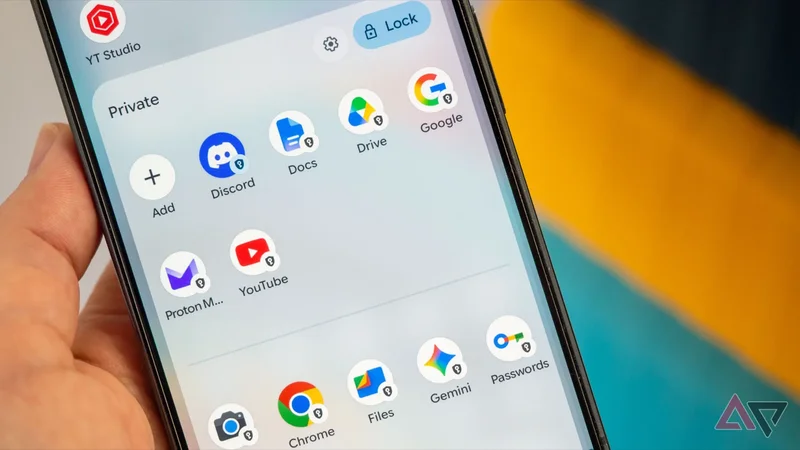
One of my favorite Pixel features over the last couple of years has been the rather hidden, but very useful Private space. It's part of the default Pixel Launcher, though it probably remains unknown by many Pixel users because you have to activate it first.
Part of the issue with Private space, also, is that people don't really know what it's good at, or when to use it. Yes, of course, there are questionable reasons to need an incognito mode on your phone, but there are also plenty of legit good reasons.
I've been a fan of the feature for so long now, and I keep harping on about it, so let me tell you what it's good at and what I use it for.
Private space sandboxes one of my Gmail addresses
And keeps it from crowding my main apps
Private space is a small area at the bottom of the Pixel Launcher's app list that needs to be unlocked to access its contents. It's a bit of a hidden vault where you can stash apps, games, and files and keep them away from your main phone.
It's usually very easy to set it up by opening the search bar in the Pixel's app drawer and typing Private Space (or going to Settings > Security & Privacy > Private space) and then following the steps to set it up.
Part of the process involves adding a new unlock method (PIN or pattern) and approving the use of biometrics or not, but the most crucial aspect is signing in with a Gmail address.
This, for me, is where the appeal of Private space lies. I can keep one of my Google accounts — the one I use the least — separate from the rest of my phone. I don't get notifications from it and don't see it each time I need to switch accounts in Gmail, Drive, or Maps.
If you have a Google account that you're not using all that much or one you don't want to link in any shape or form to your other Google accounts, this is the easiest solution to do it.
It's honestly even more practical than setting up multiple phone-wide Android users because I don't have to sign in and out of user profiles on my phone to access Private space — it's always there on my main user profile.
This is how I quarantine a few problematic apps
Especially the distracting one or privacy-hogging ones
I used to have Twitter and Instagram installed on my phone at all times. But even after disabling most notifications, I kept getting distracted by them. A minor message or alert, and I'd be stuck in there for an hour, easy.
Then it occurred to me that I could install them in Private space instead. By default, private apps don't send any notifications. You have to manually open them to see what you missed, which is fantastic for time-consuming social media services or games.
The less I saw these icons and their notifications, the less I used them, which is a perfect way to curb my use and limit wasted time.
Private space is also where I install nosy apps I don't trust all that much or apps that I'm temporarily testing. Since I don't want them to permanently live on my phone, store their data, or cause any security risks, they get quarantined in Private space.
Again, by design, this space is meant to be a separate, sandboxed part of your Pixel phone, which has zero access to any of your other apps. It can't see your files, your banking apps, your messaging apps, your contacts, or anything else really.
And when Private space is locked, none of its apps can run in the background, go online, open any sensors, or do anything. In short, it's the perfect place to lock apps that you're iffy about using or to which you don't want to give full access yet.
Private space is the easiest way to duplicate apps on Pixel
This solves my Discord problem
Many apps don't allow you to sign in with multiple user profiles. WhatsApp and Discord are two good examples. You log in with one account, and that's it. Need access to another? You have to sign out and back in.*
Because it's absolutely separate from the rest of my phone, Private space lets me replicate the same app into its confines, and there, I can sign in with a secondary profile on the same phone. It works wonderfully for Discord, for example.
Of course, the downside is that this second instance of Discord doesn't run in the background or send notifications, but if, like me, you have one main account and a secondary one, it's not a bad compromise to keep the latter there.
A great incognito space with easy, safe access
Once you set up Private space, you can use it for so much. Beyond the use cases I detailed here, you can quarantine important documents or files there, save private contacts, or leave apps with sensitive or financial data, and more.
Whenever there's an instance where I want to do something on my phone that I would rather not touch the rest of my phone or my mail Google account, it goes into Private space — no questions asked.
Of course, I wish Google would give it more love, still. Moving files from Private space back to my main phone is impossible, and I wish there was a way to reorder apps properly, but this is what we get. It's still an excellent feature and worth checking out if you never did.