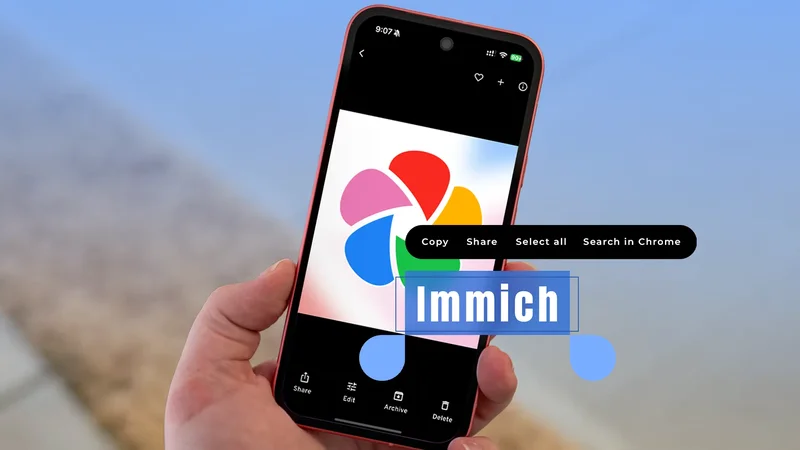
When I moved my library from Google Photos to a self-hosted Immich server, version 3.0 had recently been released. I read through the changelog, saw OCR listed under the mobile improvements, and flagged it as a nice extra.
A few weeks later, a friend asked me what I'd paid for a charger, and I found out how useful that line in the changelog was.
Reading that a feature exists and using it on your phone while someone waits on you are different experiences. The second one is what closed the last real gap between my setup and the app I left.
Immich has had optical character recognition for a while, but the useful portion only reached Android in June.
What Immich could already do
OCR search arrived in version 2.2
Immich added optical character recognition in version 2.2, in October 2025. It runs text recognition across your uploads and indexes whatever it finds, allowing you to search your library using words printed inside an image.
The processing works alongside the existing machine learning pipeline, and new uploads are handled automatically. There's also a job in the admin panel that runs it across everything you backed up before the update.
That job matters more than it sounds if you migrated from Google Takeout. My imported library was unsearchable until I triggered it, and it took a good while to work through on my hardware.
Official support covers English, Simplified and Traditional Chinese, and Japanese. Version 2.3 added to that list with language-specific models for Greek, Korean, Russian, Thai, and a few others.
Text search doesn't happen automatically when you type. On the phone, you pick the text option from the search type dropdown. On the web, there's a separate radio button.
This took me a few attempts to get right, since I kept searching normally and wondering why nothing showed up.
After I found the right toggle, it worked well. Searching for "charger" put the receipt on my screen in about two seconds, which is better than scrolling through three months of camera roll.
The web app got text copying first
Version 2.3 stopped short of the phone
Finding the receipt was only half of what I needed. The price had to get out of the image and into a chat window, and Search does not help with that.
Google Photos and Lens have handled this for years. You can open an image, drag across the text the way you would on a web page, and copy it.
Immich reached that point on the web in version 2.3, in November 2025. Its web viewer picked up a toggle that reveals detected text so you can hover over it and copy it directly.
This only worked on my laptop at the time, but since most of my photo browsing was done on my phone, the feature existed somewhere I didn't spend much time.
What version 3.0 changed
The mobile asset viewer picked up a toggle
Version 3.0 shipped in June 2026 and brought OCR to the Android app. The asset viewer now has a toggle that highlights recognized text in a photo, and you can select and copy it from the image.
It behaves like the Google Photos version does. I tapped the toggle, dragged across the price on the receipt, and pasted it into the chat without leaving the app.
Immich describes this as a first iteration, with refinements coming for how it recognizes files stored in your library. I've also run into a few images where the highlight boxes sit slightly off the text, usually on photos taken at an angle.
For the most part, printed receipts, screenshots, and documents have been accurate when I tried them. And that pretty much covers my entire use case for the feature.
Why the phone version matters more than web
Google's advantage was always convenience
It's easy to recommend Google Lens, since it already reads everything on your screen, making this Immich feature redundant. I tried using it this way for a few weeks and gave up.
Taking a screenshot of a photo to feed it to Lens creates a worse copy of an image I already own, and adds it to my library as a duplicate. It also doesn't help with finding the photo in the first place.
Moreover, Immich isn't the only self-hosted Google Photos alternative worth running, and features have rarely kept people with Google. What Google brings is the convenience of the features you need available in the app in your hand.
Text extraction is a good example, because you stop noticing it until it's missing.
A web-only version of this asks you to change how you use the platform. The mobile version works as is, which is why I use it and why I would have ignored the other one.
The gap is closing in a sensible order
Immich still isn't a drop-in replacement for users deep in the Google ecosystem. There are still features it doesn't match, especially those tied to Gemini.
What version 3.0 told me is that its priorities line up with mine, since it spent a major release putting an existing feature where people would use it rather than chasing something new to announce.
That approach is why I'm comfortable moving more of my digital life onto hardware I own this year, and why I now read a changelog properly instead of skimming it.