Although there are very few notable hardware changes coming to the Pixel 11 series, a lot of changes are happening under the hood on the software side of things, like the new Gemini-powered Gboard Ramble.
Thanks to the new Tensor G6 chip and its brand new Image Signal Processor, the Pixel 11 series also brings a bunch of new camera features. You can imagine that this is music to the ears of someone like me, who takes more than 3,000 on her Pixel every year.
I was glad to get an early look at some of these new features and I have some thoughts about each of them. Read on to find out what my first impressions are.
Camera Looks change the way your pics look
Exactly what I've been wanting on my Pixel
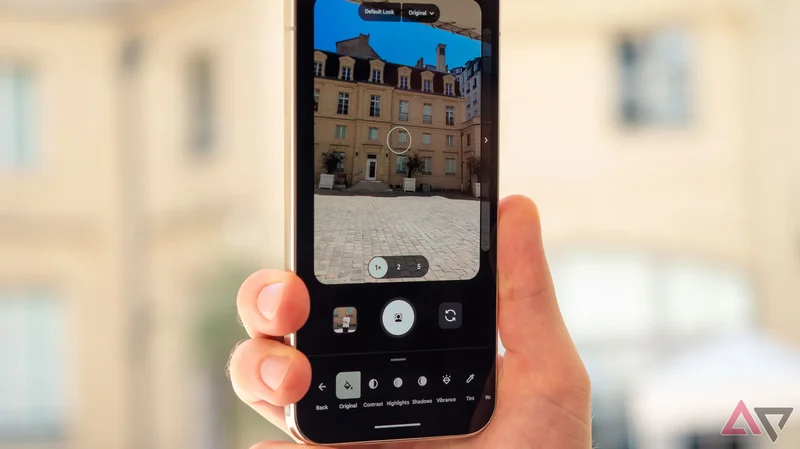
Every phone manufacturer nowadays offers a filter-like experience for the camera to allow you to tailor your photos to your liking from the get-go, without having to waste time in editing them after they're shot. Google was an outlier, but not anymore.
Camera Looks are now an integral part of the Pixel Camera experience. They live at the top of the camera UI and let you quickly switch between four default looks: Original, Classic, Shadows, and Vanilla. Each one brings something a little different to the pic.
The Pixel has always had a tendency to dull some colors when taking pics, and remove warmth, something the new Natural Look seems to fix. I'm looking forward to testing it out to see whether that ends up being true across different environments.
There are three excellent aspects to the Camera Looks feature that impressed me, beyond just that it exists:
- You can set any of the main four looks as your default. Each time you close and open the Camera app, it will stick to that choice — no need to tweak Pixel Camera settings each time.
- You can completely edit each one of these looks and save it, to tailor the warmth, shadows, highlights, contrast, saturation, and other aspects exactly to your liking.
- Besides the main four looks, there are several extras like Editorial or Black Tie (seen above). Those can't be set as default, but are still editable, too, so you can essentially create and tailor several more camera looks to your liking.
120x zoom is certainly impressive
But the real gains are in shorter ranges
A jump from 100x to 120x zoom doesn't seem like much on paper, but it still works very well. I shot a teeny tiny green Android figurine from across a large courtyard, and it came out very decent. You still get the unprocessed and processed photos to see the difference.
Google still maintains that this feature should be used on inanimate objects, not people, which was the case last year with the Pixel 10 Pro's 100x zoom. Understandable, honestly, because I've tried the 100x on animals and humans, and the results were capital-B Bad.
What the 120x does, though, is elevate the experience in the in-between, before you reach the max zoom range. I likely won't be using 120x zoom all that much, but I'll have more confidence using the 50x or 60x ranges now, knowing that it can go much further than this.
Magic Capture looks very useful
The jury's out on how well it works
The Pixel 11 Pro has a third mode at the bottom of the Camera app besides Photo and Video — Magic Capture. When you switch to it, the phone captures both video and photo at the same time, without forcing you to pick between one and the other.
Google's smarts do all the heavy-lifting in the background. They get you a high-quality video first, but they also process high-quality photos of the most important moments by doing some automatic cropping and unblurring on the spot.
A Googler ran toward the Pixel 11 Pro, shot a ball, made some faces at the camera, and the phone processed both the video and four separate photos from it.
Technically, you can already some of this by holding your finger on the shutter button when shooting pics, but that results in a low-res video. You can also manually snap pics while shooting video, but it's on you to snap the perfect moment.
Magic Capture seems to solve those limitations by doing it automatically and resulting in high-quality video and photos. I honestly can't wait to test it out in person to see how well it works in real life.
Concerts, sports events, personal family moments, playing with my friends' pets — I can imagine so many moments where this feature will be extremely useful if it works this well.
Instant Night Sight is really instant
This will probably be my most-used feature
Instant Night Sight might fly under the radar as a small improvement to the Pixel Camera experience, but it's probably the feature that I'll end up using the most in my daily life.
I shoot a lot of photos in dark environments — dim-lit expos, underground pubs, dark cathedrals, gloomy halls, etc — so anything that can save me from standing still for a few seconds each time I take a photo like that will be very welcome.
I saw it in action, too, and it's impressive how well it works compared to the Pixel 10 Pro. The new sensors on the Pixel 11 Pro already let it more light, and you can see from the preview that it's already doing a better job "seeing" what's there than its predecessor. It snapped the photo in a split-second, too. Instant alright.
I would love to test this out during a concert where every second matters and instant capture is essential if you don't want to miss the moment or get a bad, blurry pic.
5x Portrait zoom works very well
Don't sleep on this underrated feature
Of all the new Pixel 11 Pro features, 5x zoom in Portrait mode might not be the most headline-grabbing, but it's the one that piqued my interest first.
I take enough portrait pics on my Pixel, and I've always wished I could zoom in further to be able to take a pic from further apart, with better background blur and separation. But the Pixel 10 Pro limited me to 2x. The Pixel 11 Pro ups it to 5x.
And it works very, very well. Check the resulting image above. The bokeh effect is perfect, the zoom is doing its job, and even at a distance, you can see the portrait effect. This will be another feature I'll use a lot to capture candid moments from my husband throughout the year.
There are even more new Camera features to try later!
I was only able to check out these five new features on the Pixel 11 Pro XL, but there's even more that Google has packed into the camera experience on its latest phones. Video improvements are top of my mind, for sure, and I can't wait to see whether they measure up.
Stable video, 8K Video Boost, the new Teleprompter mode, the new Creator suite for trimming and re-ordering of video, the base Pixel 11's 30x Super Res Zoom — all of these are exciting and worth checking out when I get my hands on the phones for a proper review.