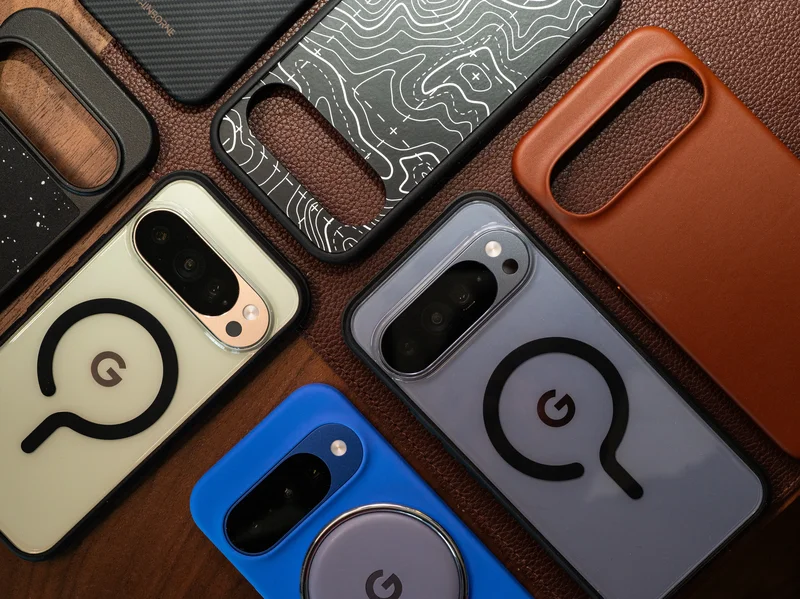
Featured in this article
Google may spend years testing the durability of its own hardware, but because accidents happen, you’d still be wise to get a good case for your Pixel 10 phone. Most devices in the Pixel 10 line—the Pixel 10, Pixel 10 Pro, Pixel 10 Pro XL, and Pixel 10 Pro Fold—use Corning's Gorilla Glass Victus 2. (The Pixel 10a uses Gorilla Glass 7i.) It's tough glass, but it's not indestructible, nor is it as strong as what you'd find on other flagship phones, like Samsung's Galaxy S26 Ultra or Apple's iPhone 17 Pro, which embeds ceramic nanocrystals into the glass for extra strength.
No matter which Google Pixel 10 you have, you'll want to protect your device with a case at the very minimum (a screen protector is also a smart buy). This will decrease the odds of an accidental drop ruining your smartphone and preserve the phone’s appearance so it looks great over time. It’s an especially important detail if you plan on trading in the phone for a newer device in the future.
I've tested several Pixel 10 cases to find the best. I’ve included other accessories in this guide, as well, including some magnetic Qi2 gadgets. To get the most out of your Pixel 10, be sure to check out our guide to Key Pixel Settings to Change.
Updated August 2026: I’ve added new screen protectors from Mous and OtterBox, removed some discontinued picks, and confirmed accuracy and prices throughout.
Will Pixel 9 Cases Fit on the Pixel 10 Series?
Sometimes the stars align, and an updated phone model has the identical dimensions, shape, and design as the previous model, allowing you to use an older case. That is, unfortunately, not the case with the Pixel 10 series. Google updated the speakers on this line, so while you may be able to fit some soft Pixel 9 cases over the Pixel 10 phones, you'll run into other issues, namely blocking the speaker port. Pixel 9 cases without magnets will interrupt the Qi2 functionality on the Pixel 10 series. For the best experience, I recommend avoiding a Pixel 9 case altogether, whether it's for the Pixel 10 or Pixel 10 Pro.
Will Pixel 10 Cases Fit on the Pixel 10 Pro?
Most Pixel 10 cases will fit the Pixel 10 Pro, and vice versa. Several retailers market their cases (even Google) for both phones. I’ve tested several Pixel 10 Pro cases on the Pixel 10 and have had no issues. The cutouts are all accurate, the button placements are perfect, and the fit is snug. However, Pixel 10 and 10 Pro cases are not compatible with the Pixel 10 Pro XL.
Will Pixel 10 Cases Fit on the Pixel 10a?
Nope. The Pixel 10a is slightly taller, thicker, and wider than the Pixel 10, and the camera bumps are different, too. These cases are not interchangeable.
What Does ‘Qi2’ Mean for Pixel 10 Cases?
The Pixel 10 phones are the first Android flagships with native Qi2 wireless charging. That means magnets are built into the backs of the phones, just like Apple's iPhones and MagSafe, allowing you to access faster, more efficient wireless charging. Magnets also align the coils perfectly, eliminating any worries about your phone not charging because you didn't place it just right on a charging pad.
Not every Pixel 10 case has magnets baked in, though most of them do. (Almost all of the cases in this guide feature magnets.) However, I have asked nearly every case maker whether its cases are Qi2-certified by the Wireless Power Consortium (which manages the Qi2 standard), and the answer is almost universally no, which may point to less reliable and efficient charging. For the best experience, make sure to check the product listing to see if it mentions “Qi2,” “Made for Google,” or “Pixelsnap compatible,” which is Google's name for its magnetic accessory system. The latter two certifications at least ensure that the case was subject to a rigorous testing standard.
One neat feature to note: When you place your Pixel 10 on a Qi2 wireless charger, you should see an option to add a screensaver. This isn't a traditional screensaver, though you can totally just set a clock or photo and call it a day. There's also a Home Controls option, which lets you place your Google Home smart devices—like smart lights and smart shades—on the lock screen while the phone is charging for quick access. Head to Settings > Display & touch > Screen saver to set it up.
Will My Old Wireless Charger Work for the Pixel 10?
While Qi2 is backward compatible with Qi wireless charging, I have extensive evidence that not all Qi wireless chargers are fully compatible with Qi2 phones. The reason may come down to the placement of the wireless charging array on newer devices. By all means, try charging your new Pixel 10 with your preferred case on a wireless charger you already own. If it works, great! It won't be as fast or efficient, but at least it'll work. However, if it doesn't work, look for a Qi2 charger. You can check out several picks here (and below).
How I Test Cases
I install every case I receive over the Pixel 10 series and take a look at the fit, whether or not ports or speakers are blocked, and ensure the buttons are clicky and responsive. I also monitor how much the case sticks out from the display—the taller the better, as it'll keep your display off the ground. To test Qi2 accessories, I gauge the strength of the magnetic connection. I also install every screen protector to test the ease of the application process.
I don't do drop tests because I have a limited number of Pixel phones. In my experience, though, a case isn’t a guarantee your phone won’t crack when dropped, regardless of “drop test” claims from a manufacturer. Even so, a case improves your chances of protection, especially if you add a screen protector.
Enter the MagSafe Accessory World
WIRED has been testing MagSafe accessories for years; you should totally take advantage of the vast ecosystem with your Pixel 10. Whether you want a magnetic wallet or phone tripod, there’s a corresponding WIRED guide with plenty of tried-and-true recommendations. Most of our picks should work with the Pixel 10 series. Here they are:
- Best MagSafe Accessories
- Best MagSafe Wallets
- Best MagSafe Wireless Chargers
- Best MagSafe Power Banks
- Best MagSafe Grips
Other Screen Protectors to Consider
Zagg Glass Elite, Glass Elite Privacy, and XTR4 for $50–$60: Zagg has a streamlined and intuitive installation process; my application was perfect. The Glass Elite ($50) uses aluminosilicate glass that’s neither too thick nor terribly thin, and the edges are rounded, so they don't feel sharp. (They don't quite extend all the way past the bezels.) I don't love the notch for the selfie camera because it stands out quite a bit. The Glass Elite Privacy ($55) is a two-way privacy screen protector, meaning folks on either side of you can't see what you're looking at (though someone standing above you can). Text can look a bit fuzzy if you look closely with this protector, and you take a small hit to overall screen brightness, but it's an otherwise solid option. Finally, the XTR4 ($60) covers more of the display, uses a stronger tempered glass, and strips away blue light (though whether that's really helpful remains up for debate). Sadly, for all of these options, you only get one protector in the box.
Spigen GlasTR EZ Fit Tempered Glass Screen Protector (2-pack) for $20: This is the best bang for your buck for screen protection. Spigen gives you two tempered glass protectors in the box, and its application tool makes installation mistakes nearly impossible. There's even a squeegee tool to push out air bubbles. All that for $20.
UAG Glass Shield Screen Protector for $40: UAG includes the usual wet wipe, dust-removal sticker, and microfiber cloth. There's also a plastic shell you place atop your Pixel to use as a guide when applying the tempered glass screen protector. It's not the easiest method I've tried, as there's room for some error (and potential to get grime or a smudge on the underside as you apply), but it was a fairly quick and painless installation nonetheless, and the air bubbles disappeared quickly.
Mous Tempered Glass Screen Protector (2-pack) for $30: This is another pretty standard and average screen-protector experience. You get two in the box, plus a caselike installation guide, a microfiber cloth, an air-bubble squeegee, and some dust stickers. Mous' packaging means it's hard to store the spare protector in the included box, but otherwise, I liked this protector.
OtterBox Glass Screen Protector for $40: Installation here is super straightforward: Put the frame on your phone, slide out the backing, and press down on the screen protector with your finger. Wait a few seconds, and the whole thing is perfectly applied. For the price, I wish this came with two protectors, but I like it fine otherwise.
Other Cases We Like
Bellroy Pixelsnap Leather Pixel Folio for $75: This case spruces up your Pixel 10 Pro Fold with leather in various colors. A slot on the flap’s interior can hold a credit card or two; the flap stays shut by magnetically sticking to the front edges of the Fold. It's an elegant look, but the bend when you flip open the Folio is a bit too thick and makes holding the phone feel unstable. Using it with the phone fully open isn't too bad, but the whole thing doesn't feel incredibly protective.
Casetify Impact Magnetic Case for $52: Casetify leaves a bad taste in my mouth after it was caught stealing artwork from Dbrand and JerryRigsEverything. Its cases are still solid, with a thick and grippy bumper and clicky buttons. It is one of the few places that offer many design options for Pixel phones.
Casetify Pixel 10 Pro Fold Impact Magnetic Case for $60: This case is more protective than the Bellroy above, but the lip around the screen is a little too thick for my taste. The design makes swiping in from the edges of the screen difficult. If that doesn’t bother you, you'll appreciate that Casetify doesn't use adhesives all over the case, but only in one spot (it provides extra stickers in the box if it comes off). It's one of the only folding case options with dozens of fun designs to choose from. The $60 price is lower than many of its peers, and there's a magnet for Pixelsnap wireless charging. It's a shame the clear version Casetify sent me attracts so much dust and lint.
Zagg Crystal Palace Lite for $30 and Crystal Palace Snap for $50: A super-simple, no-frills clear case, this Zagg option will do the job. There are two versions of the case. If you don't care about the Qi2 magnetic function of your Pixel, go for the Lite that doesn't have magnets baked in. (No Qi2 magnetic accessories will stick to it, and I'm not sure why you'd want to kill that functionality, especially since you can get magnetic cases for less than $20.) Alternatively, you can buy the Crystal Palace Snap, which adds the classic magnetic ring on the back. It also has textured edges for better grip. Either way, the buttons are responsive, the edges are nicely raised over the screen, and the clear back shows off your Pixel's color. I still think Dbrand's Ghost Case 2.0 is the better clear case, because the Snap seems to pick up scuffs easily.
Zagg Rainier Snap Magnetic Case for $70: Also available for the Pixel 10 Pro XL for $70, this rugged case has two pieces. Plop your Pixel into the thick back piece, and snap the front polycarbonate frame over top. It feels very rugged and protective without adding too much bulk, but the design leaves a lot to be desired. (It’s just a bit too tactical for me.) There's a sizable lip over the screen for great glass protection, even if it means swiping in from the edges is a bit trickier. The buttons are responsive but require a tiny bit more force to press. At least there are built-in magnets so you can take advantage of Qi2.
Mous Clarity Pixelsnap Case for $70: This is my second-favorite clear case after Dbrand's Ghost 2.0. There's a thick bumper around the phone to absorb impacts, a solid magnetic connection, and a nice lip around the screen to keep it off the ground. The buttons are clicky, too.
OtterBox Symmetry Clear Pixelsnap Case for $60: This is a nice, clear case that's also Pixelsnap-certified. The cutouts are accurate, the edges are slightly raised over the screen, and it offers a decent grip. If you prefer a completely clear case without a separate bumper, this will satisfy.
Spigen Parallax for $19, Nano Pop for $19, Tough for $20, and Liquid Air Pixelsnap Cases for $18: I've tried several Spigen cases, and the Rugged Armor is my top pick. These other options have different designs, but they're solid cases for the cost. I found the Parallax slippery, and the sides also felt a bit cheap. The Nano Pop had a decently grippy texture on the edges, but the Liquid Air is one of my favorite Spigen designs. The buttons are just a little stiffer than I'd like. The Tough has a built-in kickstand that's nice, although it can be difficult to pop out if you have short nails. These are minor gripes, though. They're great cases for $20 or less, especially considering they're all Made for Google–certified.
UAG Pathfinder Pixelsnap Case for $60: Someone probably likes how this case looks. That person is not me, but clearly, there's a market for this styling. If you fall in that camp, there's not much about the Pathfinder to complain about, except I found the buttons slightly stiffer than usual. It checks off all the other boxes, with a raised lip over the screen, but I just don't find it that attractive.
Burga Tough Case for $55: This is one of the few nonmagnetic cases I've tested for the Pixel 10 series. If you absolutely don't care for Qi2 and magnets in these phones, this is a perfectly fine case, and Burga has tons of designs you can choose from. The exterior is a hard plastic shell, but the phone is wrapped in a soft rubbery shell that absorbs impacts. The buttons are fairly clicky—but not the most responsive—and there's a solid lip around the screen.
Poetic Guardian for $27, Spartan for $26, and Revolution Case for $25: One point to note is that Poetic includes a screen protector that embeds itself into the case, like old-school cases that offered full protection. You can opt not to use it, as the case will work with or without the protector. The Revolution doesn't have any magnets but has a built-in kickstand and a cover that can completely protect your cameras; I find this a little extreme, so I don't care for it. It also, in my humble opinion, looks hideous. The Guardian looks much better, with a thick bumper, raised edges, and a covered port. The buttons are a little stiff, but at least it has built-in magnets for Qi2 (not certified). Finally, the Spartan (for Pixel 10a) has a built-in MagSafe ring stand that lets you use MagSafe accessories, grip your phone securely, and prop it up in kickstand mode. The buttons could be more responsive, but it's an option worth considering if you want a multitool sort of phone case.
Avoid These Cases
Peak Design Gnar Case: I like many of Peak Design's cases, but not the Gnar case for the iPhone 17 range or the Pixel 10. The edges of the phone feel way too slippery, and they also push in a little too much into the front screen, which disrupts my screen protector and creates a small air bubble. The lip around the display is also lackluster, and I find it a little too hard to pull out the flap that protects the USB-C charging port. I don't love the two-tone material choice on the back; it feels cheap and dull. The SlimLink square adds an extra layer of security for the Pixelsnap magnetic attachment, but you'll have to pair it with relevant SlimLink docks and mounts to get the most out of it. I think you should just stick with the Everyday Case if you want to make use of Peak Design's mounts.
Power up with unlimited access to WIRED. Get best-in-class reporting and exclusive subscriber content that's too important to ignore. Subscribe Today.