Tom's Hardware Verdict
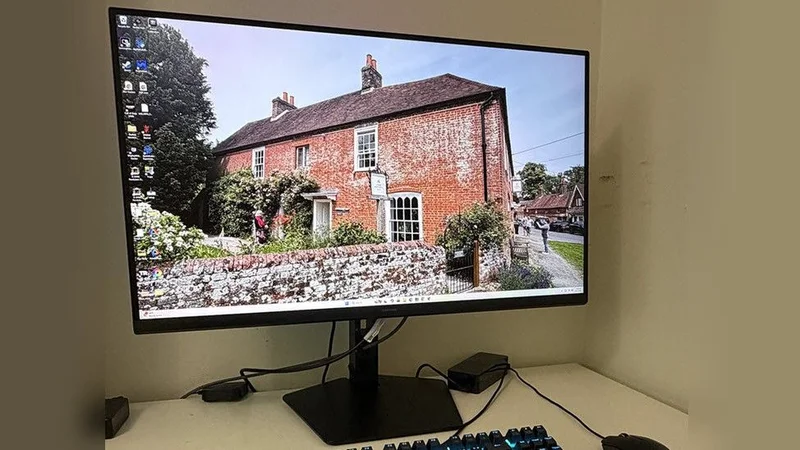
The Samsung Odyssey G80HS represents a solid step forward in the quest for greater pixel density with a gorgeous picture and speedy gaming performance. The dual refresh feature means it will work with a wide variety of systems, but it needs exotic hardware to perform at its peak.
Pros
- +Impressive contrast with saturated and accurate color
- +Automatic color space switching
- +Excellent HDR quality with effective dynamic contrast
- +Responsive panel with low input lag
- +Flexible dual refresh feature
- +Solid build quality
Cons
- -6K at 165 Hz requires expensive hardware
- -Adaptive-Sync and overdrive can’t be used together
- -No internal speakers
Why you can trust Tom's Hardware
Since the advent of fixed-pixel flat panel displays, the quest for greater pixel density has not subsided. In times past, a high-res display was 1280x1024 with a 4:3 aspect ratio. Now the gold standard is 4K, 3840x2160. So, where do we go from here?
Traditionally, resolution increases in whole multiples like 1920x1080 to 3840x2160. And there are a few 8K 7680x4320 screens out there. But in the realm of the best gaming monitors, you can have any resolution you want, so why not 6K?
Samsung’s Odyssey G80HS is a 32-inch IPS panel with 6144x3456 pixels at 165 Hz and 3072x1728 pixels at 330 Hz along with Adaptive-Sync, HDR10, and wide gamut color. Pixel density is an impressive 224 or 112 ppi. Let’s take a look.
Samsung Odyssey G80HS Specs
| Panel Type / Backlight | IPS / W-LED, edge array |
| Screen Size / Aspect Ratio | 32 inches / 16:9 |
| Max Resolution and Refresh Rate | 6144x3456 @ 165 Hz |
| Row 3 - Cell 0 | 3072x1728 @ 330 Hz |
| Row 4 - Cell 0 | FreeSync and G-Sync Compatible |
| Native Color Depth and Gamut | 10-bit / DCI-P3 |
| Response Time (GTG) | 1ms |
| Brightness (mfr) | 450 nits |
| Contrast (mfr) | 1,000:1 |
| Speakers | None |
| Video Inputs | 1x DisplayPort 2.1 |
| Row 11 - Cell 0 | 2x HDMI 2.1 |
| Audio | 3.5mm headphone output |
| USB 3.2 | 1x up, 2x down |
| Power Consumption | 52.5w, brightness @ 200 nits |
| Panel Dimensions WxHxD w/base | 28.1 x 18.5-23.5 x 10.4 inches (714 x 470-597 x 264mm) |
| Panel Thickness | 2.3 inches (58mm) |
| Bezel Width | Top/sides: 0.3 inch (8mm) |
| Row 18 - Cell 0 | Bottom: 0.8 inch (20mm) |
| Weight | 16.3 pounds (7.4kg) |
| Warranty | 3 years |
I’ll start with the caveat: the G80HS requires the latest port specification, DisplayPort 2.1 or HDMI 2.1, to run in 6K at 165 Hz. You’ll also need an HDMI cable rated for 48 Gbps, or a DisplayPort cable rated for 80Gbps. You’ll also need a GeForce RTX 5090 to even dream of running over 120fps in 6K. That’s where the dual mode function comes in. Though 3072x1728 is unusual, it is a realistic task for an RTX 5090 or an RTX 4090 to move things along at 240 fps or more. That 330 Hz refresh rate is handy to have.
The panel uses Fast IPS technology with a claimed 1ms response time. It includes Adaptive-Sync and overdrive, but you can’t have both at the same time. I’ll talk more about that later. The good part is that input lag is extremely low, so gamers will get a responsive experience. And running at the higher refresh rate eliminates nearly all motion blur.
The panel doesn’t employ Quantum Dots but manages to cover just over 90% of DCI-P3 with solid out-of-box accuracy. With a few tweaks, I saw reference-level color, gamma and grayscale tracking. The G80HS also has an equally accurate sRGB mode for graphics pros, photographers, and users who want the correct BT.709 color space for SDR content. HDR10 signals are supported as well with expanded contrast and peak white levels around 480 nits.
The G80HS is clearly a gaming monitor with extras like LED lighting, aiming points and game-specific picture modes. You get all the latest video ports too with DisplayPort 2.1 and two HDMI 2.1 inputs. There are USBs for peripherals and a 3.5mm headphone jack. The only thing missing are internal speakers.
Get Tom's Hardware's best news and in-depth reviews, straight to your inbox.
Bleeding-edge resolution doesn’t come cheap, but the G80HS isn’t super pricey either at $1,599 to start. Let’s see how it performs.
Assembly and Accessories
The G80HS arrives packed in crumbly foam with a base, upright, and panel that assembles easily, no tools needed. A medium-sized power brick with right-angled cords provides the alternating current, and you get very thick HDMI and DisplayPort cables which are rated for 48 and 80 Gbps respectively.
Product 360
The G80HS has a minimalist aesthetic with only a tiny Samsung logo on the front bezel. The rest of the frame is flush and thin. Coupled with a very slim side profile, one might think they’re looking at an OLED. Internal bits are packed into a central bulge which has generous ventilation. The stand’s fulcrum is ringed by an LED that can play a variety of effects and colors.
The stand is substantial with firm movements and generous adjustments. You get a five-inch height range plus 2/25 degrees tilt and 30 degrees swivel. There’s a 90-degree portrait mode as well. The base has a medium footprint and brings plenty of stability. I noted that the fulcrum had a little wobble when adjusting tilt and rotation.
The screen has an effective anti-glare coating with a matte finish. It is grain-free and provides excellent clarity for the extreme 224ppi pixel density. You’ll need a magnifying glass to see any dot structure from any distance. Sharp and smooth is almost an understatement.
The I/O panel includes a DisplayPort 2.1 and two HDMI 2.1 ports. All of them can manage 6K resolution at 165 Hz if your video card has DisplayPort 2.1 or HDMI 2.1 outputs. USB 3.2 ports are also included, one upstream and two downstream.
OSD Features
The G80HS has a super-efficient OSD that’s controlled by a joystick. A quick menu pops up on the first press, then you click up and select to see the full menu.
Samsung’s gaming monitors all have this cool control-panel-looking menu with signal info at the top in little portholes and a tree-style menu. The G80HS has four sub-menus starting with game options. You can toggle Adaptive-Sync, which is good because if you want overdrive, it must be turned off. This is an unusual choice because at 165fps, you’re going to want both things. The choice is less motion blur or no frame tears. And that will depend on game type. I’ll talk more about that below.
The Dual Mode option switches between 6K at 165 Hz and 3K at 330 Hz. Given my experience, users will be using the 3K mode more often for twitchy shooters and the 6K mode for less frenetic titles. For aiming help, you get two different reticles. And the lighting, called Infinity Core, can play different colors and effects through the LED ring in the back. CoreSync lets you sync the light show with what’s happening on the screen.
The Picture menu starts with 10 picture modes, with Graphic being the default and best choice for all-around gameplay and productivity. It leaves calibration controls accessible and has an Auto color space option which selects sRGB for SDR and DCI-P3 for HDR. This is something I wish more wide-gamut monitors had. For adjustments, you get gamma presets and a very precise set of RGB sliders.
To enhance contrast, there are three different options: Local Dimming, Contrast Enhancer, and Dynamic Brightness. Local Dimming is a bit misleading because the G80HS is not a full-array panel. And tests showed me that it doesn’t do zone-edge dimming either. The best of the three for expanding dynamic range is Dynamic Brightness. That will deliver almost 15,000:1 contrast versus the panel’s native ratio of around 1,700:1. In HDR mode, you can opt for dynamic tone mapping, which improves the image in most cases. I noted that in testing, the Static mode produced reference-level accuracy. You can read more about that on page five.
Samsung Odyssey G80HS Calibration Settings
The G80HS is close to standard out of the box and will display its full native color gamut, 90% of DCI-P3, for both SDR and HDR content. The Picture menu has a single-point RGB control which is very precise. I used it to tighten up grayscale tracking. Gamma is nearly perfect on the zero setting. If you want sRGB for SDR content, change the Color Space option to Auto. Then the monitor will switch back and forth automatically. My recommended settings are below. I noted that I could adjust the RGB sliders independently for HDR mode, and as it turned out, the same settings worked. This is something very few HDR monitors allow.
| Picture Mode | Graphic |
| Brightness 200 nits | 17 |
| Brightness 120 nits | Row 2 - Cell 1 |
| Brightness 100 nits | 4 |
| Brightness 80 nits | 2 (min. 71 nits) |
| Contrast | 50 |
| Gamma | 0 |
| Color Temp User | Red 2, Green 3, Blue -3 |
Gaming and Hands-on
Gaming on the G80HS was a unique experience. On the positive side, it’s the first dual-refresh monitor that I can call truly useful because its resolution only reduces to 3072x1728, which equates to 112 ppi, a tad more than a 27-inch QHD screen. And my GeForce RTX 4090 ran it at around 250 fps, which eliminated any need for Adaptive-Sync or overdrive.
This was fortunate because, as I discovered, playing in HDR mode grays out both options. In essence, you get no video processing with dual mode engaged, but don’t be dismayed. Motion resolution was superb, and the G80HS was super responsive to control inputs. You’ll see why when you read the input lag test results on the next page.
Playing in 6K was not as fun with my setup. An RTX 4090 is fine for 4K where I can get speeds over 200fps. But at full resolution, I could barely crack 100 fps. And with Adaptive-Sync and overdrive out of the picture, motion was just too blurry. There was no hit to input lag; control response was instantaneous. But it was hard to aim precisely at distant targets because unless I stopped moving, enemies were too difficult to make out.
Gameplay experiences aside, the G80HS is gorgeous to look at. With 224 ppi, the picture is uncannily smooth. I could not see the pixels even with my nose next to the screen. Though 4K looks very film-like and realistic, 6K is even more so. It amps up my anticipation and desire for 8K, which will inevitably be a thing within my lifetime.
Working on documents and graphics is such a pleasure when detail and clarity are this high. Though I usually crow more about contrast… Oh wait, the G80HS has a good deal of that. True that it’s IPS, but it delivers around 1,700:1 natively and almost 15,000:1 with Dynamic Brightness engaged. Though it isn’t quite in OLED territory, it is visibly superior to the average LCD panel, and that includes Mini LED monitors with their full-array backlights. The G80HS’s HDR is particularly excellent with balanced color, perfect luminance tracking, and peak highlights around 480 nits.
Takeaway: Though the G80HS’s resolution is somewhat of an “in-between” proposition, there’s no denying its appeal. 224ppi is serious pixel density, and it manifests itself as a super smooth and lifelike picture. Coupled with excellent contrast and pro-level color accuracy, it delivers a truly useful dual-refresh feature where you can play at 330fps at 3K resolution, which equates to 112ppi. So, if you can’t drive it at 6K/165 Hz yet, you can still enjoy it until the next generation of premium video cards comes to market.
MORE: Best Gaming Monitors
MORE: How We Test PC Monitors
MORE: How to Buy a PC Monitor
Current page: Features and Specifications
Next Page Response, Input Lag, Viewing Angles and UniformityChristian Eberle is a Contributing Editor for Tom's Hardware US. He's a veteran reviewer of A/V equipment, specializing in monitors. Christian began his obsession with tech when he built his first PC in 1991, a 286 running DOS 3.0 at a blazing 12MHz. In 2006, he undertook training from the Imaging Science Foundation in video calibration and testing and thus started a passion for precise imaging that persists to this day. He is also a professional musician with a degree from the New England Conservatory as a classical bassoonist which he used to good effect as a performer with the West Point Army Band from 1987 to 2013. He enjoys watching movies and listening to high-end audio in his custom-built home theater and can be seen riding trails near his home on a race-ready ICE VTX recumbent trike. Christian enjoys the endless summer in Florida where he lives with his wife and Chihuahua and plays with orchestras around the state.