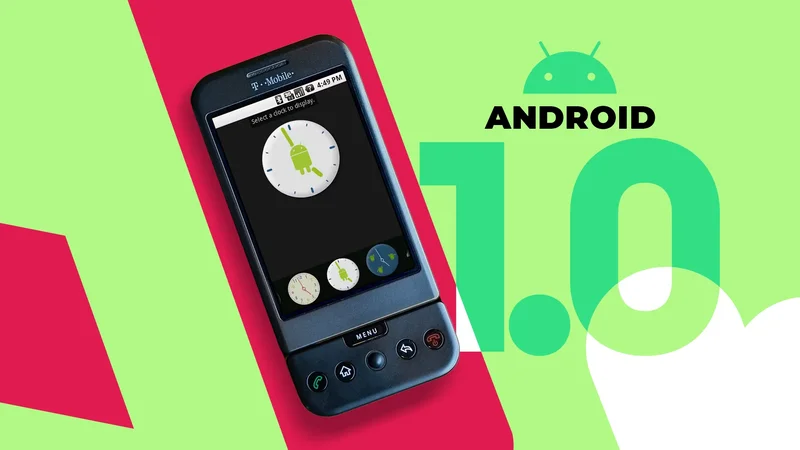
My first Android phone was the first Android phone: the HTC Dream (sold as the T-Mobile G1 in the US and parts of Europe).
I had been working as a tech reviewer for several years by then, and when "The Dream" landed on my desk in late 2008, it met me hiding behind a wall of skepticism.
The world was still treating the iPhone as a technological meteorite sent by the space gods of the future, and I didn't expect Google's panicked reaction to it to be anything other than a clunky disappointment.
I mean, it had a physical keyboard. Yuck!
But I opened the box, and the phone looked at me with its Bruce Campbell chin and its giant 3.2-inch screen, and I had to admit I liked it.
When I slid it open and saw that full-sized keyboard, I actually felt a little relieved.
The first-generation iPhone's virtual keyboard was a nightmare to use, especially for someone with big, chubby fingers like mine. So a physical keyboard on a device I could actually answer email on suddenly didn't seem so "yuck."
Booting an 18-year-old operating system in 2026
There is no installer, which is why it still runs
I'm not here to talk about the phone. I want to talk about the operating system that came with it.
Android 1.0 shipped on September 23, 2008, which means this September it turns 18, old enough to drink in some parts of the world.
So I plan to raise a glass in its honor on its birthday and celebrate the whole journey up to it. To do that, I'm going to install and review every version of the operating system along the way.
I want to see which features arrived and which quietly got dropped, but mostly I want to see what people expected to be holding when they bought this new gadget called a "smartphone," and how that changed over the years.
I downloaded the original 2008 developer kit, which is still sitting online, and a few minutes later Android 1.0 was booting on my laptop.
There is no installer. You unzip the folder and run the file, and that's the whole reason an 18-year-old program still opens on Windows 11 in 2026. It doesn't install anything; it just … runs.
What greeted me was an almost empty home screen, with a giant analog clock eating most of the precious real estate. And it's there for a reason.
Why Android 1.0 greets you with a giant clock
It was a silent promise of things to come
So why a clock widget? And why an analog clock? That seems to be a jab at Apple's design philosophy.
A widget says one thing very clearly: customizability. It says, "This clock can move, it can be a different clock, it doesn't even have to be a clock at all. It's your phone, do what you want."
That is how Google separated itself from its biggest competitor, and I respect it for that. This could have been a black screen with a grid of icons, but instead it has a wallpaper of a lake and a giant clock that screams "there are no walls in this garden, go wild."
You can place any picture as a background or choose from 18 wallpapers, three commissioned from artists Dale Chihuly, John Maeda, and Marc Ecko. That shows dedication. This wasn't added as an afterthought.
What felt like an afterthought was that you can't change that clock widget. At all. It has exactly one face.
Meanwhile, the alarm clock, buried in the app drawer where nobody is going to admire it, was shipped with four of them and a picker to switch between them.
So the thing sitting on the front page, the one making the argument about this being your phone to arrange however you like, was closer to a cardboard cutout with the word WIDGET written on it.
Google never gave it a second face. What it did instead, seven months later in Android 1.5, was take it out of the launcher completely.
In its place came the framework that lets anyone build a widget. To put that in perspective, Apple added widgets to its home screen in 2020, 13 years after the iPhone launched.
So calling Android 1.0 "customizable" is being generous. You got 18 wallpapers, a clock you couldn't touch, and permission to drag icons around. Those options expanded fast over the next few updates.
But there was one icon on that phone from day one that was smugger than any widget or wallpaper, and that was the "Android Market" icon.
Android shipped with an app store, and the name was the point
Why shop at a store when you can go to a market?
In case you forgot, the iPhone didn't have an app store for a full year after launch.
The early adopters of Apple's magical new phone were not only limited to a black background and, at first, no way to move their icons around, but were also limited to whatever was on the phone.
It was important for Google to ship this phone with that option installed, and the name they gave it was a position rather than a label.
Six weeks after Apple opened the App Store, and before the G1 was even on sale, Google's Eric Chu wrote on the Android Developers Blog:
We chose the term 'market' rather than 'store' because we feel that developers should have an open and unobstructed environment to make their content available.
A store implies somebody is deciding what's on the shelves. A market is open and varied, and anyone can set up a booth.
The 3 updates that changed what the phone was for
Now it could take any shape needed
Android 1.1 arrived in February 2009, and it is, I'm sorry to report, the most boring software update I have ever looked at.
Some map fixes. An email client for people who don't want to use Gmail. Really, nothing special.
But then Android 1.5 landed in April of the same year, and there it was, in all its glory: a virtual keyboard, the ancestor of every Android keyboard app you can install today.
It doesn't look like much, sitting across the bottom of a screen that had little room to give. But a keyboard made of pixels doesn't have to exist in plastic, and a phone that doesn't need plastic keys doesn't need to be shaped like one.
Until this update, every Android device had to have a physical keyboard. After it, any shape could be an Android phone.
It didn't arrive alone, either. Latin, Chinese, and Japanese input turned up in the same release, along with a dictionary that picked up the words you used.
In one update, Android expanded into any shape and into most of the world.
By 1.6 in September, the direction was unmistakable. You could search your phone and the web from the same box. You could talk to it instead of typing.
It shipped with a set of accessibility services, including a screen reader and a text-to-speech engine.
A year after Android arrived as a developer's phone with a keyboard sticking out of the side, it could be used by somebody who couldn't see the screen at all.
Android 1.0 already knew what it wanted to be
This was not a panicked reaction
I came into this expecting to laugh at a rushed product, and it really wasn't one.
Google was in an impossible situation. It had a phone ready to ship, watched Apple redefine the entire category in 90 minutes, and had to start over.
But a panicked company usually copies or improvises, and this doesn't do either. Going through it one version at a time, what you see is a direction.
Sure, the clock widget only had one face, but the decision to use widgets was there from day one. The plan to build a garden with no walls was laid out from the start.
Every update solved a problem, and almost all of them answered it the same way: by handing the job to somebody outside the building.
I know how this story ends, so none of it should be surprising. What surprises me is that they seem to have known where they were going this early, and that they mostly got there inside twelve months.
Which is why I'm weirdly impatient to install 2.0.