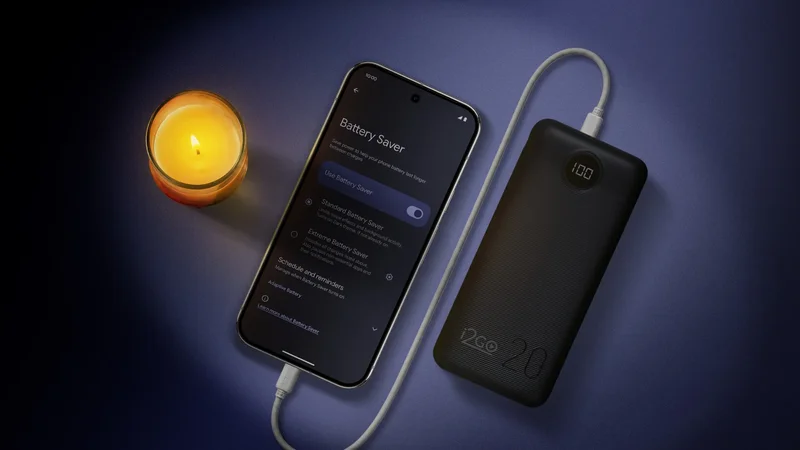
A few years ago, I experienced a nasty power outage that lasted over a week. Back then, I was one of the lucky ones. My power was restored earlier than others, as some had lost it for much longer.
That's when I decided I needed an emergency preparedness plan for the next time I experienced an extended outage — or during a travel emergency.
Thankfully, I spent time working through that, and it came in clutch during my recent two-day outage that happened two weeks ago.
I also ensured my wonderful Android phone remained reliable throughout the duration of it — and here's what I did to make that happen.
Related
Now I don't need to charge it before going to bed
Create an emergency preparedness plan
Keep a checklist of items that you may need
So for me, I have a simple checklist that I do as part of my emergency preparedness plan.
First, I make sure I have some non-perishable food stocked up that doesn't require using the toaster, microwave, oven, or stovetop — BBQ is fine as long as I have propane.
Second, I keep spare disposable batteries. I ensure the flashlights I buy can use them.
Third, I have a working, decent power bank. My primary one is from UGreen. You can purchase solid ones from Anker, as well.
I keep that charged and always do a monthly check on whether it's still working or fully charged.
Lastly, if you want to invest in a portable generator, there are a few budget-friendly ones you can buy at your local depot store.
After you've secured these key items, it should be enough to last a few days.
If you have the space, it's also not a bad idea to stock up on ice for your freezer.
However, during an outage, throw out refrigerated food if it stays in an unpowered fridge after 4 to 5 hours, or move some items to an ice-stocked cooler or half-empty freezer.
A freezer can keep food for up to 24 to 48 hours as long as it stays closed.
Also, keep a safety kit on hand for anything, and water! I live on well water, so I always have a few cases of bottled water — but you can purchase portable water filters if need be.
That's mostly everything that makes up my essentials for emergency preparedness that isn't about handling tech.
Prepare your Android phone for an outage
Keep it for crucial services and check-ins
Ensure you have surge protectors for your plugged-in electronics. If not, unplug them immediately.
My outage lasted two days, though the power company turned it back on at random times while fixing it, which is why I recommend ensuring everything is properly grounded and protected, so no damage can be done.
During all of this, my phone became my best friend. It holds all emergency contacts, mainly immediate family and some relatives, and it keeps me updated.
I technically live on the outskirts of a major city, and the city itself had bad flooding. Some people had basements flooded, including someone in my family.
Fortunately, one of our family members checked in, and she was escorted out of her home to safety.
But I wouldn't have known this if my phone couldn't receive messages.
Thankfully, I had plenty of juice because I dug deeper into my settings and practices. The key for me was in my power-saving mode settings.
I stayed connected to cell towers so I could access data, but I also kept all my app notifications completely blocked and avoided frequent background refreshes.
But instead of using ultra-low power settings, I tinkered with them so I could still use my phone comfortably. I ended up checking my city's subreddits to see what occurred inside the city, along with viewing the outage map.
I kept my Samsung phone healthy and capable by going into my Battery settings, navigating to Power savings, and choosing between Standard and Maximum. That's found on One UI 8.5.
Pixel devices on Android 16 have Battery Saver inside Battery settings and can choose between Standard Battery Saver or Extreme Battery Saver.
I stuck to Standard, but I toggled on everything for my performance and display by tapping the Gear icon next to it:
- Limit CPU speed to 70%
- Turn off Always on Display
- Decrease brightness by 10%
- Set Motion smoothness to Standard
- Turn on Dark mode
- Set Screen timeout to 30 seconds
On the first day I lost power, I only lost around 18% charge because I was constantly using Google Messages, checking the power outage map, and browsing Reddit.
The second day, I acted a little more frugally with my phone, mainly messaged to check in and then contacted the power company for updates on the estimated time of restoration.
Another practice was enabling Airplane mode in my quick settings. I noticed that my phone kept switching between LTE+ and 5G, and sometimes I couldn't get a good connection.
So instead of having my device constantly search for a signal and letting that deplete the battery unnecessarily, I turned on Airplane mode.
Airplane mode cuts off all the wireless transmissions from your device.
Related
The only downside is that it doesn't turn off the GPS receiver on your phone, so that will still take some toll on your battery. Plus, enabling Airplane mode means you can't receive messages or calls.
Then, finally, the very last setting, which I only used toward the later hours of the second day, was the Maximum setting in Power saving (or Extreme Battery Saver on Pixel).
That pretty much killed background refresh for almost all of my apps when I used my data.
You can add some exceptions to the rules, which I didn't really need, aside from Google Messages.
After the second day, I was completely fine. My device didn't dip below 51% charge, which was more than enough to get me through another day or two depending on usage.
Use data saving to preserve your monthly data plan
All of these activities assume that you have wiggle room in your monthly data plan. While I have a 30GB limit, I had more than enough data to get me through my outage.
But if you are ever worried, you'll want to take some extra steps so you have around 5GB to 10GB of data to keep on hand in case of an emergency.
Plus, when it comes to saving on phone bills, it is always a good idea to moderate your data consumption practices.