We've been waiting for Google to announce its own AirTag competitor for a couple of years now, and it finally happened. The Pixel Tag is official, and it will be available starting November 11.
Google has opted for a wafer-thin pebble design for its tracker, opting for something that is midway between a round tracker à la Moto Tag and a credit-card shaped tracker. With that design come a few compromises, though, mostly in terms of hardware choices.
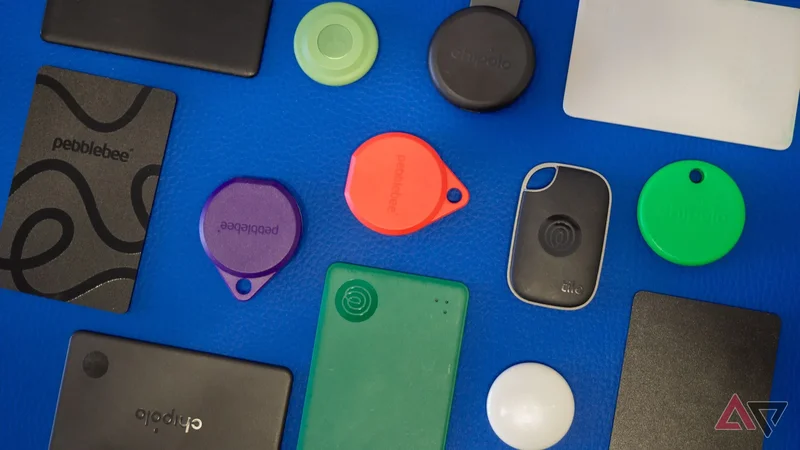
That's why, having tested over 30 Bluetooth trackers over the last couple of years, from Samsung to Apple, Motorola, Chipolo, and Pebblebee, I can safely claim that there are better options out there. Here are three you should consider before buying the Pixel Tag.
How to pick the perfect Bluetooth tracker for you
Questions of form factor, features, charging, compatibility
Google Find Hub has become very, very reliable in recent months in my experience, and it's easy to recommend any compatible Bluetooth tracker to most people. Using millions of Android phones around the world as beacons to find your lost item is as good as it sounds.
But the answer isn't as straightforward as that. I have tested enough trackers and looked at enough specs sheets that I have honed down some intricate differences between them. Here are the questions you should ask yourself before picking a tracker:
-
**Do you want it to work across Android and iOS all the time?**If so, Tile trackers are your only option. They're the best choice for car keys that are shared between an iPhone user and Android user, for example. -
**Are you an Android user now, but might switch to an iPhone later?**If so, consider trackers that can flip (after a reset) between Google's Find Hub network and Apple's Find My network. Chipolo's and Pebblebee's trackers are the two brands I recommend there. -
**Do you use a Samsung phone and live in an area where Samsung is popular?**In this case, the Galaxy SmartTag 2 is an excellent option. Samsung's SmartThings Find network was super reliable for me across Europe and West Asia, plus it packs unique features like location history and smart home controls. -
**Do you really, really care about UWB?**Ultra-wideband is a cool tech demo, but do you really need exact directional hints to find your lost item when it's near you? You can always ring the tracker and find it by sound. If you really want UWB, the Moto Tag and Tag 2 as well as the Pixel Tag are your only options, but you lose the option to switch to iOS in the future. -
**Are you OK with replaceable batteries or is USB-C charging a necessity?**If you're afraid you won't have a coin cell battery at hand when the one in your tracker runs out, go for the more recent rechargeable Chipolo and Pebblebee trackers.
There are more questions to consider, but they're secondary, like the ability to slip them in a wallet, whether you want a built-in keyring or you're fine paying for an extra accessory to hook it, as well as what other extra features you need.
What makes the Pixel Tag special
And why that may not last
Besides offering UWB connectivity, the Pixel Tag is the first Google Find Hub tracker to offer two features straight from the Find Hub app, without requiring a second app to be installed: reverse phone ringing and left-behind alerts.
Other trackers from Motorola, Chipolo, or Pebblebee offer these, as well as the option to use the tracker's button to control the camera, but they need their own apps to do that. The reason is simple: Google hasn't opened up that option yet in Find Hub.
The official Google Find Hub API is extremely limited to a few extra features: change the name, choose a volume, and share the tracker. It doesn't let trackers offer anything extra, so companies had to resort to their own apps to add those.
When the Pixel Tag launches in November, I bet that Google will soon after open that API to the other brands, making these features available by default for all trackers. For now, though, this is a distinction worth pointing out.
And without further ado, here is a table showing all the differences between the Pixel Tag and the three trackers that I recommend you buy instead.
| Model | Google Pixel Tag | Chipolo Loop | Pebblebee Clip 5 | Moto Tag 2 |
| Dimensions (mm) | 46.1 x 28 x 5.4 | 40 x 57 x 8 | 38 x 45 x 9.5 | 31.9 x 31.9 x 8 |
| Weight (g) | 11.8 | 10 | 10 | 8.5 |
| Compatibility | Android | iOS/Android | iOS/Android | Android |
| Network | Google Find Hub | Apple Find My / Google Find Hub | Apple Find My / Google Find Hub | Google Find Hub |
| Siren | ? | 125 dB | 130 dB | 77dB |
| Bluetooth version | 6.0 with Channel Sounding | 6.0 with Channel Sounding | 5.4 | 6.0 with Channel Sounding |
| Bluetooth range | ? | 120m | 150m | 100m |
| Battery Life | 12 months | 12 months | 12 Months | 600 days |
| Battery or Charging | CR2032 | USB-C | USB-C | C2032 |
| IP rating | IP67 | IP67 | IP66 | IP68 |
| UWB | Yes | No | No | Yes |
| Share your tracker with someone else | Yes | Yes | Yes | Yes |
| Left behind alert | Yes (Google Find Hub) | Yes (Apple Find My or Chipolo Andoid app) | Yes (Apple Find My only) | No |
| Reverse ring your phone | Yes (Google Find Hub) | Yes (Chipolo Android or iOS app) | Yes (Pebblebee Android or iOS app) | Yes (Moto app) |
| Customizable volume and ringtone | ? | Yes (Chipolo Android or iOS app) | No | Yes (Moto app) |
| Keyring hook / Card form factor | No | Keyring hook | Keyring hook | No |
| Special features | Accelerometer | Selfie remote (Chipolo Android or iOS app) | Bright LED, Safety Circle emergency alert | Fits in AirTag cases, selfie remote (Moto app) |
| Colors | Fog | Charcoal, Chalk, Navy, Mint, Honey, Coral | Charcoal (plus limited edition colors) | Laurel Oak, Arabesque |
| Price | $29.99 (4-pack for $99) | $39 (4-pack for $125, 6-pack $175) | $35 (2-pack for $59, 4-pack for $105) | $29.99 (4-pack for $99.99) |
Chipolo Loop
The one to get if you want all the features
The Chipolo Loop is by far my favorite tracker. It's the one that stays in my personal backpack all the time because it ticks all the boxes. Unlike the Pixel Tag, it has a built-in loop to clip it inside my backpack. It also charges over USB-C, saving me from any charging woes.
Its siren is extremely loud, its Bluetooth range is excellent, and the Chipolo app already packs all the extra features. Left-behind alerts if I move away from my backpack, reverse phone ringing, camera shutter button, customizable ringtones — what else could I possibly need?
Plus, there's a Card version of the Loop with nearly the same features in a 2.5mm thin credit card design that charges over any wireless Qi pad. That one lives in my personal wallet.
Chipolo LOOP
-
**Connectivity** - Bluetooth 6.0 with Channel Sounding
-
**Battery** - One year (USB-C charging)
-
**Range** - 120m
-
**Max speaker volume** - 125db
Pebblebee Clip 5
The one with extra safety features
The Pebblebee Clip 5 is the one I usually pack in my luggage when I travel. It even saved my bag from airport neglect in Athens and many other travelers' bags. They were forgotten near the plane while the "Last bag delivered" message showed up on the airport pick-up belt.
The Clip 5 is very similar to the Loop: Built-in keyring hook, USB-C charging, very loud siren, long Bluetooth range, reverse phone ringing. It adds a built-in LED for easy finding, but it misses out on left-behind alerts for now. Pebblebee has banked on something else, though.
There's an option to trigger a loud or silent alarm that alerts your emergency contacts and shares your location if you find yourself in a dangerous situation. I wish we didn't need this, but clearly, there are environments and circumstances where you might wish you had it.
Pebblebee also makes a 1.75mm think credit-card shaped Card 5 for wallets. It also charges over any Qi wireless pad. This one lives in my husband's wallet.
Pebblebee Clip 5
-
**Connectivity** - Bluetooth 5.4
-
**Battery** - One year (USB-C charging)
-
**Range** - 150m
-
**Max speaker volume** - 130db
Moto Tag 2
The alternative option with UWB and different features
I'll be honest: I haven't tried the Moto Tag 2 yet, but I've used the original Tag for two years. The two are similar enough that my advice should still be valid: The Moto Tag 2 is the one to get if you absolutely need UWB but have different priorities from the Pixel Tag.
A 600-day battery life sounds very impressive — that's nearly double Google's one-year promise. IP68 makes it more resistant to water than the Pixel Tag's IP67. It acts as a camera selfie button, too.
Both the Tag and Tag 2 have the exact same size as the Apple AirTag. You can buy AirTag accessories or slip Moto's trackers into compartments that are custom-made for Apple's AirTag. My luggage comes with AirTag-specific holders and the Moto Tag fits in perfectly.
Moto Tag 2
-
**Connectivity** - Bluetooth 6.0 with Channel Sounding, UWB
-
**Battery** - Over 600 days
-
**Max speaker volume** - 77dB @ 10cm
-
**Range** - 100m
The Pixel Tag isn't the only game in town
There's so much you can do with Bluetooth trackers these days, and it's a small shame that Google has waited this long to launch its own Tag, and then went for such a middle-of-the-road solution.
The Pixel tag isn't as small as coin-shaped trackers, it's not as flat as wafer-thin card trackers, it skips a built-in hook, and it still relies on coin cell batteries. Besides that, we don't know how loud the siren is or how far its range will be.
The inclusion of UWB is neat, but it's not the only thing you should consider. That's why I think there are better options out there if you're willing to look around and find the right tracker for you.