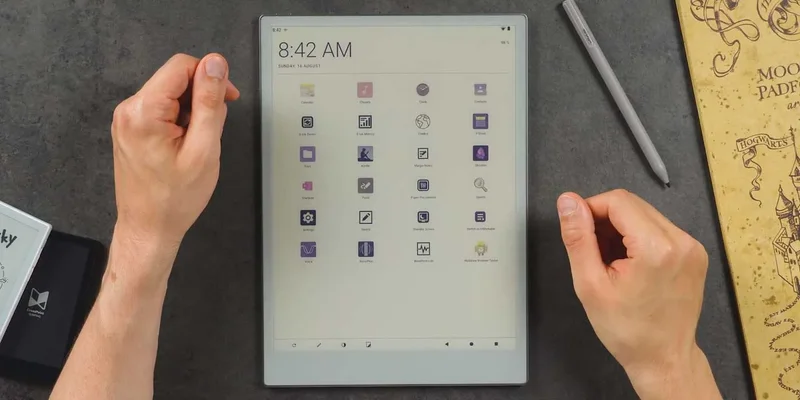
A YouTuber who took their reMarkable Paper Pro and converted it into an Android device shows off the process in a recent video, even if it defeats the purpose of the e-paper tablet.
The e-reader corner of the tech market doesn’t have many Android options. One of the biggest names that comes to mind is Boox, which makes solid e-readers and note-taking tablets with a minimal skin over some of the more recent versions of Android. But reMarkable has built its tablets on its own proprietary OS to keep things minimal and clean.
It turns out the reMarkable Paper Pro can run Android 13 if you put in a little effort. Chalid Raqami uploaded a video on YouTube of the process and how it works on a tablet that wasn’t designed to handle it.
The main constraint is hardware. E-paper tablets aren’t stacked with RAM and heavyweight GPUs because it isn’t necessary to produce a monochromatic image at moderate refresh rates. To offer a pleasant experience, the main focus seems to be on display and stylus input quality. Those don’t require a Snapdragon 8 Elite Gen 5. The reMarkable Paper Pro simply needs the NXP iMX8 Mini that comes with it and 2GB of RAM to power its own OS and color display.
To run Android 13, that seems to work just fine. Chalid says most of the device’s functions work just fine. Front light control, Wi-Fi, and even Bluetooth accessories are operational. The home screen is filled with apps like any Android device, and navigation controls show up in the bottom corner. They even mention that the reMarkable Paper Pro’s pen can be used with latency “near-stock” using a dedicated pen mode.
They also added the option to switch back to reMarkable OS in a matter of seconds – a necessary safety switch if Android doesn’t perform properly on a tablet that wasn’t designed to handle it.
As expected, the refresh rate is a hard thing to look past. But Boox has this issue too, and it comes down to the e-paper display’s capability. The video details how Android would get bogged down in the beginning on the reMarkable Paper Pro, and the port was more of a proof-of-concept. But following optimization, Chalid says memory tuning and GPU acceleration did a lot to improve usability.
The entire project seems to make the tablet more usable. With Android 13, apps otherwise blocked can be installed. That includes e-book libraries like Kindle, which isn’t something supported on reMarkable’s tablets. That becomes a turn-off if your library is hard-locked to one service.
This isn’t going to work for everyone, though. The process is somewhat complicated, and the results, for now, seem to leave it up in the air whether the effort is worth the trade-off. That question carries even more weight when you consider the reMarkable Paper Pro is designed for minimal distraction, which Android doesn’t take too seriously.
For those looking to try the same process, it doesn’t look like a port is available for the time being. That may change if reMarkable OS treats the switch any differently and doesn’t undo everything with each update. But for now, it’s a nice proof of concept for a dual-wielding reMarkable Paper Pro on Android.