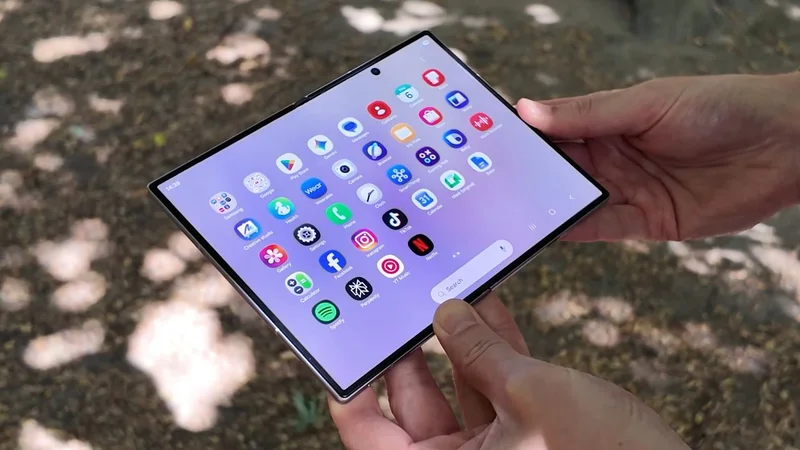
Just when it looked like foldable phones might fade into irrelevance (they represented just 1.5% of global smartphone sales in 2025), Samsung has come along with the Galaxy Z Fold 8 — a passport-shaped foldable that could, with Apple’s help, catapult dual-screen devices into the mainstream.
We’ve actually seen this form factor before — the Huawei Pura X Max, for instance, debuted in China earlier this year — but the Galaxy Z Fold 8 marks the first time a passport-style foldable has been made available in Western markets.
So, is it as revolutionary as Samsung wants us to believe? I’ve been using the Galaxy Z Fold 8 for exactly a month now, and I can safely say that, yes, it’s a supremely versatile content-watching machine — though there are some quirks to be aware of if you’re thinking of spending $1,899 /£1,699 / AU$2,699 on one.
In this article, I’ll run through what I love, don’t love, and just generally think about Samsung’s new kid on the block. You can also check out our full Samsung Galaxy Z Fold 8 review for an in-depth look at specific features, or watch the video below for an on-camera rundown of everything I’m about to say.
Calling all video lovers
Let’s kick off with my thoughts on the Z Fold 8’s design, which ditches the productivity-focused dimensions of previous book-style foldables for a squatter, passport shape when closed and a more practical rectangular shape when opened.
Samsung says these dimension tweaks are a response to changing consumer habits (read: we’re all addicted to scrolling in 2026), and it’s easy to see why the Z Fold 8 is a better phone for browsing social media, watching videos, and reading articles than the larger Galaxy Z Fold 8 Ultra.
For starters, the 5.5-inch, 10:16 cover display is perfect for one-handed use of full-sized apps. You don’t have to stretch your thumb to reach the top of the screen, and it’s also much easier to type on this wider display than on taller, narrower book-style foldables.
Sign up for breaking news, reviews, opinion, top tech deals, and more.
The phone’s width might make one-handed typing a bit of a challenge for those with smaller hands, but it’s honestly super nostalgic to type with two hands (which is how we all type for the most part anyway), as it feels a bit like using an old BlackBerry phone without the physical keyboard. Remember those?
Turn the Z Fold 8 on its side, and this cover screen becomes a 16:10 canvas that’s perfectly sized for YouTube videos, Netflix movies, and other video content. The content's aspect ratio stays the same as on any other phone, but in this orientation, the Z Fold 8 removes awkward pillarboxing for a more immersive viewing experience.
I did find that my hand would sometimes cover the bottom-firing speaker when I held the phone like this, but half-unfolding the Z Fold 8 and letting it stand independently has honestly become one of my favorite ways to watch video on any phone.
All this being said, you’re not buying a foldable to use one screen only, and opening up the Z Fold 8 gives you a glorious 7.6-inch, 4:3 display that’s — you guessed it! — also great for video.
On the front display, most video content is cropped by default to 16:9, but you still get smaller black bars here and less negative space than you would on something like the Z Fold 8 Ultra. But the Z Fold 8 really shines when displaying native 4:3 content like older anime shows.
I mean, just look at this Neon Genesis Evangelion episode on Netflix and tell me there’s a better way to watch TV on a phone:
And you can say the same for reading. Using the unfolded Z Fold 8 in portrait is great for scrolling through websites, ebooks, and comics because 3:4 isn’t too far off the dimensions of traditional physical books.
This also makes the Z Fold 8 a great size for work-focused apps like Google Docs. While the Z Fold 8 Ultra is definitely more geared towards productivity, I found that the content-focused size of this smaller model isn’t totally unsuitable for professional tasks.
One thing I have noticed, though, is that social media apps aren’t well-optimized for this unfolded screen. 3:4 isn’t too bad for Instagram, but as soon as you switch to landscape, the app just isn’t formatted nicely, so for the most part I’ve been scrolling through socials on the cover display, which feels much more normal by comparison.
And a final word on the phone’s design: the crease here is definitely less visible than it is on the Galaxy Z Fold 7. Samsung added a Flex Titanium layer to both Z Fold 8 models this year, which also makes the hinge feel sturdier, and the phone unfold completely flat. And while phones like the Pixel 11 Pro Fold and Honor Magic V6 offer better dust resistance, I’ve never worried about the durability of my Z Fold 8.
Pocketable power
In terms of performance, the Z Fold 8 is just as fun to use as it is to look at. It’s got a top-of-the-line Snapdragon 8 Elite Gen 5 chipset and 12GB of RAM, so games like Asphalt Legends run smoothly at their highest graphical settings.
Samsung has also updated its Multi-Window feature so you can use up to three apps side-by-side vertically or horizontally, as well as via the older splitting method. I can’t say I’ve ever needed to use three apps simultaneously, but having two apps open side-by-side is definitely useful for cross-referencing info while working, and if you’re really unhinged, you can scroll through Reels AND TikTok at the same time.
Now Nudge has been updated too, and will open suggested apps in split-screen, which is a nice way to encourage you to use the full potential of the foldable phone you've just spent so much money on.
Camera compromises
Right, enough of the good stuff — let’s talk about what you lose by choosing this type of foldable over another.
The biggest compromise comes in the camera department, as while the Z Fold 8’s main and ultra-wide snappers are decent enough, there’s no form of telephoto camera to speak of here, which is… pretty wild considering how much this phone costs.
The 50MP main camera does offer 2x in-sensor zoom for a little extra reach when you need it, but you’ll start to lose image quality when zooming digitally up to 10x. Thankfully, the main and ultra-wide cameras you do get are pretty solid, offering vibrant colors and plenty of detail, but you will get sharper images on the more camera-focused Z Fold 8 Ultra.
Here's a picture-by-picture comparison of the two phones' photography capabilities, as captured by TechRadar contributor Tom Bedford:
That said, selfies are great, and portrait mode is still a Samsung strength, while Smart video features like Super Steady video with Horizontal Lock and My FanCam keep the Z Fold 8 feeling fun and fresh. The former levels out shaky footage at the expense of some resolution, while the latter lets you create a motion-tracked video of a particular subject from any video.
My FanCam is pretty effective, though, as we explained in our review of the phone; the subject needs to be well lit and large enough in the frame for Samsung’s algorithm to identify. There’s no manual tracking option, so you’re at the mercy of the feature as to whether your footage is compatible.
Battery life is another good-but-not-great aspect of the Galaxy Z Fold 8. Yes, it’s the first Samsung phone to feature a silicon-carbon battery, and yes, it has better battery life than the Z Fold 7 — but you won’t get Honor- or Oppo-level endurance here.
Samsung says you’ll get 26 hours of video playback from a single charge of the Z Fold 8, and that’s true, but only if you stick to the cover screen. In reality, a day with the phone means switching between screens, watching YouTube videos in unfolded mode, maybe gaming a bit — and as such, the real battery life figure lands closer to somewhere between a day and a day-and-a-half.
Mind you, that’s still… pretty good! I charge my phone every night anyway, so I haven’t been left in the lurch with a dead Z Fold 8, but I don’t think the inclusion of silicon-carbon technology here is the revolution that some people (including me) maybe hoped it would be.
The Honor Magic V6, for context, uses a larger 6,600mAh battery that lasts for well over two days, and that’s a figure that not even the Galaxy Z Fold 8 Ultra can touch.
For charging, you’re getting 45W wired speeds, which will get you to 50% in around 25 minutes and a full charge in about an hour, and again, those are perfectly good if not exceptional numbers.
You also get 20W wireless charging, but as with every other Samsung phone, you’ll need to buy a magnetic case to make use of it, as the Z Fold 8 doesn’t have any built-in magnets.
One month verdict
Overall, I’ve really enjoyed my time with the Galaxy Z Fold 8 so far, and have been pleasantly surprised by just how well this new form factor works for most things I do on my phone every day.
Videos look great on both displays; I love typing on the cover screen and reading on the inner screen, and the Z Fold 8 is also powerful enough to be a nice little gaming machine.
You’ll get better cameras and battery life by choosing a regular flagship phone or the more expensive Z Fold 8 Ultra, but none of those devices will feel as fun or special as the Z Fold 8.
To be honest, I feel similarly about this phone as I do the iPhone Air. It seems weird and silly at first — and you’re paying a lot of money for fewer flagship features — but the Z Fold 8 is just very fun to use day-to-day, and it brings back some of the excitement that foldable phones have been missing.
If the rumors are true and Apple is indeed releasing a similarly sized iPhone Ultra later this year, this new form factor has a real chance of taking off — but as things stand right now, the Z Fold 8 is the foldable to buy if, like me, consuming content is what you do best.
Axel is TechRadar's Phones Editor, reporting on everything from the latest Apple developments to newest AI breakthroughs as part of the site's Mobile Computing vertical. Having previously written for publications including Esquire and FourFourTwo, Axel is well-versed in the applications of technology beyond the desktop, and his coverage extends from general reporting and analysis to in-depth interviews and opinion.
Axel studied for a degree in English Literature at the University of Warwick before joining TechRadar in 2020, where he earned an NCTJ qualification as part of the company’s inaugural digital training scheme.