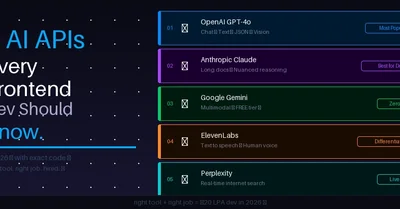
"In 2026, knowing React is the baseline. Knowing which AI APIs to use — and how to use them — is what separates the ₹8 LPA developer from the ₹20 LPA one."
Real talk. 👇
A year ago "AI developer" meant machine learning engineer with a PhD. 🎓
Today it means — a frontend dev who knows how to call the right API for the right job. That's it. That's the whole definition shift.
And here's the thing nobody tells you — there are dozens of AI APIs out there. OpenAI, Anthropic, Google, Stability, ElevenLabs, Replicate... the list is overwhelming. 😵
So beginners either:
- ❌ Use only ChatGPT API for everything (wrong tool for the job half the time)
- ❌ Get paralyzed by choice and build nothing
- ❌ Spend weeks researching instead of shipping
This post fixes that. 🔧
5 AI APIs. What each one does. When to use it. Exact code to get started. No fluff. No comparison charts with 50 columns.
Just the 5 you actually need to know in 2026. Let's go. 👇
🗺️ The Map Before We Dive In
Different AI APIs do completely different things. Think of them like tools in a toolbox 🧰
```
🤖 Need text generation / chat? → OpenAI GPT or Anthropic Claude
👁️ Need to analyze images? → Google Gemini Vision or OpenAI Vision
🔍 Need current internet data? → Perplexity API
🗣️ Need text to speech? → ElevenLabs API
🎨 Need to generate images? → Stability AI or DALL-E
Using ChatGPT for image generation when you need quality?
Wrong tool. Using Stability AI for a chatbot? Also wrong. 😬
Right tool + right job = impressive projects 🎯
```
Enter fullscreen mode
Exit fullscreen mode
Now let's go deep on each one. 👇
🥇 API #1: OpenAI GPT-4o — The Swiss Army Knife
Best for: Chat, text generation, code explanation, summarization, classification 🎯
Free tier: $5 credit on signup — enough for hundreds of demos 🆓
OpenAI is the one you've heard of. And for good reason — it's the most capable general-purpose AI API right now. But most developers use only 20% of what it can do. Let's fix that. 💪
Basic Text Generation
```
// app/api/gpt/route.js
import OpenAI from 'openai'
const openai = new OpenAI({ apiKey: process.env.OPENAI_API_KEY })
export async function POST(req) {
const { prompt, systemPrompt } = await req.json()
const response = await openai.chat.completions.create({
model: 'gpt-4o-mini', // cheap + fast + still great 💰
// model: 'gpt-4o', // expensive + best quality
messages: [
{
role: 'system',
content: systemPrompt || 'You are a helpful assistant.'
},
{
role: 'user',
content: prompt
}
],
max_tokens: 1000,
temperature: 0.7 // 0 = factual, 1 = creative 🎚️
})
return Response.json({
result: response.choices[0].message.content
})
}
```
Enter fullscreen mode
Exit fullscreen mode
The UNDERUSED Feature — JSON Mode 🤯
Most devs don't know this exists. It forces the AI to always return valid JSON. Game changer for structured data. 🎯
``
// JSON mode — AI ALWAYS returns valid JSON ✅
const response = await openai.chat.completions.create({
  model: 'gpt-4o-mini',
  response_format: { type: 'json_object' }, // ← the magic line ✨
  messages: [{
    role: 'user',
    content:
Analyze this resume and return JSON with:
{
"score": number (0-100),
"strengths": string[],
"weaknesses": string[],
"missingSkills": string[],
"verdict": "strong" | "average" | "weak"
}
Resume: ${resumeText}`
}]
})
// Parse safely — JSON mode guarantees valid JSON 🔒
const analysis = JSON.parse(response.choices[0].message.content)
console.log(analysis.score) // 78
console.log(analysis.verdict) // "average"
```
Enter fullscreen mode
Exit fullscreen mode
Vision — Analyze Images with GPT 👁️
// Send an image URL + question — GPT describes/analyzes it 🖼️
const response = await openai.chat.completions.create({
  model: 'gpt-4o',  // vision needs gpt-4o, not mini
  messages: [{
    role: 'user',
    content: [
      {
        type: 'image_url',
        image_url: { url: imageUrl }
      },
      {
        type: 'text',
        text: 'What UI improvements would you suggest for this app screenshot?'
      }
    ]
  }]
})
Enter fullscreen mode
Exit fullscreen mode
🏆 Best portfolio use cases:
- Resume analyzer with JSON scoring
- Code review assistant
- AI chat with custom personality
- Document summarizer
💡 Pro tip: Always use
gpt-4o-minifor development and demos. Switch togpt-4oonly for production features that genuinely need the extra quality. Save money, ship faster. 💰
🥈 API #2: Anthropic Claude — The Thoughtful One
Best for: Long documents, nuanced analysis, coding help, safety-critical apps 🧠
Free tier: Free tier available via API + generous limits 🆓
Claude is OpenAI's biggest competitor — and in many ways, better for specific tasks. Especially anything involving long documents or nuanced reasoning. 🎯
```
// npm install @anthropic-ai/sdk
import Anthropic from '@anthropic-ai/sdk'
const anthropic = new Anthropic({
apiKey: process.env.ANTHROPIC_API_KEY
})
export async function POST(req) {
const { userMessage, documentText } = await req.json()
const response = await anthropic.messages.create({
model: 'claude-sonnet-4-6', // best balance of speed + quality ⚡
max_tokens: 1024,
system: You are an expert document analyzer.
Be thorough, specific, and actionable in your feedback.,
messages: [
{
role: 'user',
// Claude handles LONG context amazingly well 📄
content: `Here's the document:\n\n${documentText}
    Now answer this: ${userMessage}`
  }
]
})
return Response.json({
result: response.content[0].text
})
}
```
Enter fullscreen mode
Exit fullscreen mode
Where Claude Beats GPT — Long Context 📄
```
// Claude can handle up to 200,000 tokens of context 🤯
// That's roughly 150,000 words — an entire novel!
// Perfect for:
// - Analyzing entire codebases
// - Summarizing long research papers
// - Processing full legal documents
// - Understanding complete project specs
const response = await anthropic.messages.create({
model: 'claude-sonnet-4-6',
max_tokens: 2000,
messages: [{
role: 'user',
content: `Here is an entire React codebase:\n\n${entireCodebase}
Find all the performance issues, security vulnerabilities,
and suggest architectural improvements.`
// GPT would struggle here. Claude handles it smoothly. 🎯
}]
})
```
Enter fullscreen mode
Exit fullscreen mode
🏆 Best portfolio use cases:
- Full codebase reviewer
- Research paper summarizer
- Legal document analyzer
- Long-form content generator
💡 When to use Claude vs GPT: Use Claude when you have long documents or need nuanced, thoughtful responses. Use GPT when you need speed, JSON mode, or image analysis. Both are great — pick the right tool. 🎯
🥉 API #3: Google Gemini — The Free Powerhouse
Best for: Multimodal tasks (text + image + video), budget-conscious projects 🎯
Free tier: VERY generous — 15 requests/minute FREE. No credit card needed. 🆓🆓🆓
This is the most underrated API on this list. Google's Gemini is free at a level that makes it perfect for student portfolios and side projects. 💪
```
// npm install @google/generative-ai
import { GoogleGenerativeAI } from '@google/generative-ai'
const genAI = new GoogleGenerativeAI(process.env.GEMINI_API_KEY)
// Get free key at: aistudio.google.com — no credit card 🆓
export async function POST(req) {
const { prompt } = await req.json()
// gemini-1.5-flash — fastest + free tier 🚀
const model = genAI.getGenerativeModel({ model: 'gemini-1.5-flash' })
const result = await model.generateContent(prompt)
const response = await result.response
const text = response.text()
return Response.json({ result: text })
}
```
Enter fullscreen mode
Exit fullscreen mode
Gemini's Superpower — Multimodal for Free 🖼️
```
// Analyze image + text together — completely free on free tier! 🤯
export async function POST(req) {
const formData = await req.formData()
const imageFile = formData.get('image')
const question = formData.get('question')
// Convert image to base64
const imageBytes = await imageFile.arrayBuffer()
const base64Image = Buffer.from(imageBytes).toString('base64')
const model = genAI.getGenerativeModel({ model: 'gemini-1.5-flash' })
const result = await model.generateContent([
{
inlineData: {
data: base64Image,
mimeType: imageFile.type
}
},
question // Ask anything about the image 🎯
])
return Response.json({ result: result.response.text() })
}
```
Enter fullscreen mode
Exit fullscreen mode
🏆 Best portfolio use cases:
- Anything you want AI for — it's FREE 😄
- Image description / analysis features
- Multimodal study tool (upload lecture slides, ask questions)
- Budget-friendly chatbot
💡 Student secret: Build your entire portfolio AI features with Gemini. Zero cost. When you show it in interviews, switch the backend to GPT or Claude. Same features, professional APIs. 🎯
🎤 API #4: ElevenLabs — Text to Voice That Sounds Human
Best for: Text-to-speech, voice cloning, audio content generation 🗣️
Free tier: 10,000 characters/month free — enough for demos 🆓
This one is a MASSIVE differentiator. Most developers haven't touched audio AI. If your portfolio has a feature that speaks in a human voice, you instantly stand out. 🎯
```
// No SDK needed — simple fetch call! 🎉
export async function POST(req) {
const { text, voiceId } = await req.json()
const response = await fetch(
https://api.elevenlabs.io/v1/text-to-speech/${voiceId},
{
method: 'POST',
headers: {
'xi-api-key': process.env.ELEVENLABS_API_KEY,
'Content-Type': 'application/json',
'Accept': 'audio/mpeg'
},
body: JSON.stringify({
text: text,
model_id: 'eleven_monolingual_v1',
voice_settings: {
stability: 0.5, // 0 = variable, 1 = stable 🎚️
similarity_boost: 0.75 // how close to original voice
}
})
}
)
// Return audio as blob 🔊
const audioBuffer = await response.arrayBuffer()
return new Response(audioBuffer, {
headers: { 'Content-Type': 'audio/mpeg' }
})
}
```
Enter fullscreen mode
Exit fullscreen mode
Playing the Audio on Frontend
```
// Frontend — generate and play audio 🔊
const generateAndPlay = async (text: string) => {
setLoading(true)
const response = await fetch('/api/speech', {
method: 'POST',
headers: { 'Content-Type': 'application/json' },
body: JSON.stringify({
text,
voiceId: 'EXAVITQu4vr4xnSDxMaL' // "Bella" voice — natural female 🎤
// More voices at: elevenlabs.io/voice-library
})
})
// Convert response to audio blob and play it 🎵
const audioBlob = await response.blob()
const audioUrl = URL.createObjectURL(audioBlob)
const audio = new Audio(audioUrl)
audio.play()
setLoading(false)
}
return (
generateAndPlay('Hello! This is AI-generated speech.')}
disabled={loading}
className="px-6 py-3 bg-orange-500 text-white rounded-lg"
{loading ? '🎤 Generating...' : '🔊 Listen'}
)
```
Enter fullscreen mode
Exit fullscreen mode
🏆 Best portfolio use cases:
- AI language learning app (hear pronunciation)
- Accessibility tool (read any webpage aloud)
- Podcast generator from blog posts
- AI news reader with human voice
💡 Interview gold: Demo this live. The interviewer hears a human-sounding voice come from your project. The reaction is always — "Wait, how did you do that?" That's your moment. 🎯
🔍 API #5: Perplexity — AI That Searches the Internet
Best for: Real-time information, current events, fact-checking, research tools 🌐
Free tier: Limited free tier, paid from $20/month — worth it for differentiating projects 💰
Here's the problem with GPT and Claude — their knowledge has a cutoff date. Ask them about last week's news? They don't know. Ask them current stock prices? No idea. 😬
Perplexity fixes this. It's an AI that searches the internet IN REAL TIME before responding. 🌐
```
// Perplexity API — identical format to OpenAI! Easy to learn 🎯
export async function POST(req) {
const { question } = await req.json()
const response = await fetch('https://api.perplexity.ai/chat/completions', {
method: 'POST',
headers: {
'Authorization': Bearer ${process.env.PERPLEXITY_API_KEY},
'Content-Type': 'application/json'
},
body: JSON.stringify({
model: 'llama-3.1-sonar-large-128k-online', // the "online" = searches web 🌐
messages: [
{
role: 'system',
content: 'Be precise and cite your sources. Today\'s date is important for context.'
},
{
role: 'user',
content: question
}
],
return_citations: true, // ← returns source URLs! 📎
return_images: false
})
})
const data = await response.json()
return Response.json({
answer: data.choices[0].message.content,
citations: data.citations || [] // source links! 📎
})
}
```
Enter fullscreen mode
Exit fullscreen mode
Displaying Citations on Frontend
```
// Show AI answer + where it got the info from 📎
{answer && (
{answer}
{citations.length > 0 && (📎 Sources:
{citations.map((url, i) => ( {i + 1}. {url} ))} )})}
```
Enter fullscreen mode
Exit fullscreen mode
🏆 Best portfolio use cases:
- Real-time tech news summarizer
- Current job market analyzer ("what skills are trending right now?")
- Live stock/crypto explainer for beginners
- Research assistant with source citations
💡 The differentiator: Most AI apps are frozen in time. A project that searches the internet and cites sources looks SIGNIFICANTLY more impressive. Interviewers immediately understand the value. 🌐
📊 Quick Comparison — Which API for Which Job?
| Task | Best API | Free? | Difficulty |
| --- | --- | --- | --- |
| 💬 Chatbot / text generation | OpenAI GPT | Partial 🟡 | Easy ✅ |
| 📄 Long document analysis | Anthropic Claude | Partial 🟡 | Easy ✅ |
| 🎨 Image understanding | Gemini Vision | YES 🟢 | Easy ✅ |
| 🔊 Text to speech | ElevenLabs | Partial 🟡 | Medium 🔧 |
| 🌐 Real-time internet data | Perplexity | Partial 🟡 | Easy ✅ |
| 💸 Zero budget project | Gemini | YES 🟢 | Easy ✅ |
🚀 The "Use All 5" Challenge
Want to build something that uses ALL 5 APIs? Build this: 👇
"Daily Dev Brief" — an app that:
- 🔍 Perplexity — fetches today's top tech news
- 🤖 Claude — summarizes it for a developer audience
- 🎨 Gemini — generates a visual summary description
- 🔊 ElevenLabs — reads the brief aloud in a human voice
- 💬 OpenAI — lets you ask follow-up questions about any story
That portfolio project gets you hired. Full stop. 🎯
```
Tech stack:
├── Next.js 14 (App Router)
├── 5 AI APIs integrated
├── TypeScript throughout
├── Deployed on Vercel
└── README with architecture diagram
Interview value: PRICELESS 💎
```
Enter fullscreen mode
Exit fullscreen mode
🎯 Your Action Plan
Don't try to learn all 5 at once. Here's the order: 👇
```
Week 1: OpenAI GPT
→ Build the text explainer from last post
→ Add JSON mode for structured output
→ Deploy + add to portfolio
Week 2: Gemini (it's FREE — no excuses 😄)
→ Rebuild something with Gemini
→ Add image analysis feature
→ Compare output quality
Week 3: ElevenLabs
→ Add voice to your existing project
→ Demo it in your next interview
→ Watch their reaction 😄
Week 4: Claude + Perplexity
→ Add long document analysis
→ Add real-time search feature
→ Now you know all 5 ✅
```
Enter fullscreen mode
Exit fullscreen mode
4 weeks. 5 APIs. Portfolio that stands out from 95% of freshers. 🚀
💬 Your Turn!
Which of these 5 APIs are you most excited to try? 👇
Drop in the comments:
- 🤖 OpenAI — the classic
- 🧠 Claude — the thoughtful one
- 💚 Gemini — free is my love language 😂
- 🔊 ElevenLabs — voice features sound cool
- 🌐 Perplexity — real-time internet \= game changer
And if you've already used one of these — drop what you built! Would love to see it. 🙌
Drop a ❤️ if this cleared up the "which AI API" confusion — helps more developers stop being paralyzed by choice and start building! 🙏
Go pick one. Go build. Right now. 🔥
🔖 P.S. — Bookmark the comparison table. Next time you're building a feature and wondering "which API should I use?" — pull this up. 30 seconds to the right answer.