Microsoft has been battling to truly establish itself in the device market for years now, with its Surface suite covering everything from foldable smartphones to 2-in-1s up to more traditional laptops and desktops - all the way up to the enormous Surface Hub (RIP).
But the company has seemingly always fallen short - whether it's battery life, falling short on power, or the unavoidable lock-in with the Microsoft 365 experience.
However its latest collection of Surface for Business releases, framed squarely at work and enterprise users, looked to address all of that, and having been using one for the last few weeks now, I can safely say, Microsoft may finally have cracked the formula for a great working laptop at last.
Going hands-on
Microsoft has positioned the Surface Laptop for Business squarely at enterprise customers rather than consumers, and it's a substantial refresh over the previous generation, with the biggest improvements around AI, security, manageability, battery life and repairability.
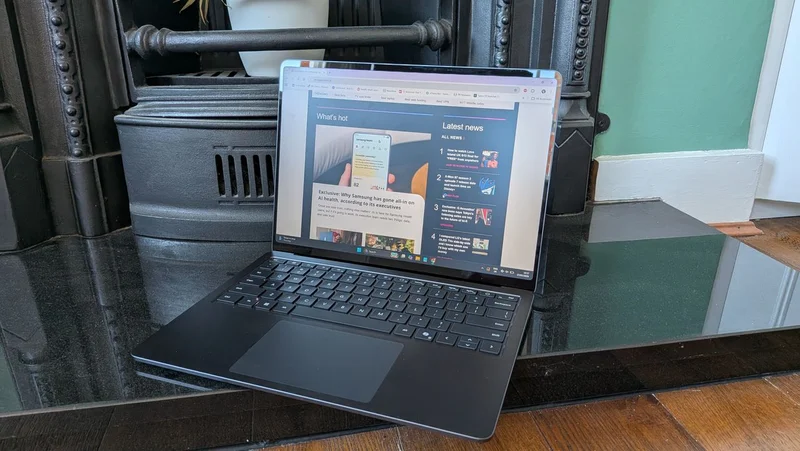
The device is light and portable, weighing in at just over 1.35kg, and its slim build (just 0.69in in width) means it slipped easily into a rucksack or carry-on bag.
It's a stylish device to look at as well - the polished black anodized aluminium build is far more striking than other identikit dull business laptops around today, with a well-designed keyboard and touchpad that offer more than enough space.
But where Microsoft is looking to take a real step forward with the Surface Laptop for Business is in hardware, where the company has equipped the device with Intel Core Ultra (Series 3) processor, up to 64 GB LPDDR5X RAM and up to 1 TB removable Gen4 SSD.
Crucially though, as with many modern devices, it also features AI-specific hardware, with an Intel AI Boost NPU delivering 50 TOPS of AI performance.
Along with offering local AI processing on the device, the NPU looks to perform a number of other tasks, from improved battery life to greater Windows performance. This is a decent level of performance, but if you're looking for tasks such as CAD, 3D rendering or AI model training, you may want something a bit more powerful, with a dedicated Nvidia GPU.
This looks to boost productivity and efficiency across the board - and I can say this was definitely true when I was working on the go.
Sadly I wasn't doing particularly AI-heavy work to really test it out, but I was able to take the device with me on a week-long overseas work trip, using it in conference keynotes, remote interviews, and site visits, and it absolutely ticked all my boxes when it came to responsiveness, usefulness and battery life.
At home however, it wasn't quite the same story.
It should also have meant the device was well-placed to be the centerpiece of my home office set-up, but unfortunately I frequently found issues when trying to connect a range of devices, from monitors to Bluetooth keyboards - this may have been a driver-led issue, but it was frustrating for quite some time.
The lack of ports may be an issue for some users - as there is just one USB-A connection, and two USB-C ports, which might be an issue for some creators. I use a docking station for my set-up, so for my usage I was largely OK - however as mentioned, even this wasn't always responsive - and it's a shame Microsoft has ditched the USB-A port on the charger block cable as well, as this has definitely saved me in the past with previous Surface devices.
Microsoft has also introduced a more advanced haptic touchpad for the Surface Laptop for Business, promising a more consistent click feel and improved gesture support, as well as customizable feedback. Although slightly smaller than my usual work device (a HP EliteBook) I found the touchpad incredibly responsive and interactive, making navigation between different apps and windows a breeze.
My device was equipped with the new integrated privacy display - a feature which gained a lot of attention when it was included in the latest Samsung Galaxy flagship smartphone earlier this year.
Toggled on via the alternate F1 button function, the privacy display instantly makes the screen difficult to read from side angles - no need for an external magnetic privacy filter any more.
This is obviously pretty useful for those workers accessing private or proprietary information, stopping snoopers or spies from catching a glimpse, but it also offers an anti-glare coating which should be a hit with everyone.
I loved it - but will you?
Will it be the ideal device for everyone? Probably not, as being a Surface device means it is closely tied-in with the Microsoft ecosystem - so if you use Microsoft 365 at work (which I don't) you'll have a much smoother set-up and overall experience.
The price will also be a sticking point for some shoppers, as my model starts from £1,599 - with the top spec hitting £2,499 - probably out of reach for most start-ups and SMBs.
But overall, I was incredibly impressed by the Surface Laptop for Business, easily the best Microsoft device I've used for work by a mile - and one I hope to get to use again sometime in the future.
Mike Moore is Deputy Editor at TechRadar Pro. He has worked as a B2B and B2C tech journalist for over a decade, including at one of the UK's leading national newspapers and fellow Future title ITProPortal. When he's not keeping track of all the latest enterprise and workplace trends, he can most likely be found watching, following or taking part in some kind of sport.