I absolutely love my Amazon Fire TV Stick. One of its most underrated features is its portability. You can chuck it in your luggage, plug it into a TV at a hotel or Airbnb, and instantly have all your favourite streaming apps wherever you are. But download a VPN onto it, however, and it becomes even more useful.
A VPN essentially encrypts your internet connection and hides your IP address, protecting your privacy when you’re using hotel wifi. But it also lets you browse as if you were back home, so you can keep watching your favourite UK shows while travelling abroad.
Not every VPN works well on a Fire TV Stick, however. Some VPNs lack a dedicated Fire TV Stick app, and others are just slow to use, or really not designed to use with a remote. I’ve tested dozens of VPNs to find the five I’d actually recommend in 2026.
Read more: **Best cheap VPNs, reviewed **
The best VPNs for Amazon Fire TV Stick in 2026 are:
- Best overall– Surfshark: From £1.79 per month, Surfshark.com
- Best budget buy– Proton VPN: From £2.39 per month, Protonvpn.com
- Best for streaming performance– NordVPN: £2.59 per month, Nordvpn.com
- Best for user experience– ExpressVPN: From £2.49 per month, Expressvpn.com
- Best beginner-friendly VPN– CyberGhost: From £1.92 per month, Cyberghostvpn.com
Read more: **Best iPhone VPNs, reviewed **
- Bestoverall VPN for Fire TV Stick
- Why we love it- Kill switch for connection protection
- CleanWeb ad and tracker blocking
-
Unlimited simultaneous connections
-
Take note- No split tunnelling on Fire TV stick app
- Base monthly price more expensive than some rivals
Surfshark's app has several important features for streaming security and privacy. Its kill switch is particularly valuable, as it automatically cuts your internet connection if the VPN drops, preventing any accidental exposure of your real location or browsing activity. This is a critical security feature for the Fire TV stick and one that isn’t offered by competing VPN apps.
The CleanWeb feature handily and effectively blocks ads, trackers, and malicious sites, creating a cleaner streaming experience. It’s also potentially faster, eliminating bandwidth-consuming ads and trackers.
It's also worth noting that while Surfshark offers GPS spoofing and Alternative ID features on other platforms, these aren't available on the Fire TV stick version. Having said that, these features are likely to be far less in demand on a device that has a primary focus on content consumption, so this shouldn't be an issue for most users.
Surfshark delivered impressive performance when I tested it on the Fire TV stick. For my wifi speed tests with a higher baseline of 208Mbps, UK server connections achieved 39Mbps (an 81 per cent decrease), while US server connections delivered 33Mbps (an 84 per cent decrease). Upload speeds showed similar patterns, with UK server connections reaching 33Mbps from a 104Mbps baseline (68 per cent decrease) and US server connections at 37Mbps (64 per cent decrease).
Ping measurements remained stable at 15ms for UK servers (compared to 14ms baseline), though US servers showed a higher latency at 278ms. Despite these percentage decreases, the actual speeds still comfortably exceed the requirements for 4K streaming (15-25 Mbps), ensuring buffer-free viewing experiences.
While Surfshark's app isn't as intuitive as some rivals’, it didn’t take me long to get to grips with the layout. The darker interface looks smart on the Fire TV, but the layout is a little illogical.
**Key specifications **
- Number of servers:4,500+
- Number of server countries:100
- Number of simultaneous devices supported:Unlimited
- Devices supported:Windows, Mac OS, Linux, iOS, Android, Fire TV and more
Read the full Surfshark VPN review
- Bestbudget Fire TV VPN
- Why we love it- Split tunnelling capability
- Strong privacy reputation
-
Open-source apps with security audits
-
Take note- Limited Fire TV-specific features
- Some streaming inconsistencies
- Some premium features require higher-tier plans
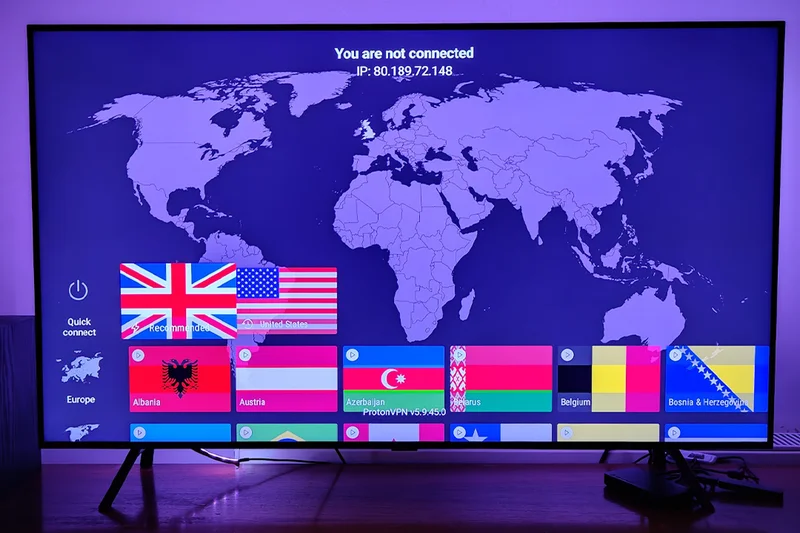
While Proton VPN’s Fire TV stick app is notably limited compared to its mobile and desktop counterparts, one of the main features of the Fire TV version is split tunnelling, which enables you to choose which apps route through the VPN and which can use your regular connection.
Many of Proton VPN's standout features on other platforms – such as Secure Core routing, NetShield ad blocker, preset profiles, Always-on VPN, Alternative Routing, and VPN Accelerator – are not available on the Fire TV stick version. This represents a significant reduction in functionality compared to the company's offerings on other devices.
Despite these limitations, Proton VPN still benefits from the company's strong privacy reputation. The service operates from Switzerland, a country with strong privacy laws outside of international surveillance alliances, and its apps are open source, allowing anyone to inspect the code for security issues.
Proton VPN demonstrated solid technical performance during my Fire TV stick testing, despite the more limited feature set.
My wifi speed tests, starting from a baseline of 121Mbps, showed that UK server connections achieved 35Mbps (a 71 per cent decrease), while US server connections delivered 32Mbps (a 74 per cent decrease). Upload speeds were relatively well-maintained, with UK server connections reaching 34Mbps from a 105Mbps baseline (68 per cent decrease) and US server connections at 41Mbps (61 per cent decrease).
Ping measurements showed some variation, with UK servers at 60ms (compared to 12ms baseline) and US servers at 222ms. Despite this, the speeds remained more than sufficient for high-definition streaming, easily exceeding Netflix's recommended 5Mbps for HD content.
Proton VPN's Fire TV app strikes a good balance between simplicity and functionality, though it lacks many of the advanced features found in the company’s other apps. However, the server selection screens are organised and simple, so it’s easy to find what you need without endless clicking around.
Key specifications
- Number of servers:20,000+
- Number of server countries:145
- Number of simultaneous devices supported:10
- Devices supported:Windows, Mac OS, Linux, iOS, Android, Fire TV and more
Read the full **Proton VPN review **
- Beststreaming-focused Fire TV Stick VPN
- Why we love it- Threat Protection for blocking ads and malware
- Meshnet for secure connections between devices
-
Multiple protocol options, including NordLynx
-
Take note- No kill switch on Fire TV dtick app
- Interface may feel a little overwhelming
- You have to pay extra for some features
NordVPN’s Threat Protection feature shields you from malicious websites, blocks intrusive ads and prevents anyone from tracking your streaming. In short, this app enhances your privacy while potentially improving streaming performance by eliminating bandwidth-consuming ads.
The Fire TV app also provides split tunnelling, which enables you to route specific apps through the VPN while keeping others on your regular connection. This is useful for services that might block VPN access. You can also access Meshnet, which enables encrypted connections between your devices for secure file sharing.
A notable limitation of NordVPN's Fire TV app, however, is the absence of a kill switch, which is available in competitor apps from the likes of Surfshark. This means if your VPN connection drops unexpectedly, your real IP address could be exposed until you manually reconnect. For casual streamers, this may not be a major concern, but those particularly focused on privacy should take note.
NordVPN's app offers several connection protocols, including its proprietary NordLynx technology (based on WireGuard), which is designed for optimal speed and security balance. During testing, we used the recommended 'automatic' protocol setting to reflect the typical user experience.
NordVPN demonstrated better wifi performance than its competitors. With a baseline download speed of 130Mbps, connections to UK servers resulted in speeds of 34Mbps (a 74 per cent decrease), while US server connections achieved 35Mbps (a 73 per cent decrease). These percentage decreases are actually better than most competitors, including Surfshark. Upload speeds fared particularly well, with UK server connections delivering 56Mbps from a 102Mbps baseline (45 per cent decrease) and US server connections reaching 49Mbps (52 per cent decrease).
Ping times remained excellent at 13ms for UK servers (unchanged from baseline), but increased significantly to 164ms for US servers. The speeds remained more than adequate for HD and even 4K streaming, though, which typically requires 15-25Mbps.
The NordVPN app feels decidedly feature-packed when you first open it on your Fire TV stick. While this isn't necessarily a bad thing, newcomers might find themselves momentarily overwhelmed by the options. The clear, immediately available list of suggested servers is, however, very useful, letting you jump in instantly, without much scrolling required.
Key specifications
- Number of servers:9,500+
- Number of server countries:161
- Number of simultaneous devices supported:Up to 10
- Devices supported:Windows, Mac OS, Linux, iOS, Android, Fire TV and more
Read the full NordVPN review
- Bestfor user experience
- Why we love it- Clean, intuitive Fire TV interface
- Lightway protocol for speed
-
Split tunnelling capability
-
Take note- No protection summary feature on Fire TV app
- Limited to eight simultaneous connections
This app uses ExpressVPN’s proprietary Lightway protocol, designed to maintain fast speeds while minimising resource usage on streaming devices. This protocol typically offers better performance than traditional options, making it well-suited for streaming activities.
Just like ProtonVPN and NordVPN, ExpressVPN’s app has split tunnelling, so you can choose which apps route through the VPN and which ones can still use your regular connection. The app also includes an auto-connect capability for quick connections when you launch the app.
It's worth noting some features found in ExpressVPN's mobile and desktop apps, such as the ‘protection summary’ feature and built-in speed test, are not available in the Fire TV stick version.
ExpressVPN delivers a streamlined Fire TV stick experience that balances security features with ease of use. The app connects swiftly and maintains stable connections, essential qualities for uninterrupted streaming sessions.
My wifi speed tests found that ExpressVPN is quicker than most of the competition. With a baseline download speed of 134Mbps, UK server connections delivered 43Mbps (a 68 per cent decrease), while US server connections achieved 37Mbps (a 72 per cent decrease). Upload speeds were particularly impressive, with UK server connections reaching 73Mbps from a 103Mbps baseline (29 per cent decrease) and US server connections delivering 64Mbps (38 per cent decrease).
Ping response times remained low at 15ms for UK servers (unchanged from baseline), while US servers showed a predictable increase, to 161ms. These speeds still comfortably exceed the requirements for 4K streaming on services such as Netflix.
ExpressVPN has clearly put significant thought into making its Fire TV app as painless as possible to use. The interface is refreshingly clean and uncluttered, with a prominent connection button and intuitive navigation. The simplified design is less intimidating than those of its rivals, such as NordVPN, making it ideal for VPN novices. The app strikes a good balance between functionality and ease of use, though it doesn't offer as many advanced features as some competitors.
Key specifications
- Number of servers:3,000+
- Number of server countries:105
- Number of simultaneous devices supported:8
- Devices supported:Windows, Mac OS, Linux, iOS, Android, Fire TV and more
Read the full ExpressVPN review
- Bestbeginner-friendly Fire TV Stick VPN
- Why we love it- Extremely user-friendly interface
- Protocol selection options
-
Ad/tracker blocking and split tunnelling
-
Take note- No dedicated streaming servers in Fire TV app
- Significant speed reduction on distant servers
The CyberGhost VPN offers a straightforward VPN user experience, with a clean interface featuring a prominent connection button and simple server selection. The app includes several useful features, including ad/tracker blocking to improve streaming performance, and split tunnelling capabilities that let you route specific apps through the VPN, while keeping others on your regular connection.
Connection customisations include the choice between WireGuard and OpenVPN protocols, enabling you to prioritise either speed or security, depending on your needs. However, the Fire TV app lacks the dedicated streaming servers available in CyberGhost's desktop apps.
My tests of the CyberGhost VPN app found mixed results. In my wifi speed tests, from a baseline of 161 Mbps, UK server connections delivered 39 Mbps (a 76 per cent decrease), while US server connections achieved 24 Mbps (an 85 per cent decrease). Upload speeds remained relatively stable, with UK server connections reaching 39Mbps from a 104Mbps baseline (63 per cent decrease) and US server connections at 42Mbps (60 per cent decrease).
Ping measurements were competitive at 23ms for UK servers (compared with 13ms baseline), and quite good for US servers at 150ms – notably better than some competitors. While these speeds show significant percentage decreases, the absolute values remain sufficient for streaming needs, with even the US server speeds comfortably exceeding Netflix's HD streaming requirements.
If you're new to VPNs, CyberGhost's Fire TV app might be just what you're looking for. The interface takes a pared-back less is more approach, with a connection button dominating the screen – you can’t miss it. The design philosophy focuses on simplicity, making it extremely accessible for beginners. What CyberGhost lacks in advanced features, it makes up for in straightforward usability, making it an excellent choice for those new to VPNs or who simply want basic protection without complexity.
Key specifications
- Number of servers:11,500
- Number of server countries:100
- Number of simultaneous devices supported:Unlimited
- Devices supported:Windows, Mac OS, Linux, iOS, Android, Fire TV and more