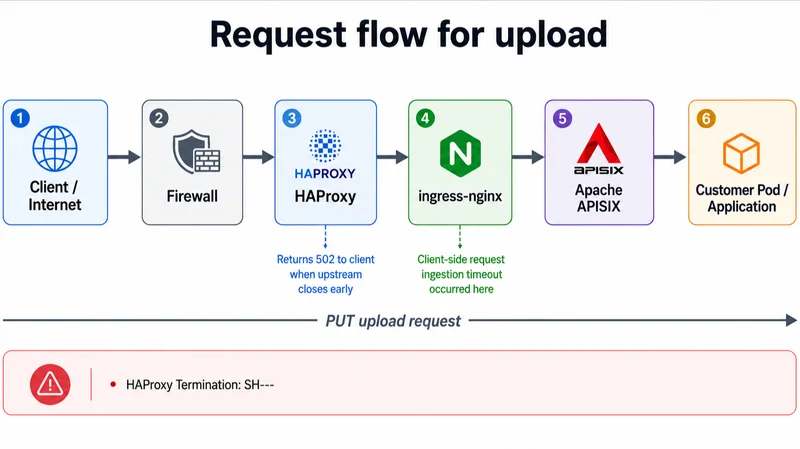
A 502 Bad Gateway tells you that one proxy failed to get a valid response from another system. It does not tell you which layer failed, whether the application ever saw the request, or which timeout actually expired.
We learned that distinction during a production incident involving failed file uploads through a Kubernetes platform.
The request path looked like this:
Internet
   |
Firewall
   |
HAProxy
   |
ingress-nginx
   |
Apache APISIX
   |
Customer pod
Customers were seeing failures while uploading files such as PDFs and JPEGs. HAProxy was returning 502 responses, but the downstream evidence was strangely clean.
There were no corresponding requests in the ingress-nginx access logs.
Nothing appeared in APISIX.
Nothing reached the application.
For a while, it looked as though the traffic had simply vanished between HAProxy and Nginx.
It had not. The most useful evidence was hiding in four characters:
SH--
The Evidence in the HAProxy Logs
Two representative failures looked like this:
[17/Jul/2026:16:38:45.516] 54.196.250.55:36466 agw-oc-api-fe-prod~ k8s-prod-ny-route-https-agw-oc-api-fe-prod/ingress1 130/0/6/-1/60132/67/63/0 502 268 - - SH-- "PUT /v2/files/default/.../Item_3.Rxcdgh7.11.22_.pdf HTTP/1.1"
[17/Jul/2026:16:38:19.181] 44.213.63.202:40376 agw-oc-api-fe-prod~ k8s-prod-ny-route-https-agw-oc api-fe-prod/ingress3 130/0/5/-1/60132/66/64/0 502 268 - - SH-- "PUT /v2/files/default/.../rGHjdsjf56TY_Letter.jpg HTTP/1.1"
These were different clients, different files, and different ingress-nginx instances - yet both transactions ended after about:
60132ms == 60s
That was the first strong clue.
Random packet loss does not usually fail two unrelated requests at almost precisely the same millisecond. Configuration timers do.
Decoding SH--
SH--HAProxy termination-state codes describe how a session ended and which phase it had reached.
The capitalization matters.
In this case:
- Uppercase
Smeans the server side aborted the connection. Hmeans HAProxy was waiting for complete HTTP response headers.
Together, SH indicates that the selected server, or something on that side of the connection closed before HAProxy received a complete response header - which is different from:
sH
A lowercase s indicates that HAProxy’s own server-side timeout expired while it was waiting for response headers, but our logs showed uppercase S.
That told us HAProxy was not merely becoming impatient and closing an otherwise healthy connection. From HAProxy’s perspective, the ingress side closed first. HAProxy then generated the 502 returned to the client.
The custom timer sequence also included -1, indicating that one of the measured phases never completed, and both requests ended at approximately 60.132 seconds.
Because HAProxy log formats are configurable, it is dangerous to assign names to every slash-delimited field without checking the active log-format. But the broader sequence was clear:
- HAProxy selected an ingress server.
- The backend connection was established quickly.
- HAProxy never received complete response headers.
- The server side closed at a repeatable 60-second boundary.
Why the Downstream Logs Were Empty
The absence of an ingress-nginx access-log entry initially sent us in the wrong direction.
An access log is not a packet capture.
A TCP connection may reach Nginx and fail while Nginx is still reading or parsing the request. Depending on the configuration and failure stage, it may never produce the normal access-log entry an operator expects.
The same explains why APISIX and the application were silent. If ingress-nginx had not completed the client-side request-processing phase, the request might never have been forwarded downstream.
The evidence therefore did not show that traffic had failed to reach Nginx.
It showed that the request did not survive far enough to become visible through the logs we were checking.
The Misleading 20-Minute Settings
The ingress-nginx configuration already contained generous proxy timeouts:
proxy_connect_timeout 1200s;
proxy_send_timeout    1200s;
proxy_read_timeout    1200s;
At first glance, those values appeared to rule out a timeout in Nginx.
They allowed 20 minutes. The requests failed after one.
The mistake was assuming that all Nginx timeouts govern the same connection.
In this topology, ingress-nginx is both a server and a client:
HAProxy  --->  ingress-nginx  --->  APISIX
 client        server/client       server
The proxy_* directives govern communication between Nginx and its proxied upstream - in this case, the connection from ingress-nginx toward APISIX.
Nginx documents proxy_send_timeout and proxy_read_timeout as inactivity timers between successive write or read operations on the upstream connection, rather than total transaction-duration limits. Our 20-minute configuration obviously didn't protect this side of the Nginx process.
The 60-Second Fingerprint
Nginx has several directives with 60-second defaults. Two relevant ones are:
client_header_timeout 60s;
client_body_timeout   60s;
They control different request phases.
client_header_timeout limits the time allowed to read the complete client request header.
client_body_timeout applies while reading the request body. It is an inactivity timeout between successive reads, not a maximum duration for the whole upload.
Because the incident involved uploads, client_body_timeout would normally be an obvious suspect. File contents live in the request body, not in the headers. However, the configuration change that resolved this incident was:
client_header_timeout 300s;
After the value was increased from 60 to 300 seconds for the affected ingress, the failures stopped - that gives us a strong operational conclusion:
ingress-nginx was closing the HAProxy-side connection at a repeatable 60-second boundary before returning response headers, and increasing the effective ``client_header_timeout to 300 seconds eliminated the failures.
What the existing evidence does not prove is why the header-reading phase took that long.
Possible contributing factors include fragmented or delayed request transmission, buffering in another intermediary, connection-reuse behavior, or another interaction in the request path. Proving the exact mechanism would require an ingress error log, Nginx debug trace, or packet capture from the incident.
That distinction matters. A post-mortem should state what the evidence proves, not promote a plausible theory into a certainty.
The Targeted Production Fix
This ingress controller was shared across the platform.
Changing client_header_timeout globally would have affected every application using it. During an outage involving a specific set of routes, expanding the change to every tenant would have created an unnecessary blast radius.
We therefore used a server-level snippet on the affected Ingress:
metadata:
  annotations:
    nginx.ingress.kubernetes.io/server-snippet: |
      client_header_timeout 300s;
The server-snippet annotation injects custom configuration into the Nginx server block generated for that Ingress host. That gave us the narrow scope we needed: fix the affected virtual server without changing timeout behavior for every workload on the shared controller.
It was also a conscious security tradeoff.
The Security Tradeoff
Custom snippets are powerful because they allow raw Nginx configuration to be inserted into the generated configuration.
That same power makes them dangerous in shared or multi-tenant environments.
CVE-2021-25742 documented how a user with permission to create or update Ingress resources could abuse custom snippets to retrieve the ingress-nginx controller’s service-account token and Secrets available to the controller.
The decision was therefore not whether snippets were entirely safe. Of course they were not. The practical choices during the outage were:
Change the shared controller globally
→ Affect every platform tenant
Leave the configuration unchanged
→ Continue the customer-facing outage
Apply a targeted server snippet
→ Accept a known, controlled security tradeoff
Sometimes production recovery requires using an escape hatch. The responsible approach is to limit who can use it, constrain its scope, review the generated configuration, document the exception, and create a path to remove it.
The snippet was treated as operator-controlled platform configuration—not as a self-service feature available to arbitrary tenants.
The Retirement Problem
This incident also occurred after the Kubernetes ingress-nginx project had been retired.
The Kubernetes project announced that maintenance would end in March 2026, with no further releases, bug fixes, or security updates after retirement. Existing deployments would continue to function, but would no longer receive upstream maintenance.
That did not cause the outage, but it changed the risk calculation.
We were applying an implementation-specific workaround to a shared controller that was no longer receiving long-term fixes.
The immediate remediation and the durable remediation were therefore different:
Immediate:
Apply a targeted 300-second timeout and restore uploads.
Durable:
Migrate away from the retired ingress-nginx controller.
The snippet ended the outage.
Lessons Learned
- A 502 identifies the component reporting the failure, not necessarily the component that caused it.
- HAProxy termination flags are more useful than the status code alone.
SHandsHpoint to different failure owners. - Missing access logs do not prove a connection never arrived. Requests can fail before normal access logging occurs.
- Timeout names must always be mapped to connection direction. The
proxy_*values on ingress-nginx controlled its upstream connection, not the request coming from HAProxy. - Exact timing is a signature. Two unrelated requests failing at precisely 60.132 seconds strongly suggested a deterministic timer, not a random network event.
Final Takeaway
The key clue was not the 502.
It was:
SH--
Those characters showed that HAProxy had connected to ingress-nginx, waited for response headers, and then observed the server side close.
The matching 60.132-second durations exposed a timeout boundary. A targeted client_header_timeout 300s server snippet restored uploads without changing the shared controller globally.
That fix carried a known security tradeoff, including the risk class documented by CVE-2021-25742. It was also applied to a retired ingress controller whose long-term answer was migration.
Sometimes the safest production decision is not risk-free.
It is the option with the smallest understood blast radius, applied deliberately, documented honestly, and removed when a durable replacement is ready.
References
-
Nginx HTTP Core Module — client_header_timeout and client_body_timeout
-
Nginx HTTP Proxy Module — Proxy Timeout Directives
-
CVE-2021-25742: ingress-nginx Custom Snippets Security Advisory. Kubernetes community.
-
Ingress NGINX Retirement: What You Need to Know. Kubernetes Blog, November 11, 2025.