Over the last few weeks, I’ve been using Gemini Live, a feature I’ve explored in the past, but never to this extent.
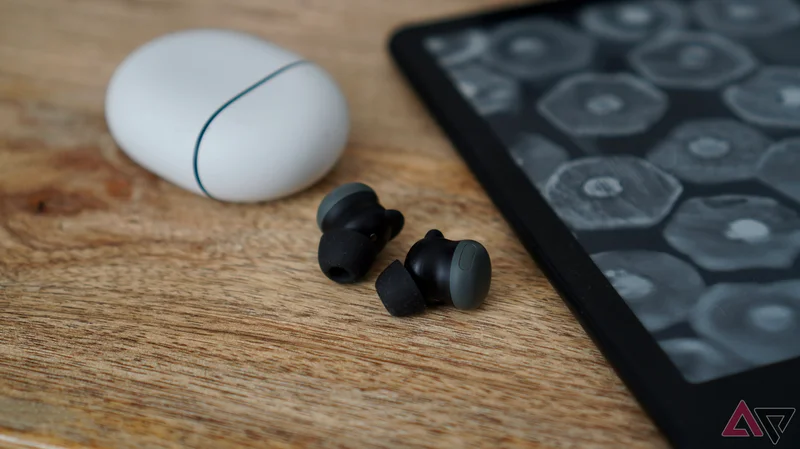
The enabler for my increased use has been the Google Pixel Buds Pro 2, which transforms the AI feature from being moderately interesting to truly useful.
My journey of discovery with Gemini Live and the Pixel Buds Pro 2 has been so successful, I wish I’d tried it sooner.
How does it work?
Hands-free conversations
Gemini Live is different than regular Gemini. It’s a live conversation between you and the AI.
Google has promoted the feature in various ways, mostly based around problem-solving, where the ability to “search with your voice” and get immediate, intelligent responses is shown to be helpful.
This never really spoke to me as a user. I rarely find myself in situations where I need this kind of feedback, and aside from testing Gemini Live for review purposes, I didn’t have a reason to use it. I’d had short conversations, but never much inspiration to explore more.
It was when I revisited the Pixel Buds Pro 2 that I decided to give Gemini Live another try, and combining earbuds with the feature turned out to be the link I’d been missing to understand its potential.
Why? The Pixel Buds Pro 2 turn it into an entirely hands-free operation. I’ve set it so that a long press of the left earbud activates Gemini, and then the command “let’s talk live” switches to Gemini Live.
It’s incredibly easy, and my phone can stay on the desk or in my pocket while I chat to Gemini.
Why does this help?
Brainstorming powers
While I don’t often find practical reasons to use Gemini Live, I’ve discovered how good the AI is at brainstorming. This is where it has been invaluable over the last few weeks.
Here’s an example. Time was tight last week, and many things had to happen on one day. I planned to write a feature about the Pixel Tablet, but needed to take advantage of the good weather to take photos of other devices.
I knew basically what I was going to write, but I often find that when I’m really busy, I forget ideas. Equipped with my Pixel Buds Pro 2, I activated Gemini Live and chatted through my feature idea while I took photos.
I could move around the house and even go outside while chatting to Gemini, all without holding my phone. Vocalizing my ideas is immensely helpful, and Gemini Live’s questioning kept me on track.
Gemini Live didn’t write the article, but it was like having another person in the room to talk through the kernel of an idea. I can’t ask myself probing questions, but Gemini Live can, and its ability to do so while I do other things is unique and helpful.
Perfect partner?
Only after you’ve explained the mission
From a hardware perspective, the Pixel Buds Pro 2’s microphones pick up my voice well, even when there’s background noise. But what about Gemini Live’s conversational powers?
Gemini Live is shockingly effective at listening, questioning, affirming, and motivating. It’s fun to brainstorm with Gemini, and because the conversation flows naturally, it never feels awkward or strange.
Gemini isn’t jokey or flippant, stays on topic, and for the most part, knows what we’ve been talking about previously.
The clever use of tone and intonation ensures it never sounds robotic, even though its vocal fry and mannerisms can sometimes be a little over the top.
One thing I learned early on is that Gemini needs a plan to follow. Before starting a brainstorming conversation, I primed Gemini Live with an overview of what I wanted to talk about and what I expected from the AI.
Without this, it was a bit confused. While it ran with the conversation, it had no end goal to focus on.
Giving Gemini Live a purpose and explaining what we were going to talk about was as important as using the Pixel Buds Pro 2 to get the most from the feature.
Where Gemini Live doesn’t work well
A few features missing
I found voicing my ideas to Gemini Live and being questioned about my points a really helpful brainstorming tool. I was able to do other things while we chatted, and I was more focused when I sat down to write.
However, there are a few problems.
First, it doesn’t seem like Gemini Live can take all the points we talk about and put them in a Google Docs file, despite Gemini Live telling me it can and will do such a thing.
I found live conversations could be interrupted by notifications arriving on my phone, causing the Gemini Live app to hang. This caused problems with memory retention, as the Live feature wasn’t very good at recalling previous conversations after we’d “hung up.”
Additionally, telling Gemini to summarize everything we’d talked about in the chat had mixed results. Plus, there’s no clear way to export chat logs from Gemini Live to a Google Docs file. This can be annoying if you brainstorm something that you later forget.
Wish I’d tried it sooner
A marketing problem?
Gemini Live’s brainstorming ability has changed my opinion of the feature, and I have the Pixel Buds 2 Pro earbuds to thank for pushing me to try it out further than ever before.
I chatted to Gemini Live about why it took me so long to brainstorm with it, and through that conversation, I looked back at the marketing Google used to promote it.
Whether it was fixing leaky pipes or getting advice on child care, none of it felt relevant to me at all, or even situations I’d entrust to AI in the first place.
This isn’t necessarily Google’s fault; it can’t advertise to everyone, but a wider problem with the industry failing to understand how to showcase AI’s breadth of ability in the real world to real people.
The worlds portrayed in AI ads, whether from Google, OpenAI, or Samsung, are ones dreamed up by marketing executives. In their desperation to be “creative,” they lose the all-important real-world connection.
In the same way I don’t wash my hair under a waterfall in the jungle, I don’t try to fix my car with the help of AI.
There is a clear disconnect between the messaging and the feature. However, I’m glad to have rediscovered Gemini Live with the Pixel Buds Pro 2 and found a fun, inquisitive, and willing brainstorming partner, so I don’t have to bother the carbon-based units in my life with my talk of phones, tablets, and wearables.
The Google Pixel Buds Pro 2 features an enhanced design, new audio drivers, and new AI features.