When I was working on the WASM backend for my Scheme compiler,
I ran into several tricky situations with debugging generated WASM code. It
turned out that Chrome has a very capable WASM debugger in its DevTools, so in
this brief post I want to share how it can be used.
The setup and harness
I'll be using an example from my wasm-wat-samples project for this post. In fact,
everything is already in place in the gc-print-scheme-pairs
sample. This sample shows how to construct Scheme-like s-exprs in WASM using gc
references and print them out recursively. The sample supports nested pairs
of integers, booleans and symbols.
To see this in action, we have to first compile the WAT file to WASM, for
example using watgo:
$ cd gc-print-scheme-pairs
$ watgo parse gc-print-scheme-pairs.wat -o gc-print-scheme-pairs.wasm
The browser-loader.html file in that directory already expects to load
gc-print-scheme-pairs.wasm. But we can't just open it
directly from the file-system; since it loads WASM, this file needs to be
served with a local HTTP server. I personally use static-server
for this, but you can use anything else - like Python's built-in http.server:
$ static-server
2026/04/10 08:55:20.244096 Serving directory "." on http://127.0.0.1:8080
...
Now it can be opened in the browser by following the printed link and selecting
the browser-loader.html file.
The debugging process
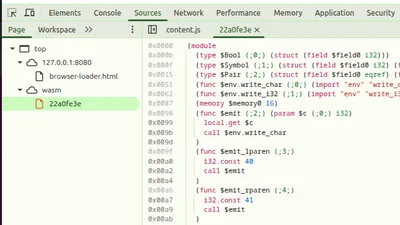
Open the Chrome DevTools, and in Sources, open the Page view on the left.
It should have one entry under wasm, which will show the decompiled WAT
code for our module. Note: this code is disassembled from the binary WASM, so
it will lose some WAT syntactic sugar (like folded instructions):
You can set a breakpoint by clicking on the address column to the left of the
code, and then refresh the page. The DevTools debugger will run the program
again and stop at the breakpoint:
Here you can step over, into, see local values and call stack, etc - a real
debugger!
Debugging unexpected exceptions
The most important use case for me while developing the compiler was debugging
unexpected exceptions (coming from instructions like ref.cast). Notice
the checkboxes saying "Pause on ... exceptions" on the right-hand side of the
previous screenshot. With these selected, the DevTools debugger will
automatically stop on an exception and show where it is coming from. Let's
modify the gc-print-scheme-pairs.wat sample to see this in action. The
$emit_value function performs a set of ref.test checks to see which kind
of reference it's dealing with before casting; let's add this line at the
very start:
(call $emit_bool (ref.cast (ref $Bool) (local.get $v)))
It's clearly wrong to assume that $v is a bool reference without first
testing it; this is just for demonstration purposes.
Without setting any breakpoints, recompiling this code with watgo and
reloading the page, we get:
The debugger stopped at the instruction causing the exception; moreover, in the
Scope pane on the right we can see that the actual type of $v is
(ref $Pair), so it's immediately clear what's going on.
I've found this capability extremely valuable when writing (or emitting from
a compiler) non-trivial chunks of WASM code using gc types and instructions.
Debugger vs. printfs in wasm
"Should I use a debugger or just printfs" is a common topic of debate among
programmers. While I'm usually in the "printf debugging"
camp, I'm not dogmatic, and will certainly reach for a debugger when
the situation calls for it.
Specifically, when investigating reference exceptions in WASM, two strong
factors tilt the decision towards using a debugger:
- In general, WASM's printf capabilities aren't great. We can import print-like
functions from the host (and - in fact - our sample does just that), but
they're not very flexible and dealing with strings in WASM is painful in
general. This is compounded even more when working with gc types, because
these aren't even visible to the host (they're opaque references). If we want
to do printf debugging of gc values, we have to build a lot of scaffolding
first. - Exception debugging - in general - is much easier with a supportive debugger
in hand. Our ref.cast exception from the example above could have
happened anywhere in the code. Imagine having to debug a very large
WASM program (emitted by a compiler) to find the source of a failed
ref.cast; the debugger takes you right to the spot!
In fact, even for C programming, I've always found gdb most useful for
pinpointing the source of segmentation faults and similar crashes.