I liked the autonomous agent experience in Kiro, but I kept wishing for one extra thing. I wanted the agent to run on my own machine, use my own tools, and work inside my own environment. At the same time, I did not want to be tied to that machine to use it. I wanted to trigger it from anywhere, see what it was doing, review the output, and let it continue only when I approved.
That is how Remote Kiro started.
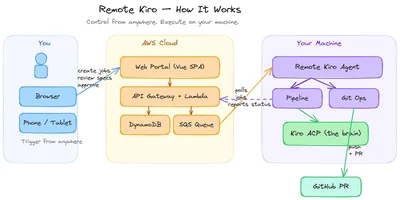
Remote Kiro is a self-hosted, serverless AI coding agent platform that I built on AWS. It gives me a simple web portal where I can create jobs, review generated specs, approve each phase, and let a remote agent running on my machine do the actual work. The portal is the control side. My machine is the execution side. And Kiro ACP is the brain behind the whole thing.
What is Kiro ACP?
At the heart of this project is Kiro ACP.
That is what makes the whole thing work.
The remote agent itself is just a worker process. It can poll for jobs, clone repositories, push changes, and send updates. But the actual planning, requirement generation, task generation, and coding happen through kiro-cli acp. The agent creates a session in the repository, sends prompts, and receives the responses and updates back. So if Remote Kiro is the platform, Kiro ACP is the part that actually thinks and does the coding work.
Architecture Overview
At a high level, Remote Kiro has two sides.
One side is the portal, where I create jobs, manage repositories and profiles, and review progress.
The other side is the remote agent, which runs on my machine, picks up jobs, and executes them.
The control plane is fully serverless on AWS. The frontend is a Vue.js SPA served through CloudFront and S3. Authentication is handled by Cognito. The backend uses API Gateway and Lambda. DynamoDB stores the platform data. SQS is used to queue jobs. S3 stores bundles and artifacts. Secrets Manager stores Git credentials. Amazon Bedrock is used in a few places to improve prompts and generate AI agent configurations. The remote agent is a Node.js process that runs separately and talks to Kiro ACP.
What I liked about this design is that the platform stays lightweight, and the actual work still happens in my own environment.
The portal
The portal is where I control everything.
It has a dashboard to see job counts and remote agent status. It has repository management, profile management, AI agent configuration, job creation, and job detail views.
Dashboard
The dashboard shows the jobs by status like queued, running, awaiting approval, completed, failed, cancelled, and timed out. It also shows the remote agents and whether they are online or offline. That gives me a quick idea of whether the system is healthy and whether any agent is available to do the work.
Repositories and Profiles
Repositories are the Git repos the agent can work on. Each one stores the Git URL, default branch, linked profile, and review settings. The Git credentials are stored securely in Secrets Manager.
Profiles define how the agent should behave. They can include steering files, MCP configuration, and validation commands. These are bundled and uploaded, and when a job starts, the remote agent downloads that bundle and applies it before doing the work.
That part was useful because I did not want the agent behavior to be hardcoded.
AI Agents
The AI Agents page lets me create or generate specialized agents for different kinds of work. For example, a backend-focused agent, a Python-focused agent, or a review agent. These configurations can also include MCP servers.
That means I can choose the kind of agent I want for a given job instead of using one generic setup for everything.
Create Job
This is where the actual work starts.
To create a job, I select the repository, choose the profile, optionally select an AI agent, describe the feature I want built, and add any constraints if needed. Once I submit the job, the backend stores the details, creates the work branch name, and sends a message to SQS for the remote agent to pick up.
How the workflow works
This is the part I cared about most.
I did not want the system to jump straight from prompt to code. I wanted checkpoints in between, just like how we usually think through requirements, design, and tasks before implementation.
So the workflow looks like this.
When I create a job, the backend stores it in DynamoDB and pushes a message to SQS. The remote agent polls the queue, picks up the job, claims it through the backend, validates repository access, clones the repo, creates the work branch, and applies the profile bundle.
After that, the spec-driven part begins.
Requirements
First, the agent asks Kiro ACP to generate the requirements. These are shown in the portal, and I can approve them, reject them with feedback, or edit them before moving on.
Design
Once the requirements are approved, the agent generates the design. Again, it pauses and waits for approval.
Tasks
After the design is approved, the agent generates the task breakdown. This is the last checkpoint before coding starts.
Implementation
Only after the tasks are approved does the agent start implementing the feature. It works through the tasks, posts progress events, runs validation commands, commits the changes, pushes the branch, and creates the pull request.
That approval loop is what made the system feel useful to me. It gives me control without forcing me to do the actual implementation.
The remote agent
The remote agent is a standalone Node.js process that runs on my machine.
It validates that kiro-cli and git are installed, registers itself with the backend, sends heartbeats, and keeps polling SQS for jobs. When it gets one, it processes the job stage by stage. Because it runs on my machine, it gets access to my environment, my repos, my Git setup, and my installed tools. But because the control happens through the portal, I can still manage it from anywhere.
That was the main thing I wanted from the beginning, and this setup gave me exactly that.
Conclusion
That is the high-level view of Remote Kiro.
For me, the interesting part was not just building another AI coding demo. It was building something that fits better into a real workflow. I wanted the agent to run on my machine, but I wanted the control to stay remote. I wanted a proper flow with requirements, design, tasks, approvals, and then implementation. And I wanted Kiro ACP to sit at the center of that experience.
Remote Kiro gave me exactly that.
If you are interested in trying this approach or exploring the implementation in more detail, you can find the full source code in the GitHub repository.
GitHub Repo: https://github.com/jayaganeshk/serverless-kiro-control-plane