TechRadar Verdict
The GoBirding Vision Master is a novel idea, and when its on-device bird identification works, it's a treat. But sluggish autofocus, stabilization that struggles at full zoom — even on a tripod, odd-looking colors, and unusual bokeh hold back the image quality, while the companion app feels distinctly unfinished (something I hope will be remedied by the time it goes on sale). At $999 (approx. £749 / AU$1,439), it's a steep ask for a device with this many rough edges, even accounting for the fact that there's little else quite like it on the market. If you're a keen spotter able to grab one for an early-bird (no pun intended) price, however, you may feel like you've got your money's worth.
Pros
- ++Innovative all-in-one scope, camera and app ecosystem
- +On-device AI identification works well in good conditions
- +Useful second-screening for sharing views with others
Cons
- -Autofocus is sluggish and often unreliable
- -Stabilization struggles at higher zoom levels
- -Odd-looking colors and unusual angular bokeh
Why you can trust TechRadar
GoBirding Vision Master: One-minute review
Bird-spotting scopes have remained stubbornly analog for a very long time: you point some glass at a distant feathered friend, squint, and hope you remembered your spotter's guide. The GoBirding Vision Master Smart AI Spotting Scope, or the APL-ETF-M1 to give it its slightly snappier model name, wants to drag that experience kicking and screaming into the smartphone era.
It does so by squeezing a 4K camera, on-device AI bird identification and smartphone-friendly connectivity into a 30x optical zoom scope. It's certainly an ambitious concept; and after spending a few weeks testing it, I came away impressed in some ways and frustrated in others.
The build quality is a positive: the scope feels solid rather than plasticky, and the design manages to be fairly discreet too. At 932g with the tripod mount attached, it's not a lightweight in absolute terms, but it's manageable enough for a session in the field. The front and eyepiece caps, though, have an annoying habit of working themselves loose when the scope is packed away in a bag — worth knowing if you're the sort who likes to keep your gear spotless.
The headline feature — AI bird identification — works, but with caveats. GoBirding claims the M1 can ID over 1,500 species offline, and over 10,000 when connected to the internet via your smartphone, and in practice it correctly called out everything from common cormorants and herring gulls to species I hadn't heard of, like the water pipit. It's less confident with distant or backlit subjects, though, and it drew a blank on a peregrine falcon I spotted, likely because the bird was too well camouflaged against its perch for the system to extract enough detail; you need a clean, in-focus shot for reliable results, and that's not always easy to get.
Which brings me to the scope's chief weakness: autofocus. It's sluggish, and for fast or skittish birds, I found myself reaching for manual focus. It's a similar story with the image stabilization; GoBirding recommends a tripod over handheld use, and having tried both, I heartily agree. Mounted up, footage steadies out nicely; handheld, especially at higher magnifications, it completely fails to remain level.
Image quality itself is a mixed bag. 4K/30fps video looks reasonably sharp at native zoom, but push into the digital range beyond 30x and detail falls off fast. Colors also tend toward the oversaturated — skies in particular can look implausibly turquoise — and the bokeh has an odd, angular quality unlike anything I've seen from a superzoom camera, more chain-link fence than creamy blur.
The companion app is spotty too. Second-screening — letting someone else see what you're viewing through the scope on their phone — works well, and is genuinely useful for shared birding trips. But other features feel unfinished: the app never once managed to log my location correctly, defaulting instead to a spot on the equator, and it doesn't automatically record the time or place of AI-identified sightings, which feels like a missed opportunity given how central data-logging is to the scope's appeal.
Sign up for breaking news, reviews, opinion, top tech deals, and more.
Pricing, like a skittish sparrow, remains something of a moving target. GoBirding has confirmed an official retail price of $999, with Kickstarter backers able to secure an Early Bird unit for significantly less depending on tier; there will also be an as-yet-unspecified Super Early Bird VIP discount available too. The Kickstarter campaign is expected to arrive around August 20, with shipping to follow in batches after that — but I should caution that all of this remains subject to change.
GoBirding Vision Master: Price and availability
- Official retail price set to be $999 (about £750 / AU$1,450)
- Kickstarter Early Bird pricing from $649 (about £490 / AU$940)
- Kickstarter campaign expected to launch around August 20, 2026
The M1 isn't on sale yet. GoBirding's Kickstarter campaign is expected to launch around August 20, 2026, offering backers an Early Bird price from $649 to $699 depending on tier. That's well below the $999 official retail price, which will apply once the M1 reaches general sale. A further Super Early Bird VIP discount has also been promised, though GoBirding hasn't yet specified the terms.
GoBirding hasn't published official GBP or AUD pricing, so the conversions above are calculated at current exchange rates rather than confirmed figures. Production is reportedly already underway, with shipping to begin shortly after the Kickstarter campaign wraps and orders are confirmed. There's no word yet on wider retail availability beyond that, however.
At $999, the M1 sits close in price to premium bridge cameras like the Nikon Coolpix P1100, but well below high-end AI optics like the Swarovski AX Visio. My gut feeling is that it's a rather steep price to pay for a scope that doesn't feel completely finished in terms of features and has some image-quality issues, but given that there's not really anything else like it on the market, it's hard to say what something like this should cost.
GoBirding Vision Master: Specs
| Zoom: | 30x optical, up to 120x hybrid |
| Sensor: | 1/2.7-inch CMOS |
| Video: | Up to 4K/30fps; 1080p/120fps |
| Viewfinder: | 1080p Micro OLED, 0.49-inch |
| Stabilization: | OIS (optical image stabilization) |
| Storage: | microSD, up to 512GB (not included) |
| Battery life: | Around 6 hours of continuous use |
| Waterproofing: | IP65 |
| Dimensions: | 11.7 x 3.22 x 4.3 inches / 297.6 x 82 x 110mm |
| Weight: | 32.8oz / 932g (inc tripod mount) |
GoBirding Vision Master: Design
- Solid, weatherproof IP65 build
- Tripod-ready straight out of the box
- Weighs around 32.8oz / 930g
Picking up the M1, the first thing I noticed was the heft-to-size ratio — it's a dense, reassuringly solid object, rather than something that feels hollow or plasticky. The forest-green and gunmetal-grey colorway feels like an appropriate choice for a birding tool, and should blend into foliage far better than a garish action-cam-orange scope would.
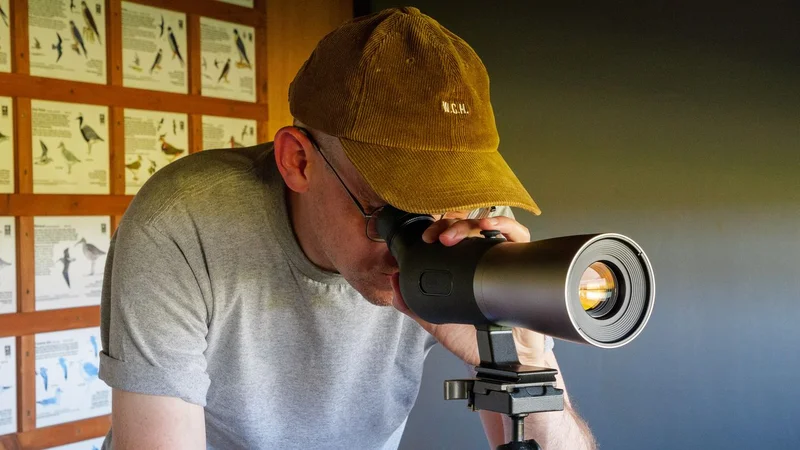
The controls are nicely tactile and have a rubbery finish, which suits outdoor use: there's a push-pull zoom joystick (which can be tilted left and right to manually focus), a dedicated AI recognition button, and separate stills/video capture controls, and they're all operable by feel alone, which is helpful when you're trying to keep your eyes on a parakeet rather than the top of the scope. The eyepiece itself houses a 1080p micro-OLED display, is angled nicely for extended viewing sessions, and can be twisted to adjust focus. As a glasses wearer, I found it comfortable and easy to get a nice sharp view.
A pull-out rubber flap protects the microSD slot and USB-C port. I found that I wasn't able to transfer videos and images over to my MacBook Air via USB (the scope didn't show up as an openable drive in Finder) so I had to pop out the card, put it in a card reader and do it that way. Also, my sample didn't come with a microSD card, so you may need to buy one if you don't already have one going spare.
A tripod mount is attached to the underside, and given how much GoBirding leans on tripod use for its stabilization claims (more on that in the Performance section below), it's good that they haven't made you buy one separately or hunt for a compatible adapter. The mount can be removed by loosening a nut if you want to slim things down a bit and shoot handheld, but I kept it attached the whole time I was testing.
In the box you get a drawstring storage bag, a microfiber cleaning cloth, and protective push-on rubber caps for both the front element and the eyepiece. The caps are a nice idea in theory, but in practice they had an irritating habit of working themselves loose while the scope was in my backpack.
GoBirding Vision Master: Performance
- AI recognition impresses more often than it disappoints
- Autofocus is the scope's biggest let-down
- Image quality is solid in good light, shakier elsewhere
The M1's AI bird identification is simple to use — you just tap the AI button to toggle on a red box indicator, then center the bird within the box until the name appears on-screen — and mostly delivers on its promise. GoBirding claims 1,500 species identifiable offline and over 10,000 via the companion app, and across my testing it correctly called out common species like cormorants, rock pigeons and herring gulls, alongside less familiar ones — the water pipit, Caspian gull and great black-backed gull all got flagged, the latter two of which I'd wrongly assumed were regular herring gulls. I also tested it on a batch of still photos, and it was accurate the vast majority of the time, with only the occasional misidentification.
It's not infallible, though. The system needs a clean, sharply-focused subject to work with, so extreme-range or backlit birds (reduced to little more than silhouettes) routinely trip it up. It also failed to recognize a peregrine falcon I spotted perched on a distant church tower, most likely due to both the range and because its plumage blended in too well with the stonework for the AI to extract meaningful detail.
Autofocus isn't a strong point. It's noticeably sluggish and inaccurate, and for anything fast-moving or skittish I found manual focus the faster and more reliable option. Combine that with image stabilization that GoBirding itself admits works best with a tripod, and handheld shooting at higher magnifications becomes frustrating. Mounted up, footage steadies out nicely, but when you're shooting freehand, especially at the long end of that zoom range, you'll struggle to keep it level. Even when using a tripod, I found it almost impossible to get steady footage at 120x zoom.
Image quality is a mixed bag, and here the small 1/2.7-inch CMOS sensor is a limiting factor throughout. In good light, 4K/30fps footage and 8MP stills at native zoom look reasonably crisp, but push into the digital zoom range beyond 30x and detail falls away quickly, as you'd expect from a sensor this size.
Colors also look oversaturated by default — skies in particular can be implausibly turquoise — and bokeh has an odd, angular character, more chain-link fence than the smooth, attractive background blur you'd get from a larger-sensor camera.
Should you buy the GoBirding Vision Master?
Buy it if...
You want bird identification without a guide
The on-device recognition system works well enough to speed up confirming species in the field — arguably a handier trick than raw zoom power alone.
You mainly shoot from a tripod
Mount it up and the M1's stabilization and AI accuracy improve, and that ambitious zoom range becomes an asset instead of a challenge.
Don't buy it if...
You need it to work handheld
Stabilization struggles without a tripod, especially at higher magnifications — a real problem for a device that claims to offer grab-and-go convenience.
You're fussy about image quality
The small sensor, inaccurate color metering and unusual angular bokeh mean this won't satisfy anyone used to a proper superzoom camera or a dedicated wildlife lens.
Also consider
CoolPix P1100
If reach matters more than AI cleverness, the Coolpix P1100 goes further than the M1: its 125x optical zoom stretches to a 3000mm-equivalent focal length, more than double the M1's maximum. It's a conventional superzoom camera rather than a purpose-built birding tool, so you won't get on-device species recognition, and its small 1/2.3-inch sensor means image quality has its own well-documented limitations in anything but good light.
Read our Nikon P1000 review
Sony RX10 V
A very different proposition, the RX10 V pairs a much larger 1-inch sensor with a 24-600mm lens, and delivers image quality and autofocus performance that the M1 simply can't touch. Its 25x optical zoom falls well short of the M1's reach, and there's no AI bird identification here, but if outright photographic quality is your priority over specialized birding features, it's in a different league. It costs well over twice as much as the M1, though.
Read our Sony RX10 V review
How I tested the GoBirding Vision Master
- Tested over several weeks in several locations including a country park, the seafront, and a local churchyard
- Shot in a range of light conditions during the UK summer
- Tested handheld and tripod-mounted
I spent several weeks testing a review sample of the GoBirding Vision Master supplied to me by the manufacturers, across a range of locations near my home, aiming to put its birding-specific features through their paces in the kind of everyday settings a typical user would actually experience.
A local country park with a birding hide, and my town's seafront gave me a good mix of woodland, marshland and open-water species to test the AI recognition on. A nearby churchyard, home to a resident family of peregrine falcons, gave me the chance to test the M1 against a truly challenging subject: a stealthy bird of prey that spends much of its time perched high and partially obscured.
Across all locations, I tested both handheld and tripod-mounted use. I used the on-device AI identification extensively in the field, and separately tested it against a batch of still photos to assess accuracy outside of live conditions.
All shooting was carried out during a hot, dry summer spell, so while I can vouch for the M1's performance in strong sunlight, I wasn't able to test its weatherproofing in wet or cold weather.
First reviewed July 2026
Sam has been writing about tech and digital culture for over 20 years, starting off in video games journalism before branching out into the wonderful worlds of consumer electronics, streaming entertainment and photography. Over the years he has written for Wired, Stuff, GQ, T3, Trusted Reviews and PC Zone, and now lives on the Kent coast in the UK – the ideal place for a camera reviewer to ply their trade.