Music streaming is supposed to be easy. Tap a button, press play, and music plays anywhere you want: at your desk, while driving, or when traveling.
Music streaming is supposed to make music accessible. But if you use YouTube Music as your streaming service of choice, hurdles can get in the way of that simplicity. And it's frustrating.
My biggest frustration with YouTube Music
Looking back, it was a simple fix
Playlists that should reflect your music choice can quickly take a turn toward chaos. Chaos is the last thing you need when you want to sit back, relax, and enjoy your tunes.
That was my biggest frustration with YouTube Music. I'd spent years curating playlists that felt just right with the right balance of fresh discoveries and old favorites.
I arranged them in an order that matches my personal vibe. Then, YouTube Music barged in, changed things up, and switched the vibe.
Something had to change. That's when I discovered this secret setting that brought me back full control over my playlists. It's so simple that it'll probably surprise you.
The problem with automatic playlists
When the algorithm gets it wrong, it gets it really wrong
As great as YouTube Music is with its vast library of audio tracks and videos, it has some inherent issues.
By default, it automatically appends fresh tracks to the end of your playlist. While these tracks might follow the general theme or trend, they rarely fit the mood.
Black Sabbath and Iron Maiden are both metal, but I wouldn't necessarily place them in the same wheelhouse as far as their music's mood and vibe.
Even though the system uses your listening history, tracks that you like or skip, and your activity on YouTube to inform its choices, for me, it's mostly been off.
Similarly, a heavy metal workout playlist veers into acoustic ballads that completely break my flow. I get it, 80s hair metal bands were big on ballads, but there's a reason my playlist only has the high-velocity stuff.
Since YouTube Music doesn't understand that specific context, or let you get granular with BPM-based music curation, what you get are more skips than hits.
I can't trust the system to work as well as I need it to. It's too much of a gamble.
The hidden setting that fixes everything
One toggle to fix your playlists
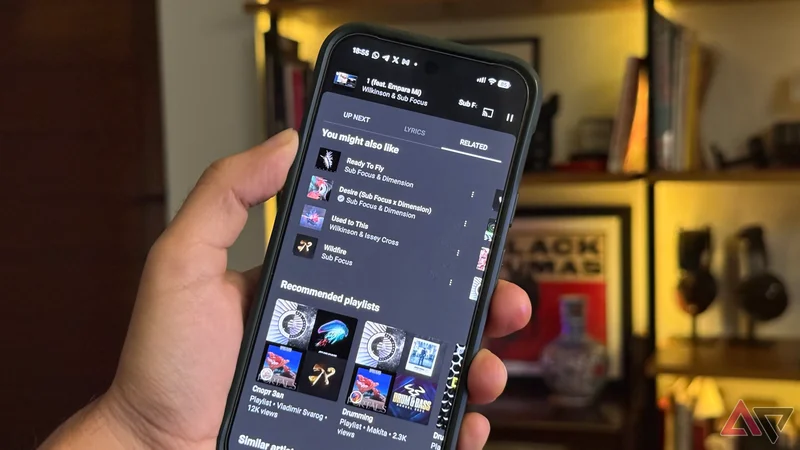
The fix is easy and hidden under YouTube Music's playlist queue.
When you start a playlist, tap the queue button. In YouTube Music, this button is labeled as Up Next. Then, scroll down to the Autoplay option.
By default, this setting is turned on and adds music based on a similar genre to your current playlist. This allows YouTube Music to freely append its algorithm-driven choices to what you listen to.
All you do is tap it off, and that's it. Now, your playlist only plays the music you add to it. The order of content will be exactly what you set.
When the last track has finished playing, the playlist stops instead of pulling in music from sources other than your personal additions.
That's all it takes to wrestle back control from YouTube's overzealous recommendation algorithms and build playlists that are perfectly suited to how you listen to music.
Why it's so important
Consistency beats the algorithms
This is an incredibly simple tweak. But that's the beauty of a simple trick that can transform your listening experiences.
I come from the mixtape generation, and playlists are deeply personal. I'm not a fan of algorithms and AI taking over my music listening experience.
It's not only YouTube. Most music streaming services employ their own version of AI-driven playlist enhancement.
This list of tracks isn't only music, but carefully curated experiences revolving around my interest in music, vibe at the gym, travel, and even mood.
By switching off recommendations, YouTube Music respects the boundaries of what I've created.
Moreover, with Gemini-powered recommendations attempting to "enhance" my personal playlists, I can't replicate the same music listening experience. I could get a new set of music the next day.
A self-curated playlist solves the problem of recommendation fatigue. If you're deep into the music streaming world, you'll have experienced it.
Music recommendations tend to revolve around the same predictable list of chart toppers. There's a lot of fatigue that comes from being presented with the same loop of songs instead of tracks that I choose.
Auto recommendations can make a lot of sense
Recommendations still have a place
Still, there are instances where automatic recommendations make sense.
If you want to discover new artists or deep cuts, tap the autoplay option.
If you are hosting a party and want to play Top 40s or modern pop, you can't go wrong with the AI recommendations, since these pull out popular tracks.
Any time you want music to play in the background without any critical listening or curation, autoplay can add something fresh to your everyday mix.
If your playlist is looking empty, autoplay is a good way to get similar-sounding recommendations.
Using the toggle allows you to choose your journey — keeping the Up Next queue for curation while leaving the Samples tab for when you want discovery.
Switching off autoplay transformed my music listening experience
Flipping the switch on autoplay changed my YouTube music listening habits. My playlists are back in my control.
Since I curated these playlists over years of manual rating in iTunes and other offline music listening apps, I don't want these to change. With autoplay turned off, my music's vibe isn't disrupted in the middle of a listening session.
That's important when I'm running a marathon with a curated, BPM-matched playlist. I can put on a curated playlist of masterfully mixed tracks without being overridden by a jarring remix created by an algorithm.
As much as I appreciate how algorithms can help you discover new music or step out of your comfort zone, there's beauty in sticking to the known and appreciating manual curation. Switching off autoplay lets you do that.