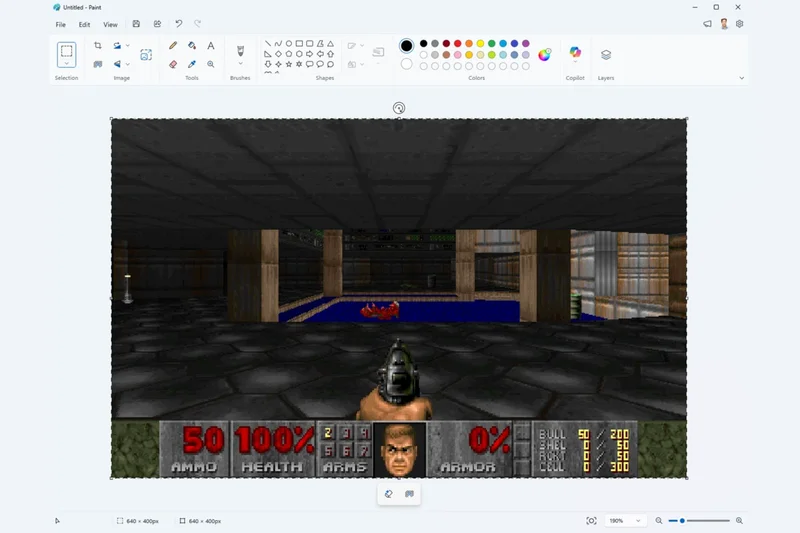
Yes, yes, step right up, folks. Here today to take on the never-ending âCan it run Doom?â challenge: Microsoft Paint! Yes, yes, right up onto the stage here, Microsoft Paint. That’s great, stand right there. And now… yes, yes, a drum roll, perfect… and now, Microsoft Paint, can you run Doom?
collective intake of breath
“Yes! But also no!”
If that answer seems a little anticlimactic, wait until you’ve seen DoomPaint in action before you scoff. Its creator, Microsoft Azure CTO Mark Russinovich, has taken a pretty clever approach to getting Doom to appear in your long-neglected raster paint application. Some might call that approach cheating, but hey, we’re not here to judge.
So how does DoomPaint work? Well, it basically uses Paint as a monitor. Russinovich isn’t making any bones about thisâas he writes on his GitHub, where the project is available as a free download: “Paint renders the game but does not compute it. Paint computes nothing. Paint has never computed anything.” Doing the computing instead is a Doom source port called VizDoom, which is based on the ubiquitous ZDoom and, as per its website, is designed for âresearch in machine visual learning and deep reinforcement learning, in particular.â Russinovichâs code creates a wrapper around ViZDoom, hiding the actual ViZDoom window and instead capturing each frame to the Windows clipboard. From there, each frame is pasted directly into Paint, and⦠voila! For all intents and purposes, you have Doom running in Paint. Thereâs even sound!
Thatâs the basic concept, but Russinovichâs impressively detailed readme makes for pretty interesting reading on how he went about turning that concept into something that actually worksâand for all that it’s not somehow magically getting Paint to act as a game engine, the project still sounds like it came with its fair share of challenges. Much of the work, as you might expect, went into getting the frames into Paint in a way that was reliable and also fast enough to make the game playable. It turns out that getting this working reliably is not particularly straightforwardâand as ever with Windows, it seems that the challenge is supporting a virtually infinite variety of systems, setups,  and software versions.
The first step is capturing the frame, which seems reasonably straightforward: Python’s image library module provides a method for capturing a window’s contents, and Russinovich’s code tweaks this to ensure that it works even when the window is offscreen. Each frame is captured as a simple bitmapâa device-independent bitmap or DIB, to be preciseâand sent to the clipboard. So far, so good.
As far as getting the image from the clipboard into Paint goes, youâd think that simply sending a Ctrl-V keystroke to Paint after each frame is sent to the clipboard would be the most straightforward approach, and it isâexcept when it doesnât work. Russinovich explains that âsome Paint builds silently drop synthetic keys,â which must have been a nice thing to discover. DoomPaint automatically tests for this, falling back on UI automation if the synthetic Ctrl-V doesnât work; this backup option is ârock-solid, but briefly opens the Edit menu each frame.â Ugh.
It also turns out that Paint kinda does what it wants when it wantsâor, in more technical terms, âPaint processes each paste asynchronously, reading the image off the clipboard on its own schedule.â To add to the fun, âpaste latency varies wildly with frame size.â This is bad, because if you send another frame to the clipboard while Paint is still reading the previous one, Paint returns an error and suddenly youâre not shooting demons anymore.
The fix, Russinovich explains, is to treat the clipboard as an OLE data object. At this point, youâre either nodding your head sagely and saying, âAh, good idea,â or staring blankly at this paragraph and wondering how pasting stuff into Paint can possibly run at a decent frame rate, OLE data object or not. If itâs the former, then I refer you to the readme for the details of how this works, because weâve reached the limits of my knowledge, such as it is; if it’s the latter, all good, because now weâre going to talk about how pasting stuff into Paint can possibly run at a decent frame rate!
And the answer to that question is pretty simple: make the window small. As Russinovich explains, “Paint’s per-frame cost is dominated by pixel count, not per-paste overhead, so frame resolution is the biggest lever on smoothness.â This means that while running the game at 640×400 is âheavyâ, the original 320×200âyes, thatâs really the resolution at which the original Doom ranâactually runs OK. Whatever the frame rate, the game itself runs smoothly on its own thread.
Getting the music to work seems reasonably straightforwardâit gets sent to Windowsâ built-in MIDI sequencerâwhile the sound effects get played through OpenAL. And as far as the actual game goes, the download comes with the shareware version of Doom, which contains the original gameâs first episode, along with FreeDoom, which contains the rest of the original game, shorn of proprietary assets. Doom and Doom II use the same engine, so if you want MS Paint to throw mancubi and revenants at you, get your legal copy of Doom2.WAD, drop it into the WAD directory, and off you go. Have fun!